
Pioneer XC-HM70-S: Playback with NETWORK feature Listening to Internet radio stations
Playback with NETWORK feature Listening to Internet radio stations: Pioneer XC-HM70-S
Table of contents
- VENTILATION CAUTION IMPORTANT Operating Environment
- Condensation
- Contents Accessories
- Before you start General Loading the batteries
- Controls and Displays Remote control
- Front Panel
- Connecting your equipment Aerial connection
- Speaker connection Using other subwoofer Connecting a TV, etc.
- Connecting to the network through LAN interface AC power connection
- General control To turn the power on Setting the clock Auto power down setup
- Enhancing your system
- Listening to a CD or MP3/ Disc playback WMA disc Various disc functions
- Advanced CD or MP3/WMA disc playback Programmed play (CD)
- Programmed play (MP3/WMA) MP3/WMA folder mode (only for MP3/WMA files)
- Procedure to playback MP3/WMA disc with folder mode on
- Listening to the iPod, iPhone or iPad Supported iPod, iPhone and iPad models: Connecting your iPod/iPhone To remove adaptor for iPod or iPhone To insert iPad adaptor
- Playing an iPod, iPhone or iPad Basic playback controls
- Listening to USB mass storage device/MP3 player Connecting a USB device Playing a USB device
- Playback with NETWORK feature Listening to Internet radio stations
- Playing back audio files stored on components on the network Network setup menu Playing back your favorite songs
- Network connection requirements About network playback
- Glossary
- Listening to the radio Improving FM sound Saving station presets Listening to station presets Naming preset stations Changing the noise cut mode
- Using the Radio Data System (RDS) An introduction to RDS Displaying RDS information Searching for RDS programs
- Timer and sleep operation Sleep operation Setting the wake-up timer Turning the wake-up timer on/off
- Additional Information
- Additional Information
- Additional Information
- About playable music file formats Category Extension Stream About status messages Status messages Descriptions
- Specifications About iPod/iPhone/iPad Disclaimer for Third Party Content
Playback with NETWORK feature
Playback with NETWORK
feature
This receiver is equipped with the LAN terminal and you can
enjoy the following features by connecting your components
to these terminals.
• Listening to Internet radio stations
You can select and listen to your favorite Internet radio
station from the list of Internet radio stations created,
edited, and managed by the SHOUTcast database
service.
See Listening to Internet radio stations below.
• Playback the music files stored in PCs
You can playback a lot of musics stored in your PCs using
this unit.
See Playing back audio files stored on components on
the network on page 21.
-
Besides a PC, you can also play back audio files stored
on your other components with the built-in media server
function based on DLNA 1.0 or DLNA 1.5 framework and
protocols (i.e. network-capable hard disks and audio
systems).
20
En
Important
2 Switch the TV input so that it connects to the receiver.
3 Press NETWORK on the remote control to switch the
Listening to Internet radio stations
receiver to the NETWORK function.
Internet radio is an audio broadcasting service transmitted
It may take several seconds for this receiver to access the
via the Internet. There are a large number of Internet radio
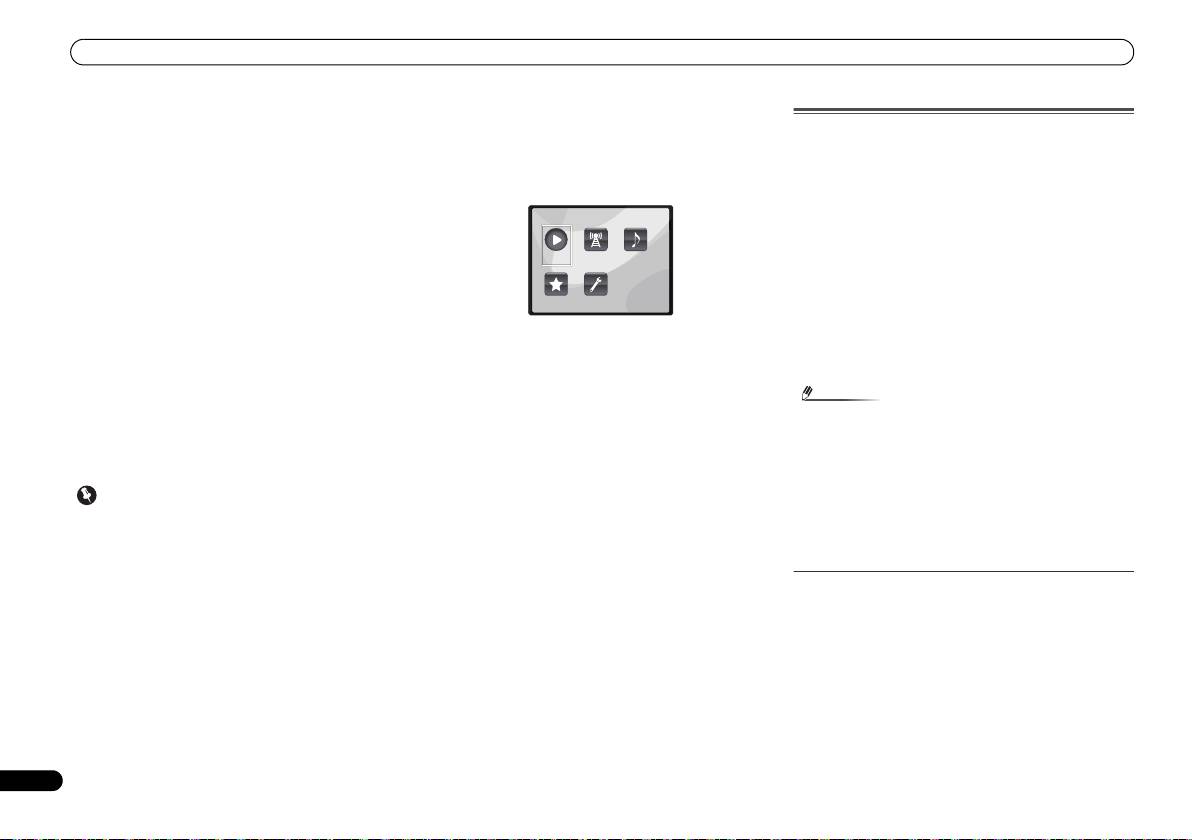
network. The following screen appears when the NETWORK
stations broadcasting a variety of services from every corner
is selected as the input function.
of the world. Some are hosted, managed, and broadcast by
private individuals while others are by the corresponding
traditional terrestrial radio stations or radio networks.
Whereas terrestrial, or OTA (over-the-air), radio stations are
geographically restricted on the range of radio waves
broadcast from a transmitter through the air, Internet radio
stations are accessible from anywhere in the world, as long
as there is a connection to the Internet, as services are not
transmitted through the air but are delivered over the World
Wide Web. On this receiver you can select Internet radio
4Use
/
to select the category you want to play back,
stations by genre as well as by region.
and then press ENTER.
Select a category from the following list:
Depending on the Internet line conditions, the sound may not
be smooth when playing Internet radio.
• Now Playing – Display the Current status and station
information.
• Internet Radio – Listening the SHOUTcast internet radio
via network.
• Music Library – Playback the music files stored in PCs.
• Favorites – Favorite songs currently being registered.
• Settings – Perform NETWORK function settings.
5Use
/
to select the folder, music files or Internet
radio station to play back, and then press ENTER.
• When you play back audio files, ‘Please Wait’ is displayed
Press / to scroll up and down the list and select the
before playback starts. The display may continue for
desired item. When you press ENTER, playback starts with
several seconds depending on the type of file.
the playback screen being displayed for the selected item. To
• In case a domain is configured in a Windows network
return to the list screen, press RETURN.
environment, you cannot access a PC on the network
When the items are displayed over multiple pages, use /
while you are logged onto the domain. Instead of logging
to quickly display different pages.
onto the domain, log onto the local machine.
6 Repeat step 5 to play back the desired song.
• There are cases where the time elapsed may not be
For detailed operating instructions, refer to the section
correctly displayed.
shown below.
1 Switch on the receiver and your TV.
• Internet radio stations – See Listening to Internet radio
See Connecting to the network through LAN interface on
stations below.
page 10.
• Music files stored in PCs – See Playing back audio files
stored on components on the network on page 21.
Note
X-HM70_En.fm 20 ページ 2011年8月2日 火曜日 午後4時46分
Main Menu
Now Playing
Internet
Music
Radio
Library
Favorites Settings
• To listen to Internet radio stations, you must have high-
speed broadband Internet access. With a 56 K or ISDN
modem, you may not enjoy the full benefits of Internet
radio.
• The port number varies depending on the Internet radio
station. Check the firewall settings.
• Broadcasts may be stopped or interrupted depending on
the Internet radio station. In this case, you cannot listen
to a radio station selected from the list of Internet radio
stations.
About list of Internet radio
The list of Internet radio stations on this receiver is created,
edited, and managed by the SHOUTcast database service.
