
Pioneer VSX-1021: Connecting your TV and playback components
Connecting your TV and playback components: Pioneer VSX-1021
Table of contents
- IMPORTANT VENTILATION CAUTION Operating Environment
- Contents Flow of settings on the receiver
- Before you start
- Deleting the AVNavigator Remote control
- Connecting your equipment
- Placing the speakers Connecting the speakers
- Bi-amping your speakers Installing your speaker system
- Selecting the Speaker system About the audio connection About the video converter
- About HDMI
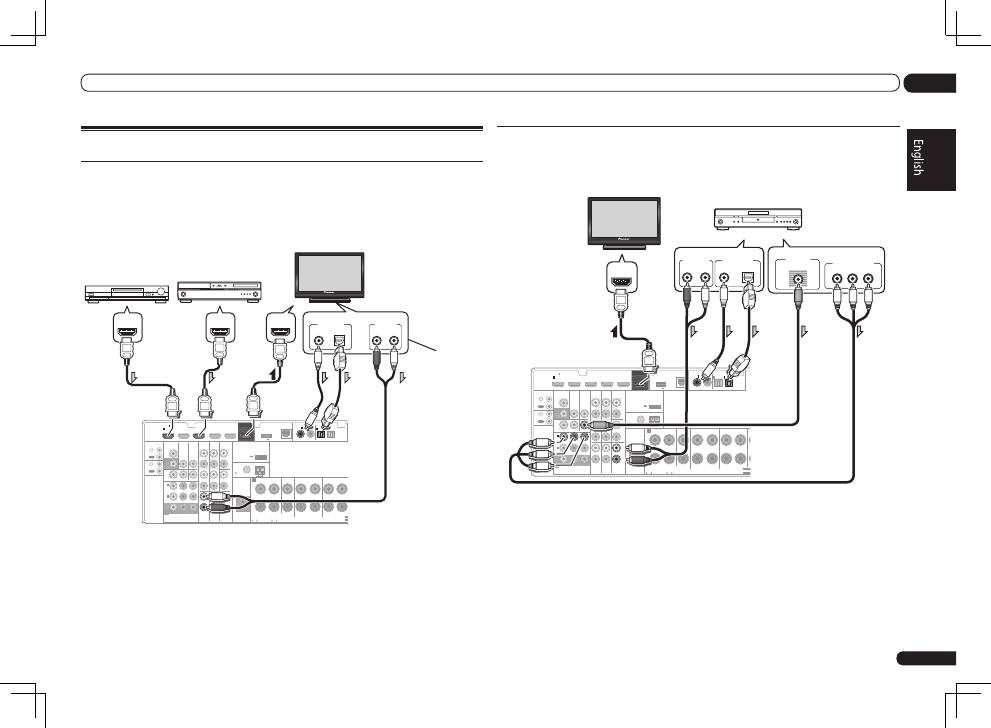
- Connecting your TV and playback components
- Connecting an HDD/DVD recorder, BD recorder and other video sources
- Connecting a satellite/cable receiver or other set-top box Connecting other audio components
- MULTI-ZONE setup Sub Zone Input functions available Sub Zone Input functions available Connecting AM/FM antennas
- Connecting to the network through LAN interface Connecting to a wireless LAN Plugging in the receiver
- Basic Setup
- Operation Mode Setup
- Operable functions/
- Basic playback
- Playing a USB device
- Playback with HOME MEDIA GALLERY inputs Bluetooth ADAPTER for Wireless Enjoyment of Music
En
11
02
Connecting your equipment
Connecting your TV and playback components
Connecting using HDMI
If you have an HDMI or DVI (with HDCP) equipped component (Blu-ray Disc player (BD), etc.), you
can connect it to this receiver using a commercially available HDMI cable.
If the TV and playback components support the
Control
with HDMI feature, the convenient
Control
with HDMI functions can be used (see
Control with HDMI function
on Operating Instructions in
CD-ROM).
HDMI
VIDEO
CONTROL
IR
COMPONENT VIDEO
VIDEO IN
TV/SAT
IN
ZONE 2
DVR/BDR CD-R/TAPE ZONE 2
DVR/
BDR
OUT
OUT
DVD IN
IN
IN
IN
IN
CD
L
R
L
R
IN
L
R
OUT
OUT
VIDEO
IN
DVD IN
BD IN
DVR/BDR IN
FM UNBAL
75
FRONT
CENTER
SURROUND
SURROUND BACK / ZONE 2
R
L
R
L
R
L
(Single)
AM LOOP
(
CD
)
(
DVD
)
TV/SAT
VIDEO
DVD
Y
P
B
P
R
(
DVR/BDR
)
(
TV/SAT
)
COAXIAL
(10/100)
LAN
AUDIO
PRE OUT
SPEAKERS
ANTENNA
OPTICAL
ASSIGN
ABLE
ASSIGNABLE
ASSIGNABLE
OUT
MONITOR
OUT
MONITOR
OUT
SUBWOOFER
IN
1
(DVD)
IN
1
(DVR/
BDR)
IN
2
ASSIGNABLE
1
IN
1
IN
2
IN
1
IN
2
SEL
SEL
CAUTION:
SPEAKER IMPEDANCE
6 -16 .
ATTENTION:
ENCEINTE D’IMPEDANCE DE
6 -16 .
A
OUT
IN
OUT
IN
DC OUTPUT
for WIRELESS LAN
(OUTPUT 5 V
0.1 A MAX)
ADAPTER PORT
(OUTPUT 5 V 0.6 A MAX)
DIGITAL OUT
COAXIAL
OPTICAL
ANALOG
R
L
AUDIO OUT
HDMI IN
HDMI OUT
HDMI OUT
VSX-1021
only
HDMI/DVI-compatible
Blu-ray Disc player
Other HDMI/DVI-
equipped component
HDMI/DVI-compatible
monitor
Select one
This connection is
required in order to
listen to the sound of
the TV over the
receiver.
!
For input components, connections other than HDMI connections are also possible (see
Connecting your DVD player with no HDMI output
on page 11 ).
!
If you want to listen to the sound of the TV over the receiver, connect the receiver and TV with audio
cables.
—
When the TV and receiver are connected by HDMI connections, if the TV supports the HDMI ARC
(Audio Return Channel) function, the sound of the TV is input to the receiver via the
HDMI OUT
terminal, so there is no need to connect an audio cable. In this case, set
TV Audio
at
HDMI Setup
to
via HDMI
(see
HDMI Setup
on Operating Instructions in CD-ROM).
Connecting your DVD player with no HDMI output
This diagram shows connections of a TV (with HDMI input) and DVD player (or other playback com-
ponent with no HDMI output) to the receiver.
HDMI
VIDEO
CONTROL
IR
COMPONENT VIDEO
VIDEO IN
TV/SAT
IN
ZONE 2
DVR/BDR CD-R/TAPE ZONE 2
DVR/
BDR
OUT
OUT
DVD IN
IN
IN
IN
IN
CD
L
R
L
R
IN
L
R
OUT
OUT
VIDEO
IN
DVD IN
BD IN
DVR/BDR IN
FM UNBAL
75
FRONT
CENTER
SURROUND
SURROUND BACK / ZONE 2
R
L
R
L
R
L
(Single)
AM LOOP
(
CD
)
(
DVD
)
TV/SAT VIDEO
DVD
Y
P
B
P
R
(
DVR/BDR
)
(
TV/SAT
)
COAXIAL
(10/100)
LAN
AUDIO
PRE OUT
SPEAKERS
ANTENNA
OPTICAL
ASSIGN
ABLE
ASSIGNABLE
ASSIGNABLE
OUT
MONITOR
OUT
MONITOR
OUT
SUBWOOFER
IN
1
(DVD)
IN
1
(DVR/
BDR)
IN
2
ASSIGNABLE
1
IN
1
IN
2
IN
1
IN
2
SELECTA
SELECTA
CAUTION:
SPEAKER IMPEDANCE
6 -16 .
ATTENTION:
ENCEINTE D’IMPEDANCE DE
6 -16 .
FR
A
OUT
IN
OUT
IN
DC OUTPUT
for WIRELESS LAN
(OUTPUT 5 V
0.1 A MAX)
ADAPTER PORT
(OUTPUT 5 V 0.6 A MAX)
HDMI IN
ANALOG
R
AUDIO OUT
VIDEO OUT
VIDEO
Y
P
B
P
R
COMPONENT VIDEO OUT
DIGITAL OUT
COAXIAL
OPTICAL
L
HDMI/DVI-compatible
monitor
DVD player, etc.
Select one
Select one
!
If you want to listen to the sound of the TV over the receiver, connect the receiver and TV with audio
cables (page 11).
—
When the TV and receiver are connected by HDMI connections, if the TV supports the HDMI ARC
(Audio Return Channel) function, the sound of the TV is input to the receiver via the
HDMI OUT
terminal, so there is no need to connect an audio cable. In this case, set
TV Audio
at
HDMI Setup
to
via HDMI
(see
HDMI Setup
on Operating Instructions in CD-ROM).
!
If you use an optical digital audio cable, you’ll need to tell the receiver which digital input you
connected the player to (see
The Input Setup menu
on Operating Instructions in CD-ROM).
