
Pioneer VSX-1021: About HDMI
About HDMI: Pioneer VSX-1021
Table of contents
- IMPORTANT VENTILATION CAUTION Operating Environment
- Contents Flow of settings on the receiver
- Before you start
- Deleting the AVNavigator Remote control
- Connecting your equipment
- Placing the speakers Connecting the speakers
- Bi-amping your speakers Installing your speaker system
- Selecting the Speaker system About the audio connection About the video converter
- About HDMI
- Connecting your TV and playback components
- Connecting an HDD/DVD recorder, BD recorder and other video sources
- Connecting a satellite/cable receiver or other set-top box Connecting other audio components
- MULTI-ZONE setup Sub Zone Input functions available Sub Zone Input functions available Connecting AM/FM antennas
- Connecting to the network through LAN interface Connecting to a wireless LAN Plugging in the receiver
- Basic Setup
- Operation Mode Setup
- Operable functions/
- Basic playback
- Playing a USB device
- Playback with HOME MEDIA GALLERY inputs Bluetooth ADAPTER for Wireless Enjoyment of Music
En
10
02
Connecting your equipment
!
If you connect a component that
is not compatible with HDCP, an
HDCP ERROR
message is displayed on the
front panel display. Some components that
are compatible with HDCP still cause this
message to be displayed, but so long as there
is no problem with displaying video this is not
a malfunction.
!
Depending on the component you have
connected, using a DVI connection may result
in unreliable signal transfers.
!
This receiver supports SACD, Dolby Digital
Plus, Dolby TrueHD and DTS-HD Master
Audio. To take advantage of these formats,
however, make sure that the component
connected to this receiver also supports the
corresponding format.
!
Use a High Speed HDMI
®
cable. If an HDMI
cable other than a High Speed HDMI
®
cable is
used, it may not work properly.
!
When an HDMI cable with a built-in equalizer
is connected, it may not operate properly.
!
Signal transfer is only possible when
connected to a compatible component.
!
HDMI format digital audio transmissions
require a longer time to be recognized. Due to
this, interruption in the audio may occur when
switching between audio formats or beginning
playback.
!
Turning on/off the device connected to this
unit’s
HDMI OUT
terminal during playback,
or disconnecting/connecting the HDMI
cable during playback, may cause noise or
interrupted audio.
HDMI, the HDMI logo and High-Definition
Multimedia Interface are trademarks or regis-
tered trademarks of HDMI Licensing, LLC in the
United States and other countries.
“x.v.Color” and
are trade-
marks of Sony Corporation.
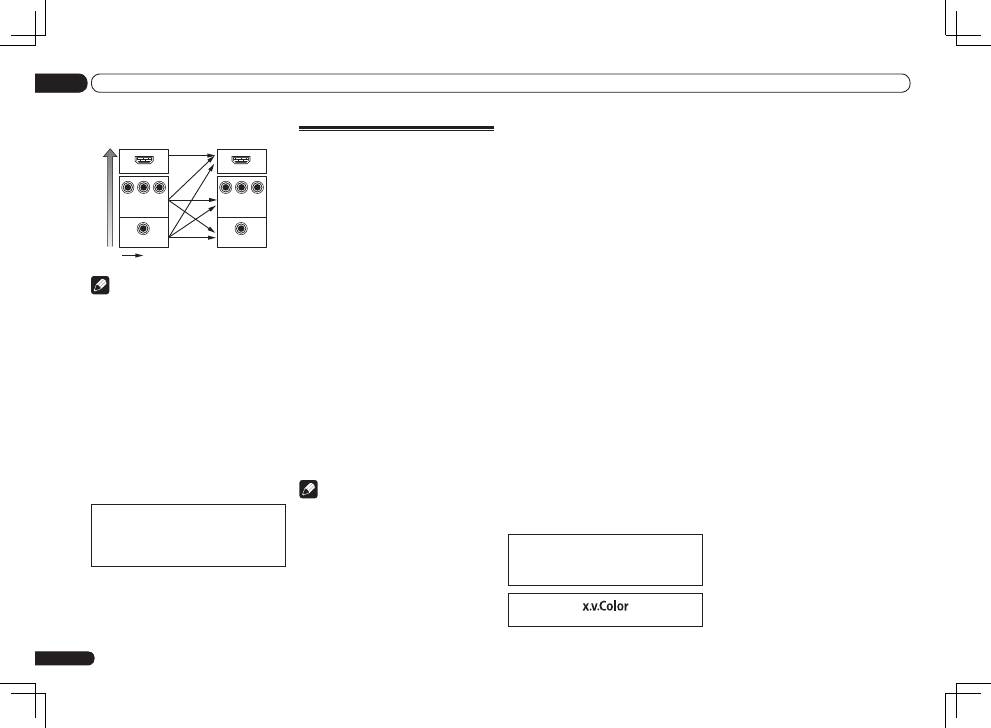
VIDEO IN
VIDEO
MONITOR OUT
COMPONENT
VIDEO IN
Y
P
B
P
R
Y
P
B
P
R
COMPONENT VIDEO
MONITOR OUT
HDMI IN
HDMI OUT
High picture qualit
y
Video signals can be output
Terminal for connection with
source device
Terminal for connection
with TV monitor
Note
!
If the video signal does not appear on your
TV, try adjusting the resolution settings on
your component or display. Note that some
components (such as video game units) have
resolutions that may not be converted. In this
case, try switching Digital Video Conversion
(in
Setting the Video options
on Operating
Instructions in CD-ROM)
OFF
.
!
The signal input resolutions that can be
converted from the component video input
for the HDMI output are 480i/576i, 480p/576p,
720p and 1080i. 1080p signals cannot be
converted.
!
Only signals with an input resolution
of 480i/576i can be converted from the
component video input for the composite
MONITOR OUT
terminals.
This item incorporates copy protection technol-
ogy that is protected by U.S. patents and other
intellectual property rights of Rovi Corporation.
Reverse engineering and disassembly are
prohibited.
About HDMI
The HDMI connection transfers uncompressed
digital video, as well as almost every kind of
digital audio.
This receiver incorporates High-Definition
Multimedia Interface (HDMI
®
) technology.
This receiver supports the functions described
below through HDMI connections.
!
Digital transfer of uncompressed video
(contents protected by HDCP (1080p/24,
1080p/60, etc.))
!
3D signal transfer
!
Deep Color signal transfer
!
x.v.Color signal transfer
!
ARC (Audio Return Channel)
!
Input of multi-channel linear PCM digital
audio signals (192 kHz or less) for up to 8
channels
!
Input of the following digital audio formats:
—
Dolby Digital, Dolby Digital Plus, DTS, High
bitrate audio (Dolby TrueHD, DTS-HD Master
Audio, DTS-HD High Resolution Audio),
DVD-Audio, CD, SACD (DSD signal), Video
CD, Super VCD
!
Synchronized operation with components
using the
Control
with HDMI function (see
Control with HDMI function
on Operating
Instructions in CD-ROM)
Note
!
An HDMI connection can only be made
with DVI-equipped components compatible
with both DVI and High Bandwidth Digital
Content Protection (HDCP). If you choose to
connect to a DVI connector, you will need a
separate adaptor (DVI
d
HDMI) to do so. A DVI
connection, however, does not support audio
signals. Consult your local audio dealer for
more information.
