
Pioneer KRP-SW01BG: Preventing Equipment from Falling Over
Preventing Equipment from Falling Over: Pioneer KRP-SW01BG
Table of contents
- Cautions Contents
- Checking the Enclosed Parts Care for the Glossy Surface of the Stand
- Attaching the Pioneer Display and Television Assembling the Stand
- Attaching the Pioneer Display and Television
- Forward/Backward Angle of Inclination Adjustment Mechanism
- Installing the Product on a TV table etc. Preparing the Cables
- Preventing Equipment from Falling Over
- Dimensions Diagram Detaching the Pioneer Display and Television from the Stand Specifications
16
En
Preventing Equipment from Falling Over
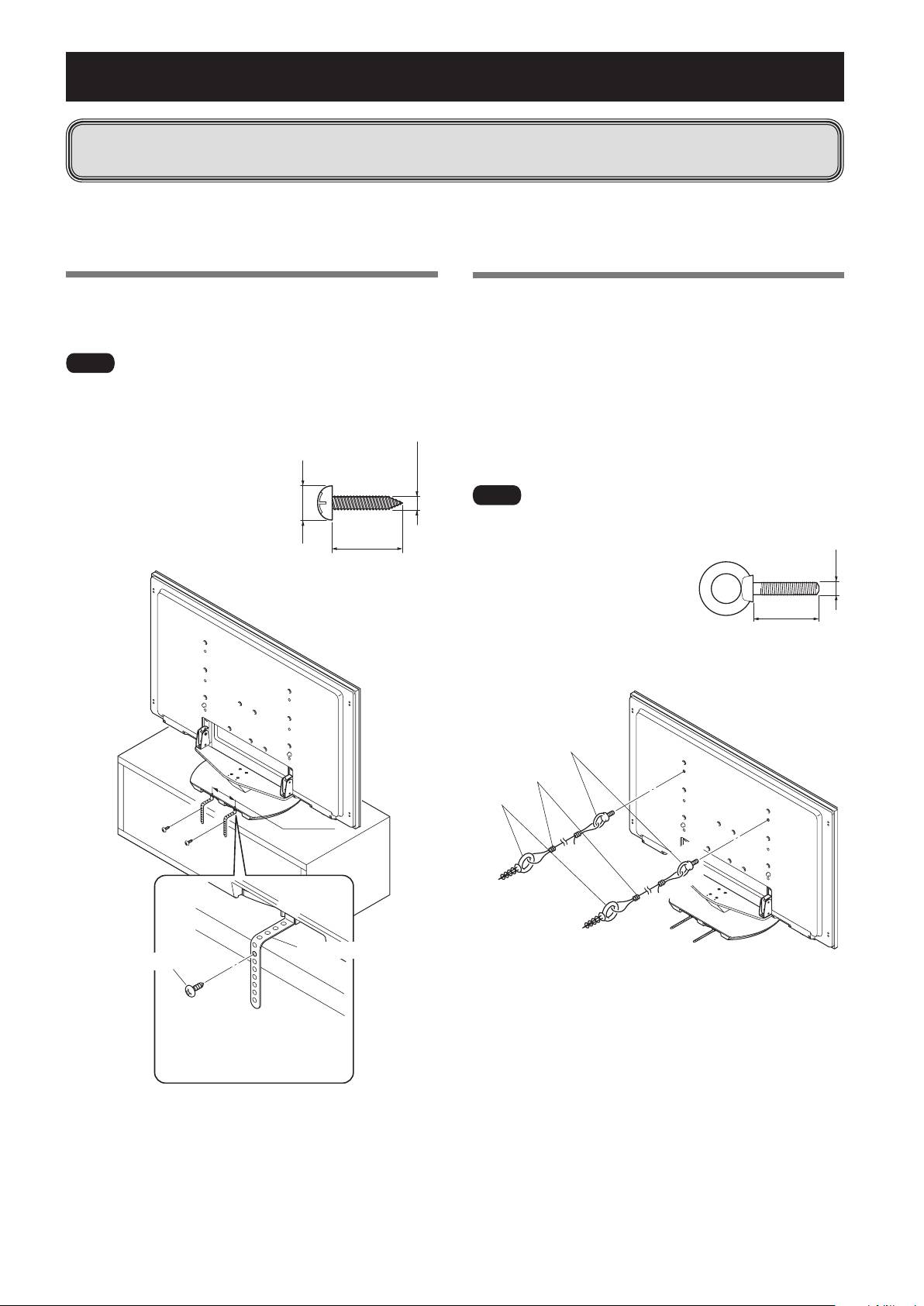
Using a wall for stabilization
1
Attaching falling prevention bolts to the
Pioneer display and television.
2
Usingstrongcordstostabilizeitappropriately
andfirmlytoawall,pillar,orothersturdy
element.
• Performthisworkinthesamewayontheleftand
right sides.
• Thelengthofthecordsusedmustbelongenoughto
allow the stand to rotate freely.
Ìi
• Donotusebaremetalwireforthecords.Thewireendsmay
cause electric shock and fire if they get inside the Pioneer
display and television through the
ventilation holes.
• Usefallingpreventionbolts,ropes
and fittings that are available on
the market.
Recommended bolts:
Nominal diameter M8
Length 12 mm to 15 mm (1/2 to 5/8 inch)
1 Falling prevention bolts
2 Cords
Fittings
Stabilizing on TV table or other location
Fix the Pioneer display and television to a TV table using the
fall-prevention straps as in the diagram.
Fix the racks etc. using screws for sale on the market.
Ìi
• ThePioneerdisplayandtelevisionbeingquiteheavy,aTV
tablethatissturdyenoughtosupportit,andwithsufficient
width and depth to ensure that it does not fall over should
always be used.
• TostabilizethePioneerdisplay
andtelevisiononaTVtable,
use screws that have a nominal
diameter of 6 mm (1/4 inch).
Select the appropriate screws
after consulting a professional
installer if necessary.
136 mm
Screw
Fall-prevention strap
(commercially available)
Make a pilot hole in the rack’s
top board (center of the board’s
thickness), and fix the strap
with a store-bought screw.
After installing the stand, be sure to take special care to ensure that the Pioneer display and
television will not fall over.
• BecauseofthePioneerdisplaysandtelevisionsweight,ifitcouldfalldown,thiscanresultininjury.
• Forsafety,besuretotakespecialcaretoensurethatthePioneerdisplayandtelevisionwillnotfallover.
6 mm
(1/4 inch)
Min. 20 mm
9 mm to 15 mm
(3/8 to 5/8 inch)
(13/16 inch)
M8
12 mm to 15 mm
(1/2 to 5/8 inch)
