
Pioneer KRP-SW01BG: Installing the Product on a TV table etc. Preparing the Cables
Installing the Product on a TV table etc. Preparing the Cables: Pioneer KRP-SW01BG
Table of contents
- Cautions Contents
- Checking the Enclosed Parts Care for the Glossy Surface of the Stand
- Attaching the Pioneer Display and Television Assembling the Stand
- Attaching the Pioneer Display and Television
- Forward/Backward Angle of Inclination Adjustment Mechanism
- Installing the Product on a TV table etc. Preparing the Cables
- Preventing Equipment from Falling Over
- Dimensions Diagram Detaching the Pioneer Display and Television from the Stand Specifications
Installing the Product on a TV table etc.
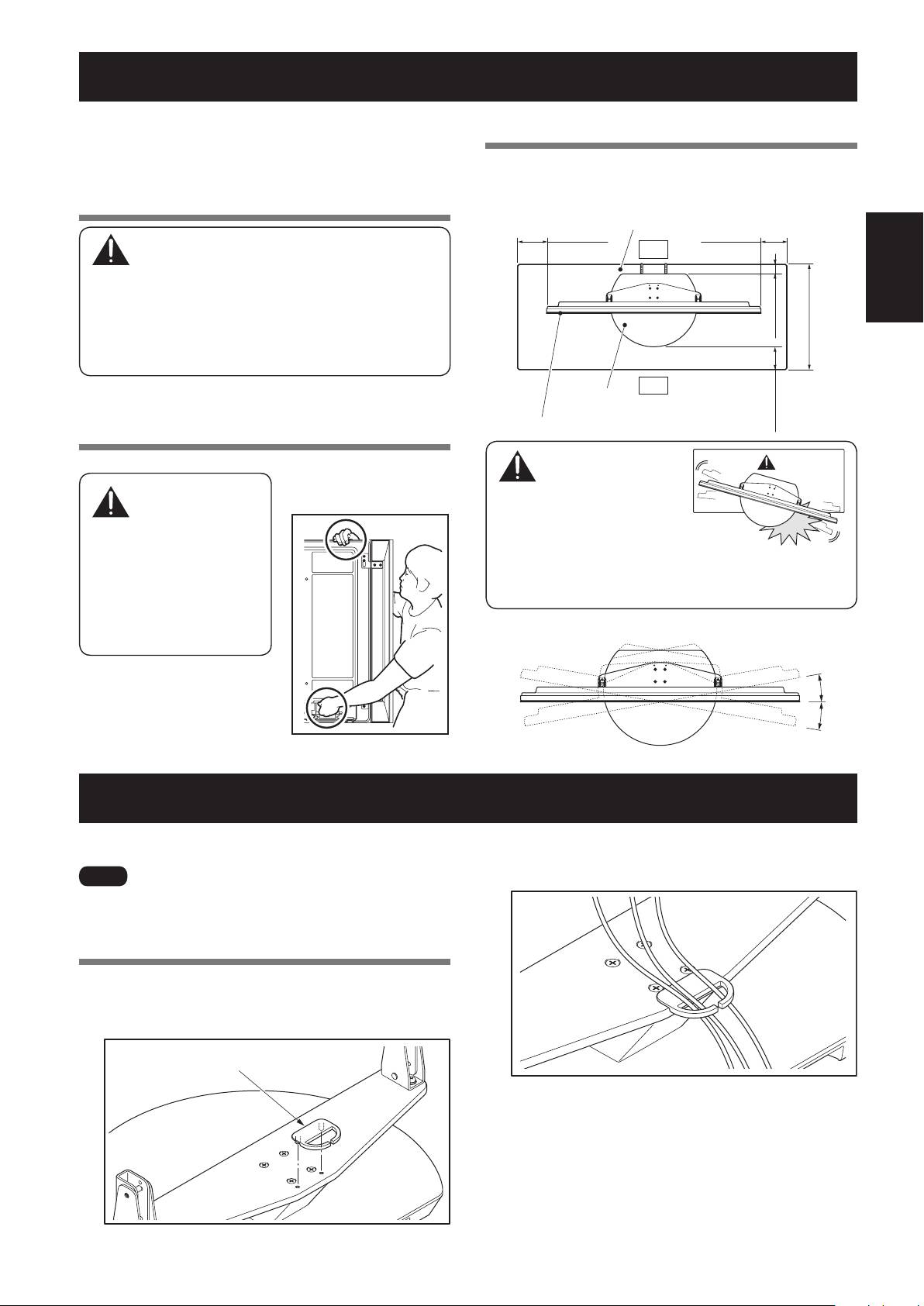
Be sure to observe the following precautions when moving
or installing this product with a Pioneer display and television
into a TV table or other enclosure.
Precautions when moving
English
15
En
Caution
Installation precautions
Make sure that you always secure a space at least as large
as that shown in the following diagram in front of and behind
the table top stand.
• Whenmovingtheproductmorethanafew
meters,firstremovethespeaker,thenremove
the Pioneer display and television from the stand
andmovethespeaker,
stand,Pioneerdisplayand
television separately.
• WhendetachingthePioneerdisplayandtelevision
fromthestand,besuretofollowtheprocedure
described in “Detaching the Pioneer Display and
Television from the Stand” on page 17.
Precautions when installing in a TV
table or other enclosure
Wheninstallingin
a TV table or other
enclosure,holdthe
Pioneer display and television
by the handles located on the
rear of the Pioneer display
and television. If you hold
thespeakers,theymaybe
damaged or twisted.
TV table
Min. 30 mm
Min. 30 mm
(1-3/16 inch)
Back
(1-3/16 inch)
Min. 40 mm
(1-9/16 inch)
Depth of the TV table
480 mm (18-29/32 inch)
or more recommended
Front
Table top stand
Pioneer display and television
Min. 30 mm
(1-3/16 inch)
Caution
• Ifthestand
protrudes from the
TVtable,itcould
cause unforeseen
accidents such as
the equipment breaking or
falling over.
• Whenrotating,takecarenottoallowthe
display to bump into walls or surrounding
objects.
Range of angle rotation
10°
10°
Hold the Pioneer display and
television by its handles and
from the top.
Preparing the Cables
Use the enclosed cable binder to bind the cables.
Ìi
Be very careful not to apply force to the bases of the cables on
the Pioneer display and television side.
Using the cable binder
1
Insert the cable binder through the hole on the
top of the rotating platform of the stand.
Cable binder
2
Gathering the cables and routing them through
the cable binder.
Protrusion is
dangerous.
Caution
