
Pioneer KRP-SW01BG: Attaching the Pioneer Display and Television
Attaching the Pioneer Display and Television: Pioneer KRP-SW01BG
Table of contents
- Cautions Contents
- Checking the Enclosed Parts Care for the Glossy Surface of the Stand
- Attaching the Pioneer Display and Television Assembling the Stand
- Attaching the Pioneer Display and Television
- Forward/Backward Angle of Inclination Adjustment Mechanism
- Installing the Product on a TV table etc. Preparing the Cables
- Preventing Equipment from Falling Over
- Dimensions Diagram Detaching the Pioneer Display and Television from the Stand Specifications
2
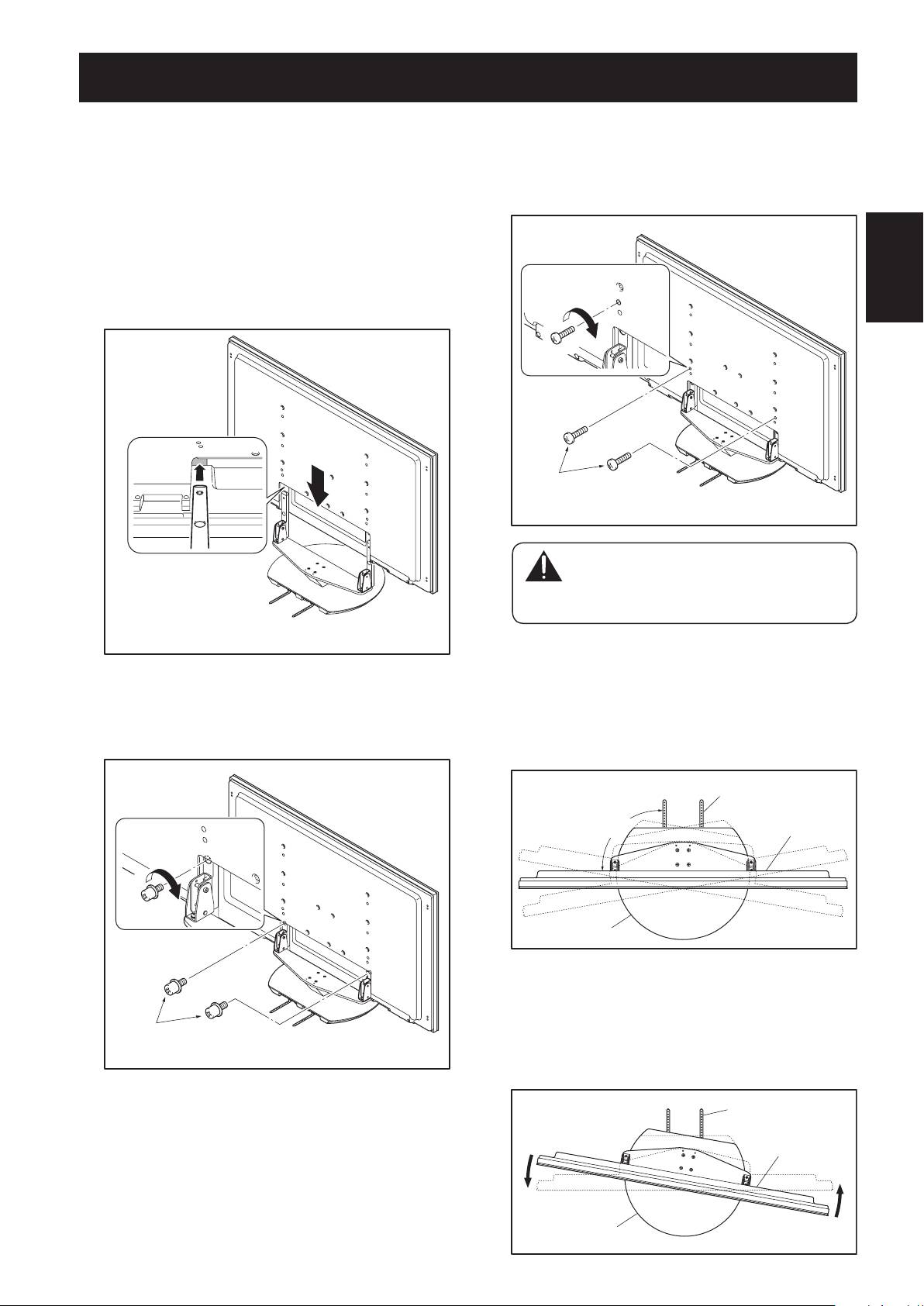
Attaching the Pioneer display and television to
the stand.
Fit the stand’s support columns to the bottom of the
Pioneer display and television as indicated by the arrows,
then slowly insert them vertically. Be extremely careful
not to insert the support columns of the stand into any
part of the Pioneer display and television other than the
stand insertion slots. Note that doing so might damage
the Pioneer display and television panel or its ports or
English
result in the warping of the stand.
13
En
Line up the column
supports with the bottom
of the Pioneer display and
television as indicated in
the accompanying
diagram.
3
Securing the Pioneer display and television
with Installation screws
2
.
Fix the screws with a Phillips screwdriver.
Screws
�
(M8 × 15 mm: black)
Attaching the Pioneer Display and Television
4
Securing the Pioneer display and television
with Installation screws
3
.
Attach the Pioneer display and television at the points
marked with “T” using a Phillips screwdriver.
Screws
�
(M8 × 23 mm: black)
Caution
There have been cases where unforeseen
accidents such as the equipment breaking or
falling over occurred because the stand was
installed with wrong screws.
5
Finding the center of the rotation range of the
stand.
The state in which the fall-prevention straps attached to
the stand are at a right angle in relation to the Pioneer
display and television is the center of the angle of
rotation of the stand.
Fall-prevention strap
Pioneer display
90°
and television
Table top stand
If the fall-prevention straps lean toward the left in relation
to the Pioneer display and television, the rotation angle
of the stand can be adjusted to the center by turning the
display toward the left so that the fall-prevention straps
form a right angle in relation to the Pioneer display and
television.
Fall-prevention strap
Pioneer display
and television
Table top stand
