
Pioneer KRP-SW01BG: Dimensions Diagram Detaching the Pioneer Display and Television from the Stand Specifications
Dimensions Diagram Detaching the Pioneer Display and Television from the Stand Specifications: Pioneer KRP-SW01BG
Table of contents
- Cautions Contents
- Checking the Enclosed Parts Care for the Glossy Surface of the Stand
- Attaching the Pioneer Display and Television Assembling the Stand
- Attaching the Pioneer Display and Television
- Forward/Backward Angle of Inclination Adjustment Mechanism
- Installing the Product on a TV table etc. Preparing the Cables
- Preventing Equipment from Falling Over
- Dimensions Diagram Detaching the Pioneer Display and Television from the Stand Specifications
English
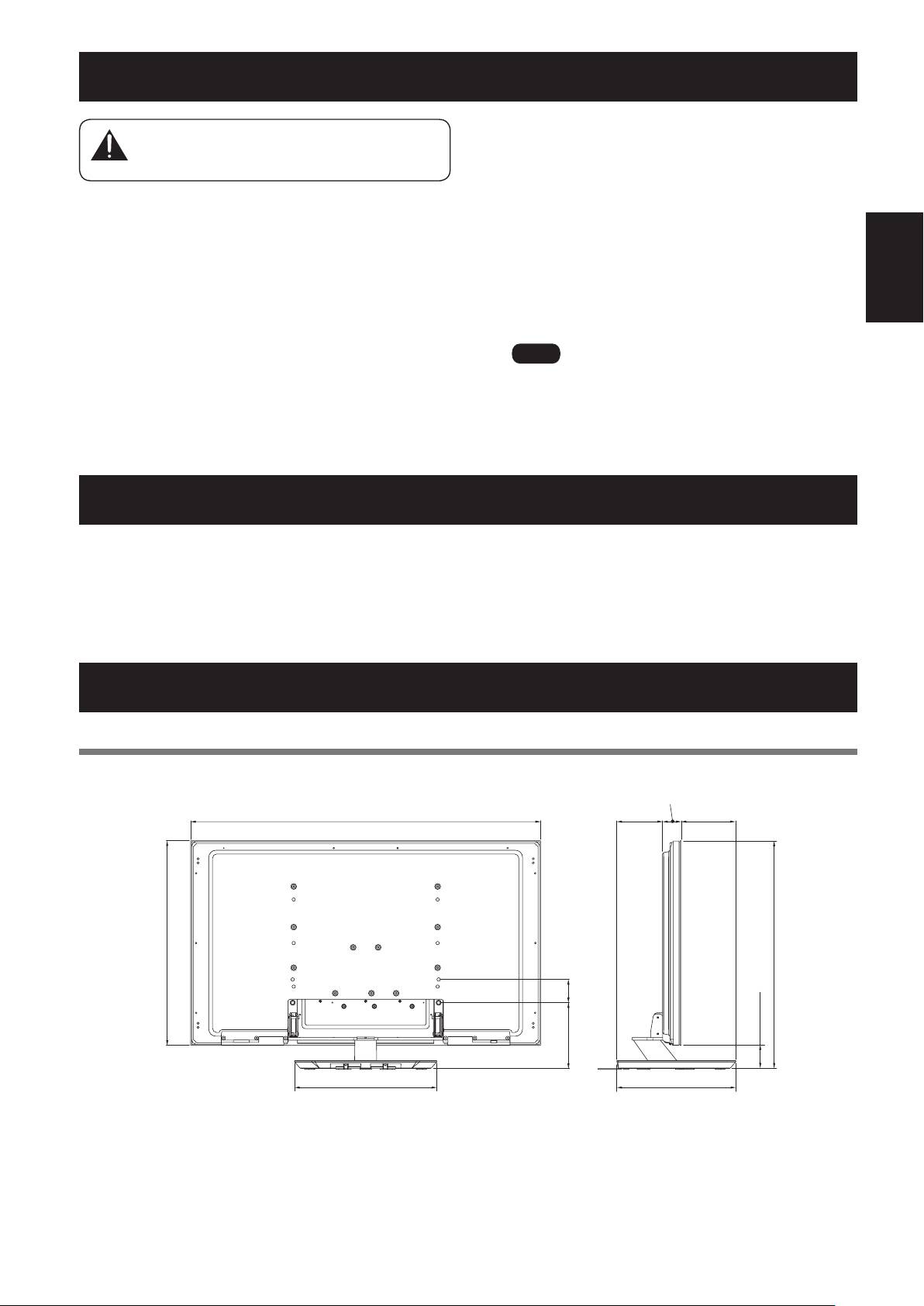
Dimensions Diagram
50 inch display model (PRO-101FD/KRP-500A/KRP-500M) (without speakers)
Unit: mm (inch)
PublishedbyPioneerCorporation.
Copyright©2008PioneerCorporation.
All rights reserved.
17
En
64 (2-17/32)
1233 (48-17/32)
159
187
(6-1/4)
(7-3/8)
723 (28-15/32)
804 (31-21/32)
80
(3-5/32)
225
81(3-3/16)
(8-27/32)
490 (19-9/32)
410 (16-5/32)
Detaching the Pioneer Display and Television from the Stand
5
Remove the speakers.
To remove the Pioneer display and television
fromthestand,besuretoalwaysfollowthe
6
Referring to steps 3 and 4 in “Attaching the
procedure described below to prevent accidents.
PioneerDisplayandTelevision”(Page13),
remove the installation screws (4 screws).
1
Turn off the power and remove the power
7
Holding the Pioneer display and television by
plug from the power outlet and the cables
itshandlesandfromthetop,slowlyliftthe
from the connectors.
display vertically.
2
Remove the fall-prevention straps and cords.
8
Place the Pioneer display and television slowly
3
First,confirmthattheforward/backward
onto the sheet laid out in step 4 with its screen
inclination anchor bolt is securely tightened.
facing downwards.
4
First clear a space on a flat floor etc. where you
canlaythePioneerdisplayandtelevisionflat,
then lay a sheet to protect it from scratches or
other damage.
Ìi
WhenreattachingthePioneerdisplayandtelevisiontothe
stand,becertainthattheleft/rightsupportcolumnsare
set at the same angle.
Specifications
Externaldimensions 533mm(W)×339.4mm(H)×410mm(D)(20-31/32inch(W)x13-3/8inch(H)x16-5/32inch(D))
Weight 10.7 kg (23.6 lbs)
• Theabovespecificationsandexteriormaybemodifiedwithoutpriornoticetoimprovetheproduct.
Caution
