
Pioneer DEH-P8100BT: When connecting to separately sold power amp
When connecting to separately sold power amp: Pioneer DEH-P8100BT
Table of contents
- Contents Connecting the units
- Connecting the units
- Connecting the power cord
- Connecting the units
- When connecting to separately sold power amp
- Connecting the units
- Installation DIN Front/Rear-mount Removing or attaching the trim ring DIN Front-mount
- Removing the Unit Installing the microphone When installing the microphone on the sun visor DIN Rear mount
- When installing the microphone Installing the steering remote on the steering column control Adjusting the microphone angle
- Installing the unit on a left-hand drive car
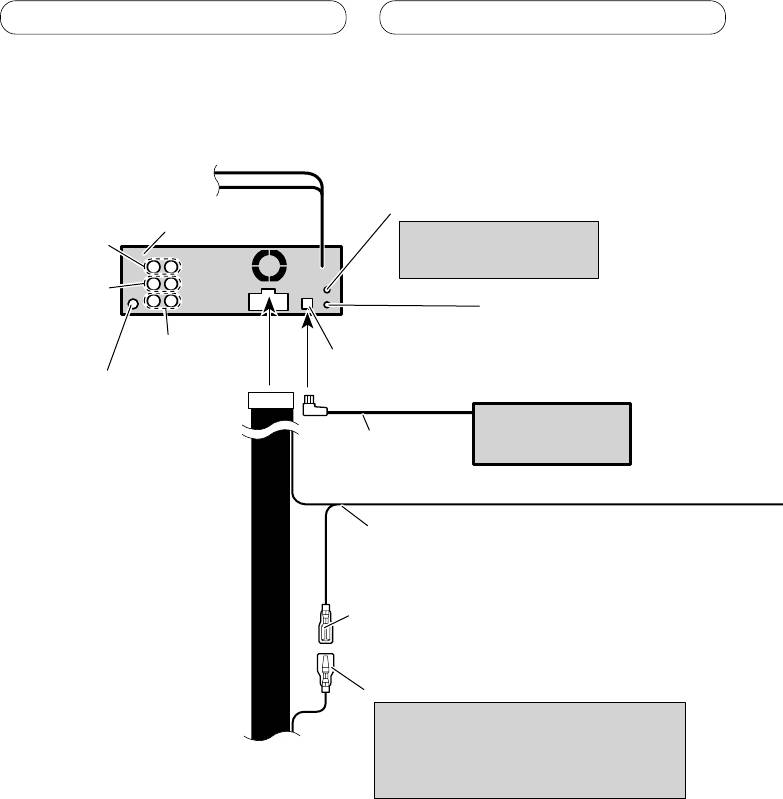
Connecting the units
When connecting to separately sold power amp
AUX jack (3.5 φ)
This product
Use a stereo mini plug cable
Rear output
to connect with auxiliary
device.
Front output
Wired remote input
Hard-wired remote control
adaptor can be connected
Subwoofer output
(sold separately).
IP-BUS input (Blue)
Antenna jack
Multi-CD player
(sold separately)
IP-BUS cable
Blue/white
Connect to system control terminal of the
power amp (max. 300 mA 12 V DC).
Blue/white (7*)
Connect to auto-antenna relay control
terminal (max. 300 mA 12 V DC).
Blue/white (6*)
The pin position of the ISO connector will
differ depends on the type of vehicle.
Connect 6* and 7* when Pin 5 is an
antenna control type. In another type of
vehicle, never connect 6* and 7*.
6
Top 10 manuals
100.00
NZXT HALE90 1000W99.99
Samsung SM-R38099.97
AEG BSB 18C99.97
Dell 2700W99.97
Smeg KSEC70X99.96
Beurer HDE 4099.96
Pyramida KH 50 v.299.96
MSI CSM-H81M-P3299.96
AEG HR 562799.95
Melissa 640-048