
Pioneer DEH-P8100BT: Installation DIN Front/Rear-mount Removing or attaching the trim ring DIN Front-mount
Installation DIN Front/Rear-mount Removing or attaching the trim ring DIN Front-mount: Pioneer DEH-P8100BT
Table of contents
- Contents Connecting the units
- Connecting the units
- Connecting the power cord
- Connecting the units
- When connecting to separately sold power amp
- Connecting the units
- Installation DIN Front/Rear-mount Removing or attaching the trim ring DIN Front-mount
- Removing the Unit Installing the microphone When installing the microphone on the sun visor DIN Rear mount
- When installing the microphone Installing the steering remote on the steering column control Adjusting the microphone angle
- Installing the unit on a left-hand drive car
Installation
Note
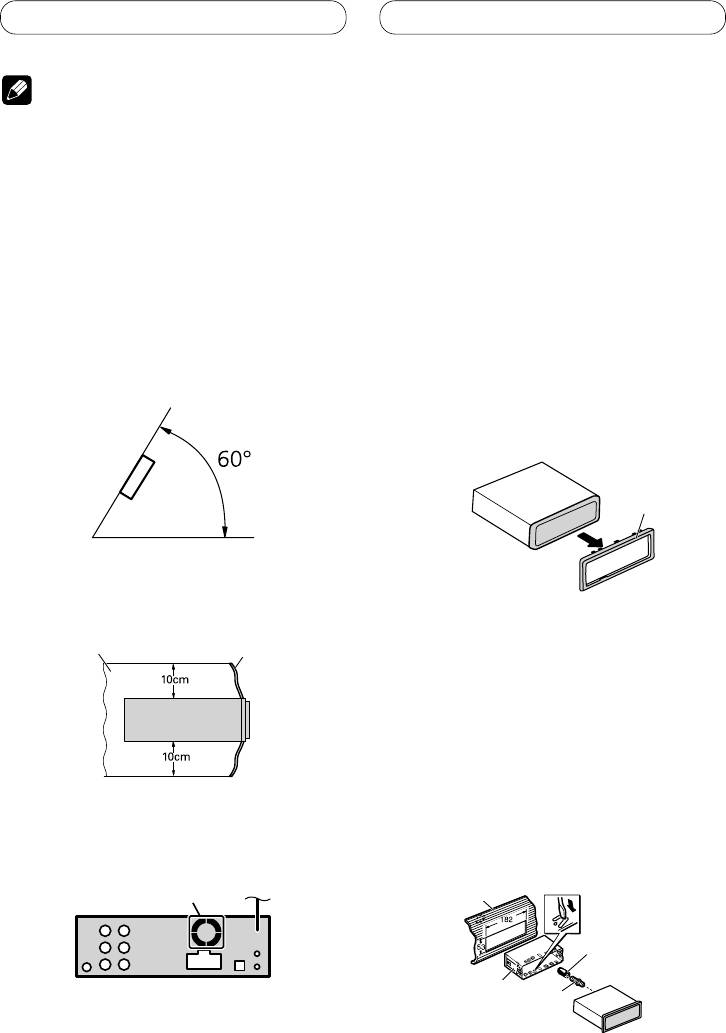
DIN Front/Rear-mount
This unit can be properly installed either from
• Check all connections and systems before final
“
Front
”
(conventional DIN Front-mount) or
installation.
“
Rear
”
(DIN Rear-mount installation, utilizing
• Do not use unauthorized parts. The use of
threaded screw holes at the sides of unit
unauthorized parts may cause malfunctions.
chassis). For details, refer to the following
• Consult with your dealer if installation requires
drilling of holes or other modifications of the
installation methods.
vehicle.
• Do not install this unit where:
Removing or attaching
— it may interfere with operation of the vehicle.
— it may cause injury to a passenger as a result
the trim ring
of a sudden stop.
1.
Extend top and bottom of the trim ring
• The semiconductor laser will be damaged if it
overheats. Install this unit away from hot places
outwards to remove the trim ring.
such as near the heater outlet.
•
When reattaching the trim ring, push the trim
• Optimum performance is obtained when the unit is
ring onto the unit until it clicks. (If the trim ring
installed at an angle of less than 60°.
is attached upside down, the trim ring will not
fit properly.)
•
It becomes easy to remove the trim ring if the
front panel is released.
Trim ring
• When installing, to ensure proper heat dispersal
when using this unit, make sure you leave ample
space behind the rear panel and wrap any loose
cables so they are not blocking the vents.
Leave ample space
Dashboard
DIN Front-mount
Installation with the rubber bush
1. Insert the mounting sleeve into the
dashboard.
• When installing in a shallow space, use a
supplied mounting sleeve. If there is enough
space behind the unit, use factory supplied
mounting sleeve.
• The cords must not cover up the area shown in the
2. Secure the mounting sleeve by using
figure. This is necessary to allow the amplifiers to
a screwdriver to bend the metal tabs
radiate freely.
(90°) into place.
3. Install the unit as illustrated.
Do not cover this area.
Dashboard
Rubber bush
Mounting sleeve
Screw
8
