
Pioneer DDJ-ERGO-V: About the installation procedure (Mac OS X) Checking the latest information on the VIRTUAL DJ LE software
About the installation procedure (Mac OS X) Checking the latest information on the VIRTUAL DJ LE software: Pioneer DDJ-ERGO-V
Table of contents
- Before start About trademarks and registered Installing the VIRTUAL DJ LE software trademarks About the installation procedure (Windows) What’s in the box Installing the software About the VIRTUAL DJ LE software
- About the installation procedure (Mac OS X) Checking the latest information on the VIRTUAL DJ LE software
- About the driver software (Windows) Connections Installing the driver software Starting the system Starting this unit
- Launching VIRTUAL DJ LE Launching VIRTUAL DJ LE (Windows) Launching VIRTUAL DJ LE (Mac OS X)
- Operation Loading tracks and playing them Outputting sound Quitting the system
- Additional information Specifications
English
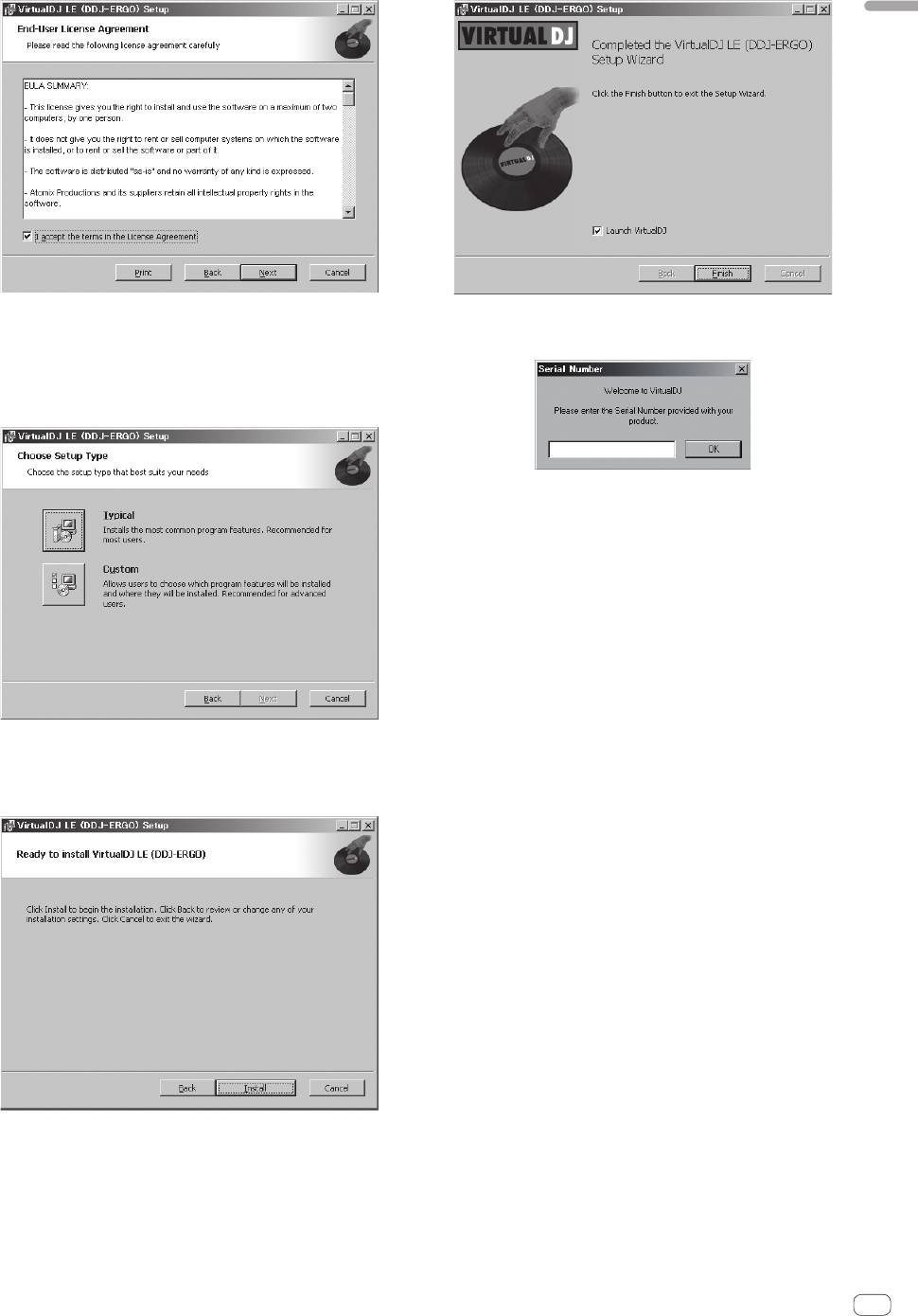
6 Select the type of installation for VIRTUAL DJ LE, then
9 Input the serial number attached to the VIRTUAL DJ
click [Next].
LE software CD-ROM’s package, then click [OK].
— When [Typical] is selected, plug-ins and other components are
installed simultaneously. Normally select [Typical].
— When [Custom] is selected, you can select which components to
install.
About the installation procedure (Mac OS X)
1 Insert the included VIRTUAL DJ LE software CD-ROM
in the computer’s CD drive.
The [VirtualDJ_LE] icon appears on the screen.
2 Double-click the [VirtualDJ_LE] icon.
The contents of the CD-ROM are displayed.
3 Double-click [install_virtualdj_le_ergo_v7.x.x.pkg].
The VIRTUAL DJ LE installer is launched.
4 Once the VirtualDJ LE (DDJ-ERGO) installer is
launched, click [Continue].
7 When the screen below is displayed, click [Install].
Installation begins.
5 Read the contents of the license agreement carefully,
The installation completed screen appears once installation is
click [Continue] and then click [Agree] to accept the
completed.
license agreement.
If you do not agree to the license agreement, click [Disagree] to cancel
installation.
6 Select the type of installation for VIRTUAL DJ LE, then
click [Install].
— Normally select standard installation to install.
— To install in a different location, click [Change Install
Location...] and choose the place of installation.
Installation begins.
The installation completed screen appears once installation is
completed.
7 Click [Close].
This completes the installation procedure.
Checking the latest information on the VIRTUAL
DJ LE software
For the latest information on the operating environment and compatibil-
8 Click [Finish].
ity, and to acquire the latest operating system, please visit the following
This completes the installation procedure.
Atomix productions website:
VIRTUAL DJ LE is launched if [Launch VirtualDJ] on the screen is
http://www.virtualdj.com
checked when [Finish] is clicked.
En
3


