
Asus ROG Xonar Phoebus: 4. Connecting Speakers and Peripherals
4. Connecting Speakers and Peripherals: Asus ROG Xonar Phoebus

English
ASUS Xonar Phoebus Quick Start Guide
9
4. Connecting Speakers and Peripherals
4.1 Connecting Phoebus Box
4.1.1 Connecting Phoebus Box
No Item Description
1 Microphone In
Connect the microphone’s 3.5mm plug from the Phoebus
Port
Control Box into this Mic-In port for voice communication,
recording or karaoke.
2 Headphone Port
The headphone port has a built-in high-quality amplier
to drive headphones. Connect the Phoebus Control box
directly to this port.
3 Box Link Port
Connect Phoebus Control box directly to this port.
4.1.2 Connecting Phoebus Control Box with external headphone and
microphone
No Item Description
1 Headphone Port
Connect the headphone to the headphone port on the
Phoebus Control box.
2 Microphone In
Connect the microphone’s 3.5mm plug to the Mic-In port
Port
on the Phoebus Control Box.
Mic in
HP out
Box link
Line in
Front
Ctr / Sbw
Rear
Side /
SPDIF out
1
2
3
Headphone Out
Mic In
1
2
U7062_Xonar-Phoebus_QSG.indb 9 18.01.2012 16:12:26 Uhr
English
10
ASUS Xonar Phoebus Quick Start Guide
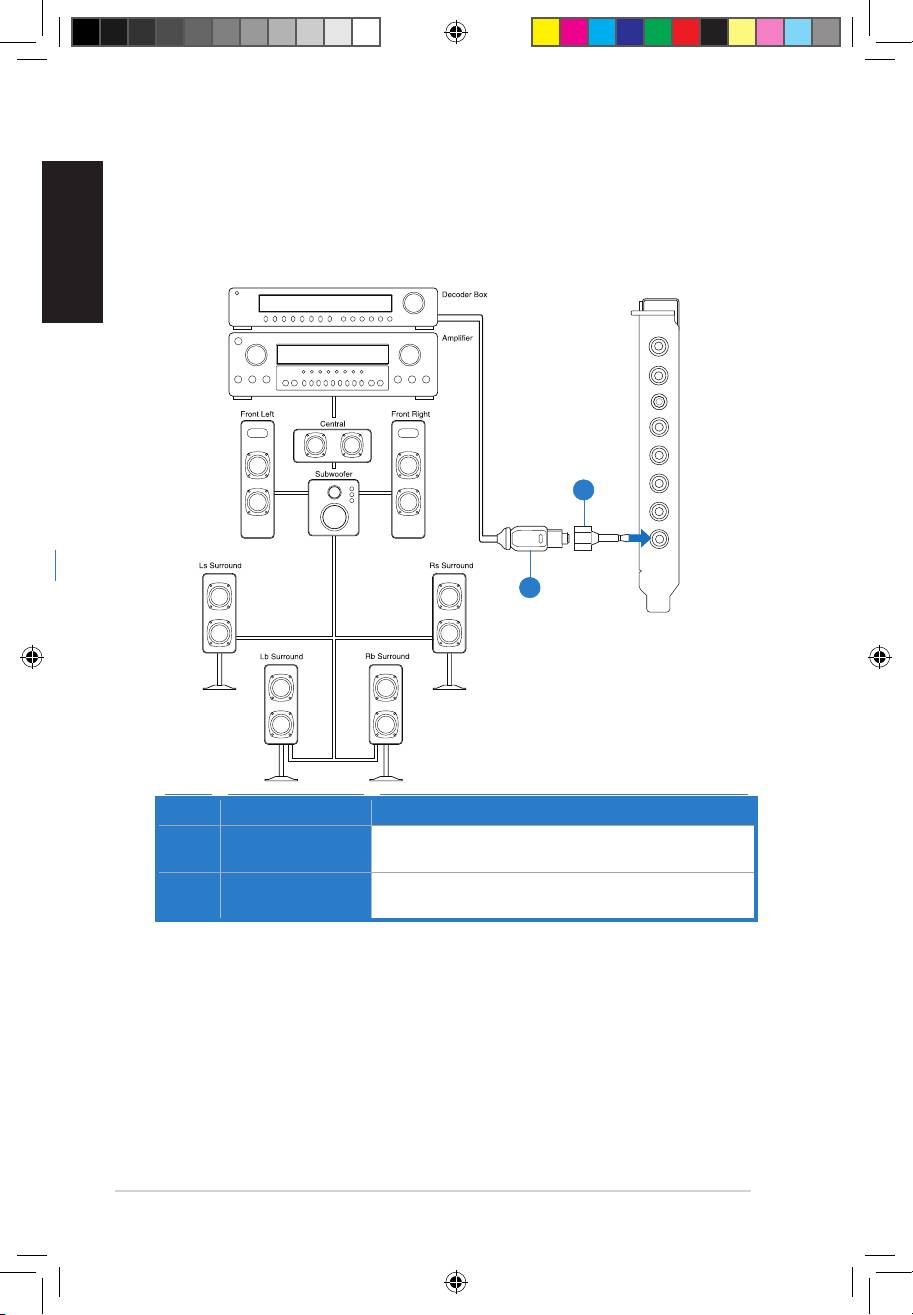
4.1.3 Connecting Digital Speaker Systems (Home Theater)
Xonar Phoebus makes playback through your home theater system possible, creating
an impressive surround sound experience. A single digital cable connection can carry
high-quality digital audio from any of your PC audio sources to any digital speakers or
AV Receivers.
No Item Description
1 Optical adapter
Plug the optical TOSLINK adapter into the S/PDIF-Out
connector.
2 Optical cable
Connect your decoder’s S/PDIF-In port to the optical adapter
with the TOSLINK optical cable
Mic in
HP out
Box link
Line in
Front
Ctr / Sbw
Rear
Side /
SPDIF out
1
2
U7062_Xonar-Phoebus_QSG.indb 10 18.01.2012 16:12:28 Uhr

English
ASUS Xonar Phoebus Quick Start Guide
11
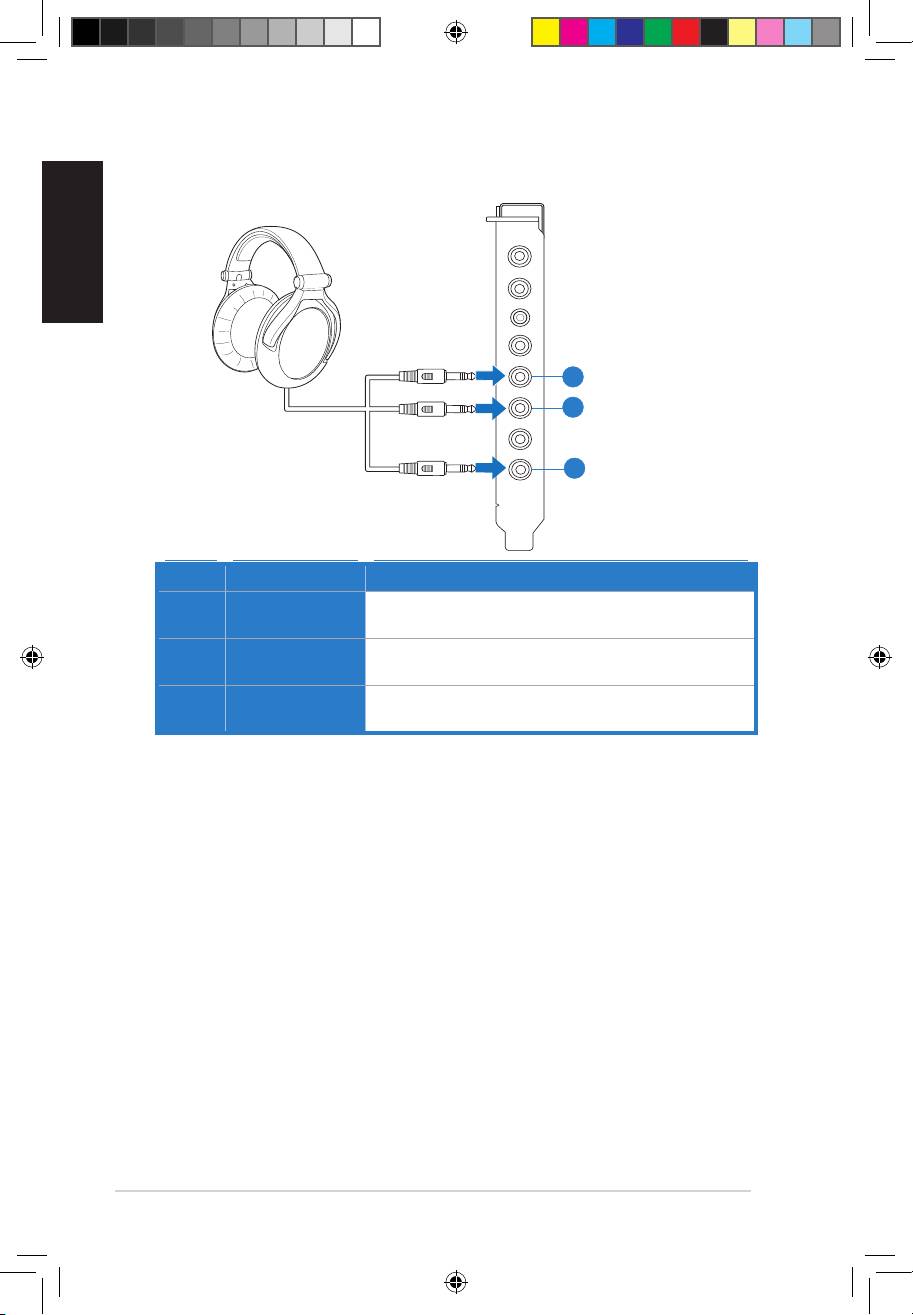
4.1.4 Connecting stereo headphones
Connecting stereo hadphones
Mic in
HP out
Box link
Line in
Front
Ctr / Sbw
Rear
Side /
SPDIF out
1
No Item Description
1 Headphone Out
The Headphone Out Port has a built-in high-quality
Port
amplier to drive headphones. Please connect your stereo
headphones directly to this jack.
U7062_Xonar-Phoebus_QSG.indb 11 18.01.2012 16:12:29 Uhr
English
12
ASUS Xonar Phoebus Quick Start Guide
Connecting 5.1 channel hadphones
No Item Description
1 Front Out
Connect the front-channel 3.5mm plug of your 5.1
headphones into this jack.
2 Side Surround
Connect the surround-channel 3.5mm plug of your 5.1
Out
headphone into this jack.
3 Center/
Connect the Center/Bass-channel 3.5mm plug of your 5.1
Subwoofer Out
headphone into this jack.
Mic in
HP out
Box link
Line in
Front
Ctr / Sbw
Rear
Side /
SPDIF out
1
3
2
U7062_Xonar-Phoebus_QSG.indb 12 18.01.2012 16:12:31 Uhr
English
ASUS Xonar Phoebus Quick Start Guide
13
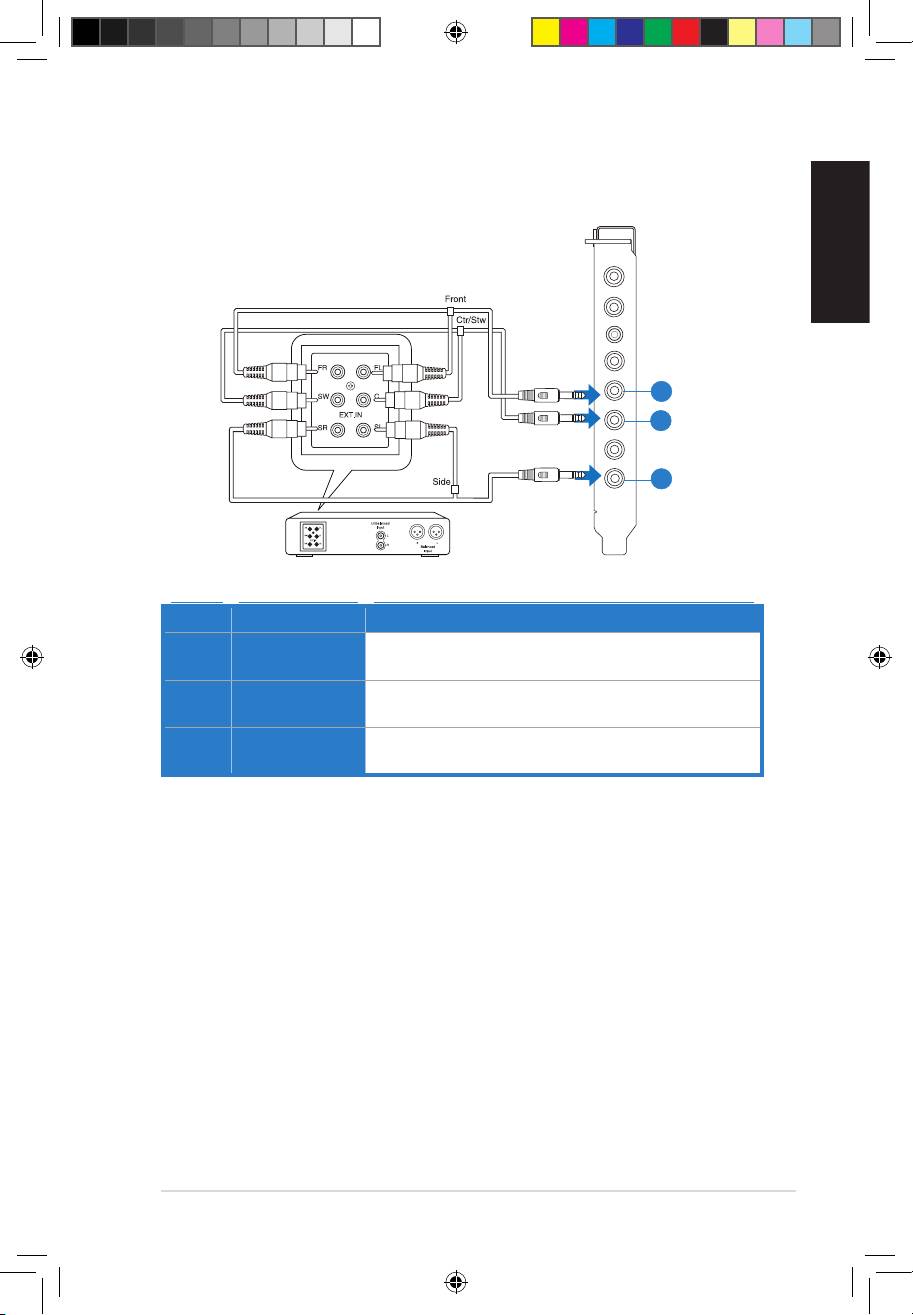
4.1.5 Connecting analog speaker systems
Connecting analog power amplier
Mic in
HP out
Box link
Line in
Front
Ctr / Sbw
Rear
Side /
SPDIF out
1
3
2
No Item Description
1 Front Out
Connects to the “left front” and “right front” input ports of the
analog amplier with the mini-jack to RCA cable.
2 Side Surround
Connects to the “left surround” and “right surround” input ports
Out
of the analog amplier with the mini-jack to RCA cable.
3 Center/
Connects to the “Center” and “subwoofer” input ports of the
Subwoofer
analog amplier with the mini-jack to RCA cable.
U7062_Xonar-Phoebus_QSG.indb 13 18.01.2012 16:12:32 Uhr
English
14
ASUS Xonar Phoebus Quick Start Guide
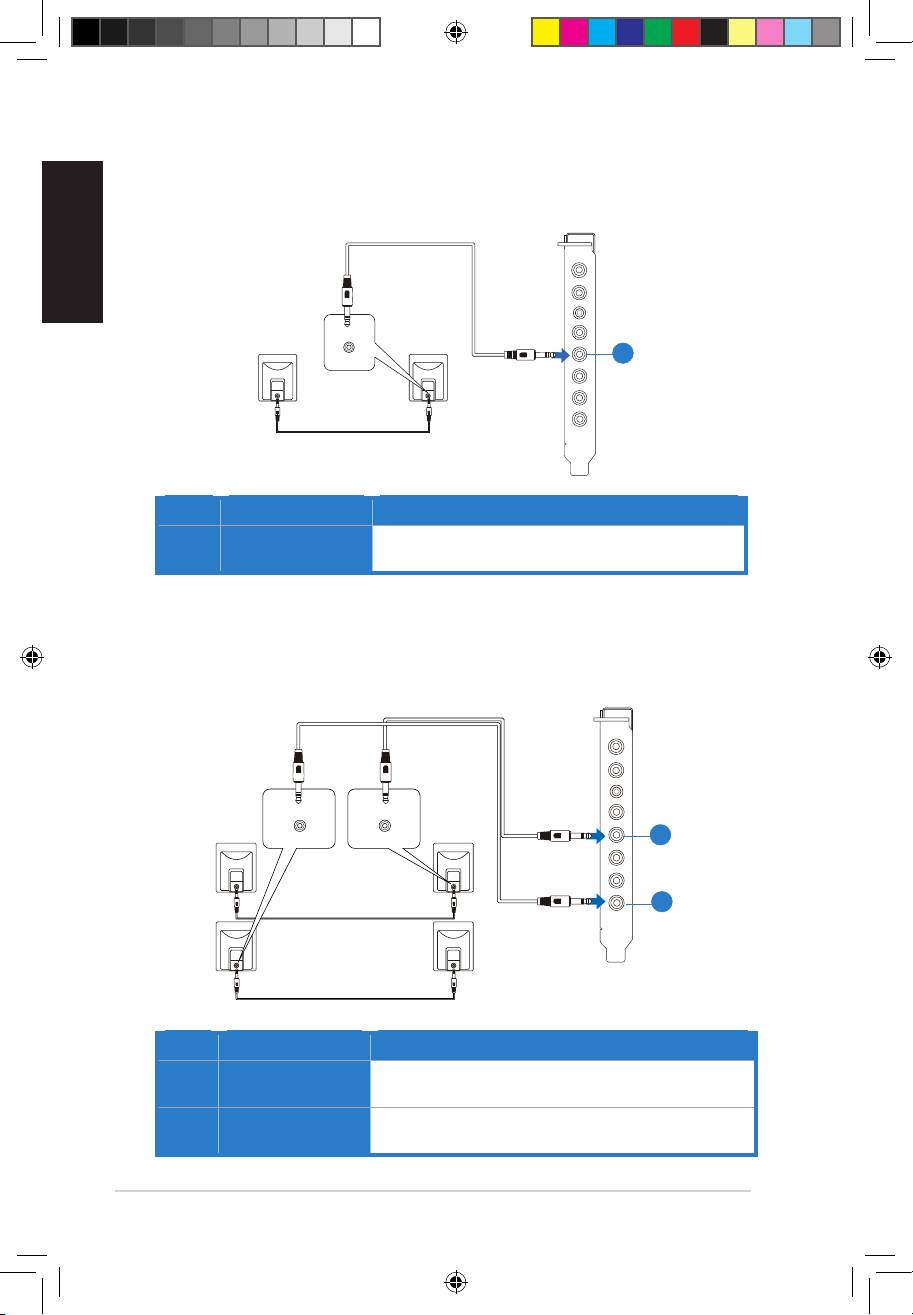
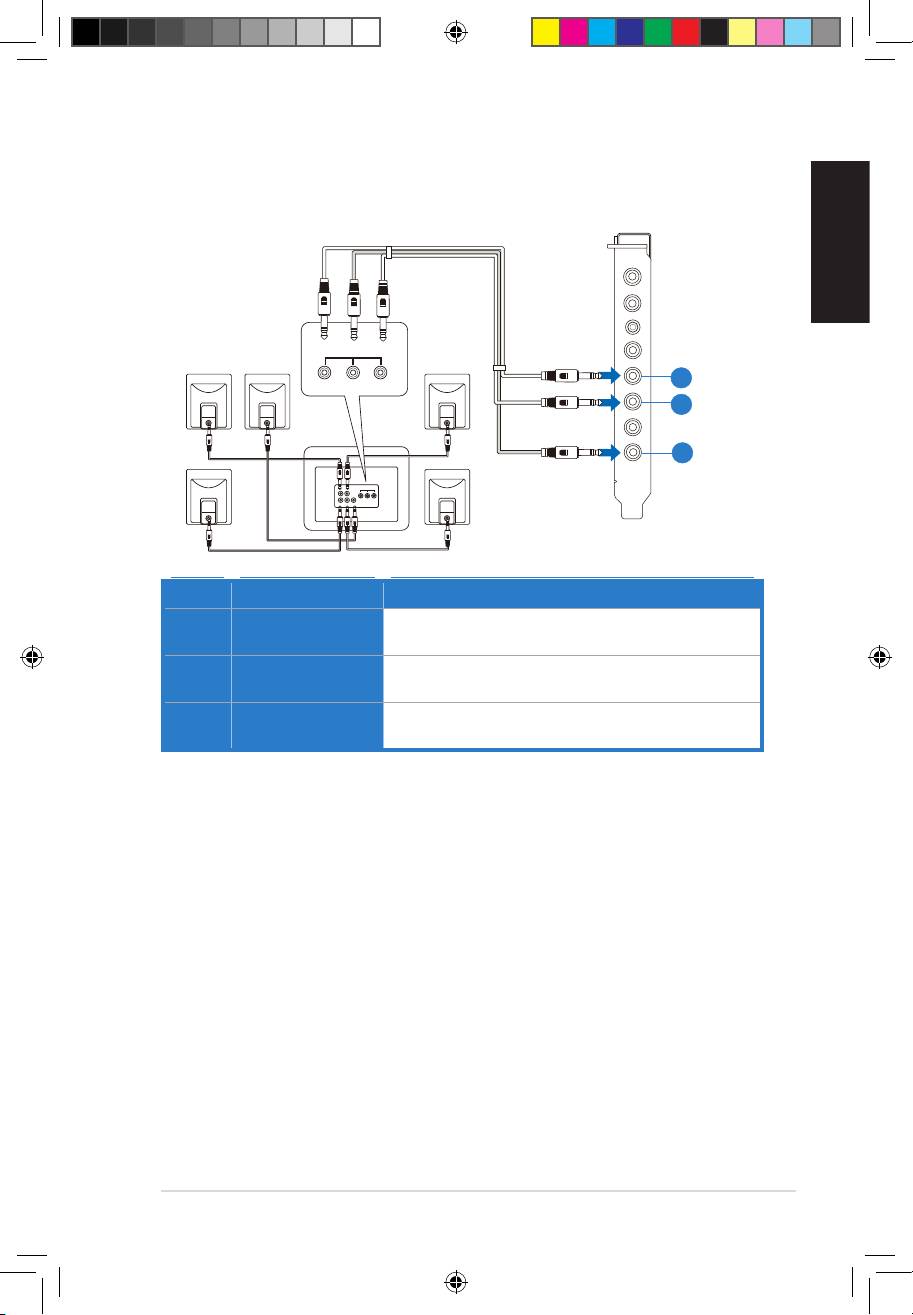
Connecting 2 channel speakers
2 speakers
No Item Description
1 Front Out Port
Connect the 2 channel speaker set’s 3.5mm plug into this
Front Out jack.
Connecting 4 channel speakers
4 speakers
No Item Description
1 Front Out
Connects to the Front input port of the 4/4.1 speakers with
the mini-jack cable.
2 Side Surround
Connects to the Surround input port of the 4/4.1 speakers
Out
with the mini-jack cable.
Mic in
HP out
Box link
AUDIO
INPUTS
Line in
Front
Ctr / Sbw
Rear
Side /
SPDIF out
1
1
2
Mic in
HP out
Box link
AUDIO
AUDIO
INPUTS
INPUTS
Line in
Side
Front
Front
Ctr / Sbw
Rear
Side /
SPDIF out
U7062_Xonar-Phoebus_QSG.indb 14 18.01.2012 16:12:34 Uhr
English
ASUS Xonar Phoebus Quick Start Guide
15
Connecting 5.1 channel speakers
5.1 speakers
Mic in
HP out
Box link
AUDIO
INPUTS
Line in
Front
Side
Center/
Subwoofer
Front
Ctr / Sbw
Rear
Side /
SPDIF out
1
3
2
No Item Description
1 Front Out
Connects to the Front input port of the 5.1 speakers with the
mini-jack cable.
2 Side Surround
Connects to the Surround input port of the 5.1 speakers with
Out
the mini-jack cable.
3 Center/
Connects to the Center/Subwoofer input port of the 5.1
Subwoofer
speakers with the mini-jack cable.
U7062_Xonar-Phoebus_QSG.indb 15 18.01.2012 16:12:35 Uhr

English
16
ASUS Xonar Phoebus Quick Start Guide
Connecting 7.1 channel speakers
7.1 speakers
Rear
Front
Mic in
AUDIO
AUDIO
INPUTS
INPUTS
Side
Center/
HP out
Subwoofer
Box link
Line in
Front
Ctr / Sbw
Rear
Side /
SPDIF out
1
3
4
2
No Item Description
1 Front Out
Connects to the Front input port of the 7.1 speakers with
the mini-jack cable.
2 Side Surround
Connects to the Surround input port of the 7.1 speakers
Out
with the mini-jack cable.
3 Center/
Connects to the Center/Subwoofer input port of the 7.1
Subwoofer
speakers with the mini-jack cable.
4 Back Surround
Connects to the Back Surround input port of the 7.1
Out
speakers with the mini-jack cable.
U7062_Xonar-Phoebus_QSG.indb 16 18.01.2012 16:12:37 Uhr

English
ASUS Xonar Phoebus Quick Start Guide
17
4.1.6 Connecting Microphone
1
1
2
1
Mic in
HP out
2
Box link
Side /
SPDIF out
Ctr / Sbw
Line in
Front
Rear
No Item Description
1 Microphone In
Connect the microphone’s 3.5mm plug into this Mic-In port
Port
for voice communication, recording, or karaoke.
2 Headphone Port
The headphone port has a built-in high-quality amplier to
drive headphones. Connect your stereo headphones directly
to this jack.
4.1.7 Connecting Line-In audio sources
Mic in
HP out
Box link
CD Player
Line in
Front
Ctr / Sbw
Rear
Side /
SPDIF out
MP3 Player
1
No Item Description
1 Line In Port
Connect the 3.5mm plug of the CD/MP3 Player or any other
Line level analog audio sources into this Line-In jack for sound
recording.
U7062_Xonar-Phoebus_QSG.indb 17 18.01.2012 16:12:40 Uhr
Оглавление
- Table of content
- 1. Introduction
- 2. Hardware
- 3. Driver Installation
- 4. Connecting Speakers and Peripherals
- 1. Introduction
- 2. Matériel
- 3. Installation du pilote de la carte son
- 4. Connexion de haut-parleurs et de périphériques
- 1. Einführung
- 2. Hardware
- 3. Treiberinstallation
- 4. Anschluß der Lautsprecher und Peripheriegeräte
- 1. Introduzione
- 2. Hardware
- 3. Installazione Driver
- 4. Connessione di altoparlanti e periferiche
- 1. Introducción
- 2. Hardware
- 3. Driver Installation
- 4. Conectar altavoces y periféricos
- 1.Introdução
- 2. Hardware
- 3. Instalação do controlador
- 4. Ligar altifalantes e periféricos
- 1. Введение
- 2. Аппаратное обеспечение
- 3. Установка драйвера
- 4. Подключение колонок и периферии
- 1. Giriş
- 2. Donanım
- 3. Sürücü kurulumu
- 4. Hoparlör ve Çevre Birimlerinin Bağlanması
