
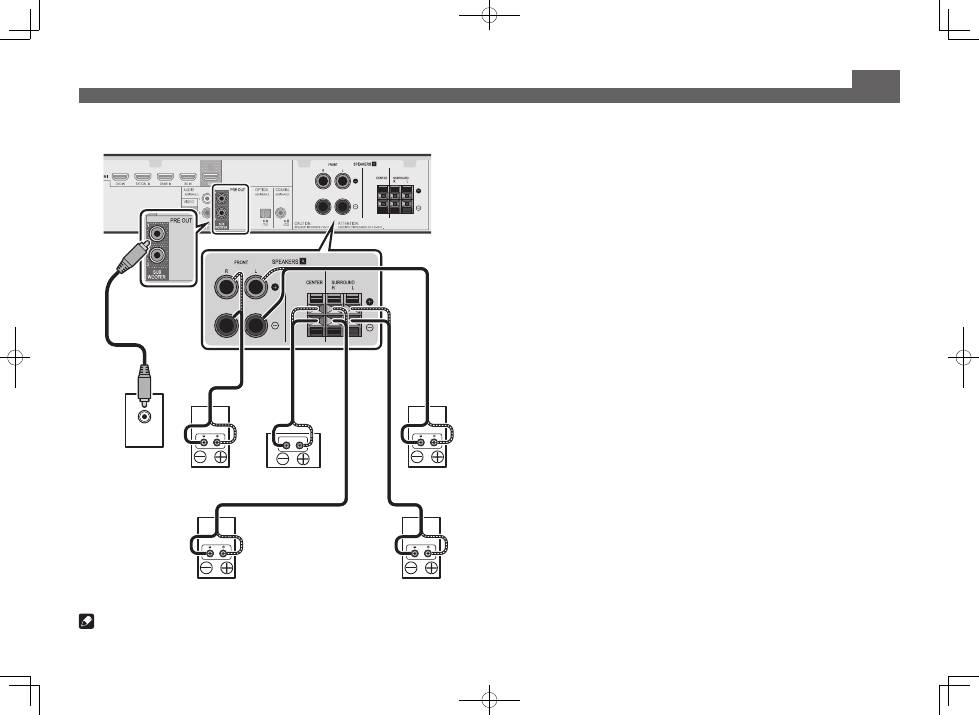
Pioneer VSX-S510-W: VSX-S310 connection diagram
VSX-S310 connection diagram: Pioneer VSX-S510-W
Table of contents
- AV Receiver Quick Start Guide What’s in the box
- Safety Brochure
- Connecting up Connecting the speakers VSX-S510 connection diagram
- VSX-S310 connection diagram
- Connecting a TV and playback components Connecting antennas
- Connecting to the network through LAN interface
- Initial Setup Before you start Automatically setting up for surround sound (MCACC)
- Basic playback Multichannel playback Listening to the radio
- Playing an iPod Listening to Internet radio stations
4
Connecting up (continued)
LINE LEVEL
INPUT
Powered
Subwoofer (
SW
)
Front Right (
R
)
Front Left (
L
)
Center (
C
)
Surround Right
(
SR
)
Surround Left
(
SL
)
VSX-S310 connection diagram
Note
• This unit supports speakers with a nominal impedance of 4
W
to 16
W
.
Top 10 manuals
100.00
NZXT HALE90 1000W99.99
Samsung SM-R38099.97
AEG BSB 18C99.97
Dell 2700W99.97
Smeg KSEC70X99.96
Beurer HDE 4099.96
Pyramida KH 50 v.299.96
MSI CSM-H81M-P3299.96
AEG HR 562799.95
Melissa 640-048