
Pioneer VSX-S510-W: Playing an iPod Listening to Internet radio stations
Playing an iPod Listening to Internet radio stations: Pioneer VSX-S510-W
Table of contents
- AV Receiver Quick Start Guide What’s in the box
- Safety Brochure
- Connecting up Connecting the speakers VSX-S510 connection diagram
- VSX-S310 connection diagram
- Connecting a TV and playback components Connecting antennas
- Connecting to the network through LAN interface
- Initial Setup Before you start Automatically setting up for surround sound (MCACC)
- Basic playback Multichannel playback Listening to the radio
- Playing an iPod Listening to Internet radio stations
9
English
Français
Italiano
Español
Nederlands
Deutsch
Basic playback (continued)
To enjoy the many functions of the
unit to the fullest extent
Load the CD-ROM into your computer and download the
PDF manual from the menu screen to read.
Functions
■
Playing a USB device
l
page 29
■
Bluetooth
ADAPTER for Wireless Enjoyment of Music
l
page 32
(VSX-S510 only)
■
Playback with NETWORK features
l
page 42
(VSX-S510 only)
■
Setting the Audio options
l
page 40
■
Using the Home Menu
l
page 51
Troubleshooting
l
page 58
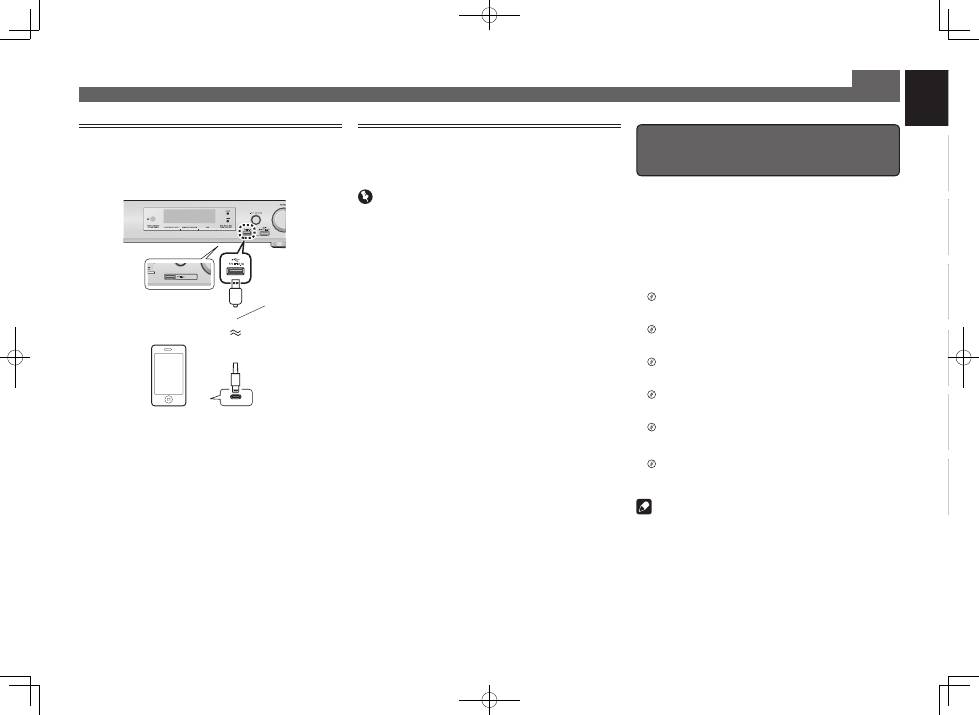
Playing an iPod
• About one minute is required between turning the power
on and completion of startup.
1
Connect your iPod.
2
Press iPod/USB to select the iPod/USB input.
When the display shows the names of folders and files,
you’re ready to play music from the iPod.
3
Use
/
to select a category, then press
ENTER to browse that category.
• To return to the previous level any time, press
RETURN
.
4
Use
/
to browse the selected category (e.g.,
albums).
• Use
/l
to move to previous/next levels.
5
Continue browsing until you arrive at what
you want to play, then press
to start
playback.
Listening to Internet radio stations
VSX-S510 only
• About one minute is required between turning the power
on and completion of startup.
Important
• When using a broadband Internet connection, a contract
with an Internet service provider is required. For more
details, contact your nearest Internet service provider.
• To listen to Internet radio stations, you must have high-
speed broadband Internet access. With a 56 K or ISDN
modem, you may not enjoy the full benefits of Internet
radio.
• Access to content provided by third parties requires a
high speed internet connection and may also require
account registration and a paid subscription. Third
party content services may be changed, suspended,
interrupted, or discontinued at any time without notice,
and Pioneer disclaims any liability in connection with such
occurrences. Pioneer does not represent or warrant that
content services will continue to be provided or available
for a particular period of time, and any such warranty,
express or implied, is disclaimed.
1
Press NETWORK repeatedly to select the
NETRADIO input.
It may take several seconds for this receiver to access the
network.
2
Use
/
to select the Internet radio station to
play back, and then press ENTER.
USB cable that
comes with the iPod
iPod/iPhone or iPad
(VSX-S510 only)
© 2013 PIONEER CORPORATION.
All rights reserved.
VSX-S510only
Note
• This unit supports AirPlay. For details, see page 42 of the
operating instructions and the Apple website (http://www.
apple.com).
• This unit’s software can be updated (page 46 of the
operating instructions). With Mac OS, it can be updated
using Safari (page 47 of the operating instructions).
VSX-S510
VSX-S310
