
Pioneer VSX-S510-W: Connecting up Connecting the speakers VSX-S510 connection diagram
Connecting up Connecting the speakers VSX-S510 connection diagram: Pioneer VSX-S510-W
Table of contents
- AV Receiver Quick Start Guide What’s in the box
- Safety Brochure
- Connecting up Connecting the speakers VSX-S510 connection diagram
- VSX-S310 connection diagram
- Connecting a TV and playback components Connecting antennas
- Connecting to the network through LAN interface
- Initial Setup Before you start Automatically setting up for surround sound (MCACC)
- Basic playback Multichannel playback Listening to the radio
- Playing an iPod Listening to Internet radio stations
3
English
Français
Italiano
Español
Nederlands
Deutsch
Connecting up
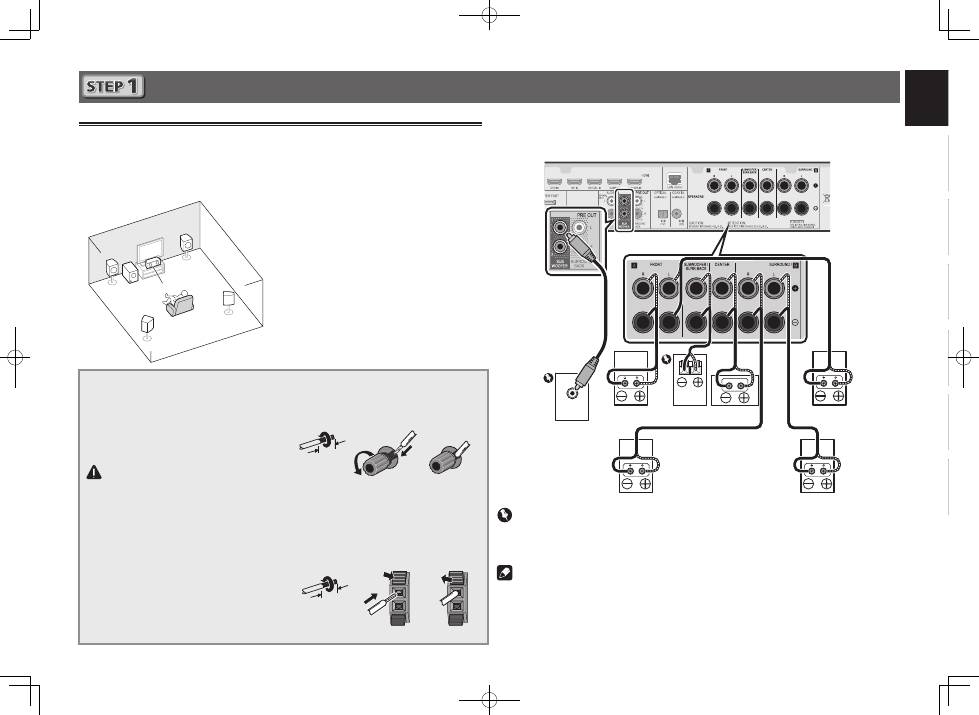
Connecting the speakers
The receiver will work with just two stereo speakers (the front speakers in the diagram) but using
at least three speakers is recommended, and a complete setup is best for surround sound.
To achieve the best possible surround sound, install your speakers as shown below.
5.1 channel surorund system:
After installing the speakers, connect them as shown below.
VSX-S510 connection diagram
LINE LEVEL
INPUT
L
– Front Left
C
– Center
R
– Front Right
SL
– Surround Left
SR
– Surround Right
SW
– Subwoofer
• In addition, surround back speakers or
Speaker B
(VSX-S510 only)
can also be
connected.
• For details, see page 11 of the Operating
Instructions (CD-ROM).
Connecting the speaker cables
Make sure you connect the speaker on
the right to the right (
R
) terminal and the
speaker on the left to the left (
L
) terminal.
Also make sure the positive and negative
(
+/–
) terminals on the receiver match those
on the speakers.
CAUTION
• Before making or changing
connections, switch off the power and
disconnect the power cord from the AC
outlet.
• These speaker terminals carry
HAZARDOUS LIVE
voltage. To prevent
the risk of electric shock when
connecting or disconnecting the
speaker cables, disconnect the power
cord before touching any uninsulated
parts.
1
Twist exposed wire strands together.
2
Loosen terminal and insert exposed wire.
3
Tighten terminal.
1
2
3
10 mm
The wires should be connected as follows to the
VSX-S310’s CENTER or SURROUND terminals.
1
Twist exposed wire strands together.
2
Push open the tabs and insert exposed
wire.
3
Release the tabs.
1
2
3
10 mm
R
SL
L
SW C
SR
Powered
Subwoofer (
SW
)
Front Right (
R
)
Surround Right
(
SR
)
Surround Left
(
SL
)
Front Left (
L
)
Center (
C
)
Important
• Connect passive subwoofers such as Pioneer S-SLW500 to the SPEAKERS SUBWOOFER
terminals.
• Please connect either the passive subwoofers or the powered subwoofers, not both.
Note
• This unit supports speakers with a nominal impedance of 4
W
to 16
W
.
Passive
Subwoofer
