
Pioneer DEH-1600UBB: Frequently used menu operations Radio
Frequently used menu operations Radio: Pioneer DEH-1600UBB
Table of contents
- About this unit If you experience problems
- Head unit Display indication Basic operations Set up menu
- Frequently used menu operations Radio
- CD/CD-R/CD-RW and USB storage devices
- Audio adjustments
- System menu System menu
- Using an AUX source Connections
- Installation DIN front/rear mount
- Troubleshooting Error messages
- Handling guidelines
- Compressed audio compatibility (disc, USB) Russian character chart Sequence of audio files Copyright and trademark
- Specifications
Black plate (4,1)
Section
02
Using this unit
Using this unit
Note
Notes
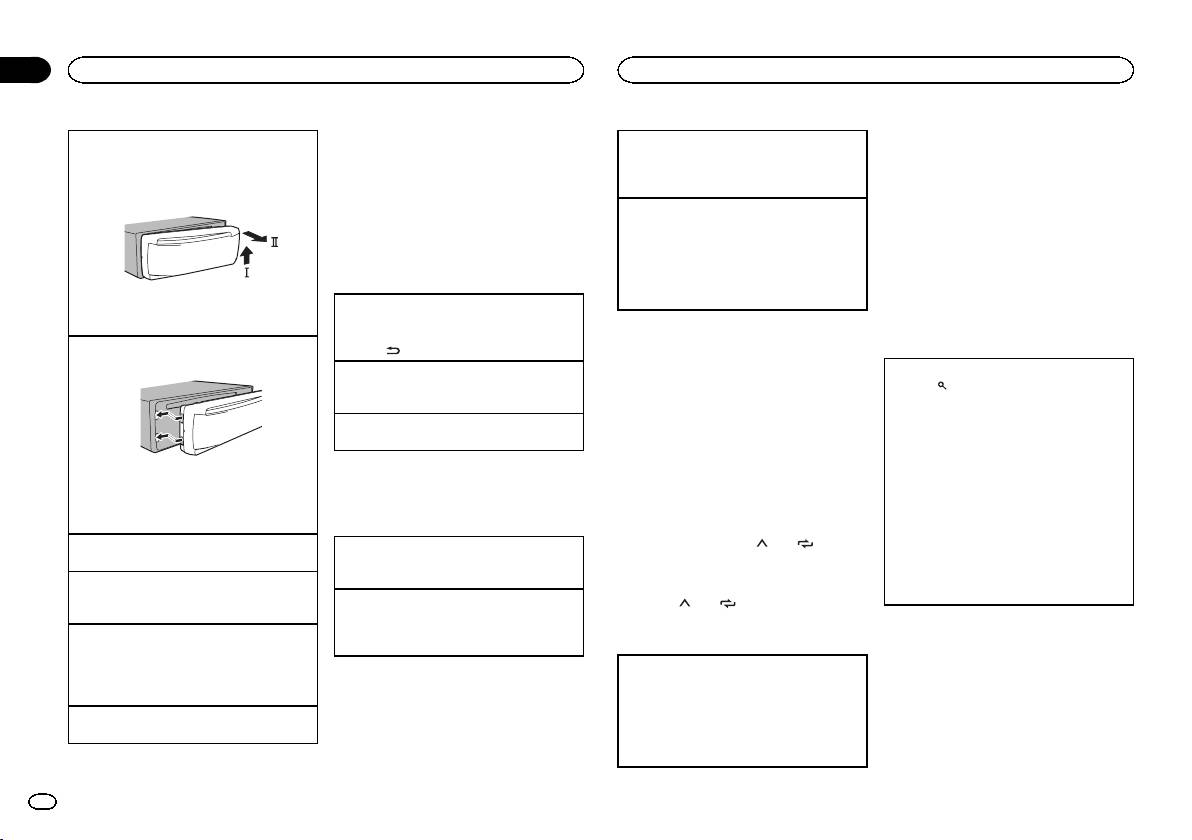
Removing the front panel
Manual tuning (step by step)
When this unit’s blue/white lead is connected to
! If the program service name cannot be ac-
1 Press the detach button to release the front
1 Press c or d.
the vehicle’s auto-antenna relay control termi-
quired in FREQUENCY, the broadcast fre-
panel.
! Select MAN (manual tuning) under SEEK to
nal, the vehicle’s antenna extends when this
quency is displayed instead. If the program
2 Push the front panel upward (M) and then pull
use this function.
unit’s source is turned on. To retract the anten-
service name is detected, the program serv-
it toward (N) you.
na, turn the source off.
Seeking
ice name will be displayed.
1 Press and hold c or d, and then release.
! Depending on the band, text information can
You can cancel seek tuning by briefly pressing
be changed.
Frequently used menu
c or d.
! Text information items that can be changed
operations
While pressing and holding c or d, you can
depend on the area.
skip stations. Seek tuning starts as soon as
you release c or d.
Returning to the previous display
3 Always store the detached front panel in a pro-
Using PTY functions
Returning to the previous list (the folder one level
tective case or bag.
Notes
You can tune in to a station using PTY (program
higher)
! For details about SEEK, refer to SEEK (left/
type) information.
Re-attaching the front panel
1 Press
/DIMMER.
right key setting) on page 5.
1 Slide the front panel to the left.
Returning to the ordinary display
! This unit’s AF (alternative frequencies
Searching for an RDS station by PTY information
Canceling the main menu
search) function can be turned on and off.
1 Press
(list).
1 Press BAND.
AF should be off for normal tuning operation
2 Turn M.C. to select a program type.
(refer to AF (alternative frequencies search)
NEWS/INFO—POPULAR—CLASSICS—
Returning to the ordinary display from the list
on page 5).
OTHERS
1 Press BAND.
3 Press M.C. to begin the search.
Storing and recalling stations
The unit searches for a station broadcasting
that type of program. When a station is found,
2 Press the right side of the front panel until it is
for each band
Radio
its program service name is displayed.
firmly seated.
! To cancel the search, press M.C. again.
Forcing the front panel into place may result in
Using preset tuning buttons
Basic operations
! The program of some stations may differ
damage to the front panel or head unit.
1 To store: Press and hold down one of the
from that indicated by the transmitted PTY.
Turning the unit on
preset tuning buttons (1/
to 6/ ) until
Selecting a band
! If no station is broadcasting the type of
1 Press SRC/OFF to turn the unit on.
the number stops flashing.
1 Press BAND until the desired band (FM1,
program you searched for, NOT FOUND is
FM2, FM3 for FM or MW/LW) is displayed.
displayed for about two seconds and then
Turning the unit off
2 To recall: Press one of the preset tuning
the tuner returns to the original station.
1 Press and hold SRC/OFF until the unit turns
Switching preset stations
buttons (1/
to 6/ ).
off.
1 Press c or d.
! Select PCH (preset channel) under SEEK to
Selecting a source
Switching the display
PTY list
use this function.
1 Press SRC/OFF to cycle between:
For more details about PTY list, visit the follow-
RADIO—CD—USB—AUX
Selecting the desired text information
ing site:
! USB MTP displays while the MTP connection
1 Press DISP to cycle between the following:
http://www.pioneer.eu/eur/products/25/121/tech/
is in use.
! FREQUENCY (program service name or
CarAudio/PTY.html
frequency)
Adjusting the volume
! BRDCST INFO (program service name/PTY
1 Turn M.C. to adjust the volume.
Function settings
information)
! CLOCK (source name and clock)
1 Press M.C. to display the main menu.
4
En
<QRD3204-A>4
