
Pioneer X-CM31-T: Part names and functions 02 Speaker system
Part names and functions 02 Speaker system: Pioneer X-CM31-T
Table of contents
- IMPORTANT VENTILATION CAUTION Operating Environment
- Information for users on collection and disposal of old equipment and used batteries
- Contents
- Chapter 1: Before you start What’s in the box Loading the batteries in the remote control
- Chapter 2: Part names and functions Remote control
- Part names and functions 02 Speaker system
- Front panel
- Top panel
- Chapter 3: Connections Connecting a TV Speaker connection
- Connecting antennas Plugging in
- Chapter 4: Getting started General control Setting the clock
- Sound controls Setting the wake-up timer
- Using Headphones Using the sleep timer
- Chapter 5: iPod/iPhone/iPad playback Confirming what iPod/iPhone/iPad models are supported Connecting your iPod/iPhone/iPad
- Connecting iPod/iPhone to the top panel
- Watching iPod/iPhone videos on your Playing iPad Playing iPod/iPhone
- Chapter 6: Disc playback Playing discs or files
- Advanced CD or MP3/WMA disc playback
- Programmed play (CD or MP3/WMA) About downloading MP3/WMA About folder playback order
- Specify the folder to play Switch the display contents
- Chapter 7: USB playback Playing USB storage devices
- Playing in the desired order (Programmed Play)
- Chapter 8: Using the tuner Listening to the radio broadcasts
- Using the Radio Data System (RDS) Searching for RDS programs An introduction to RDS
- Information provided by RDS Notes for RDS operation Using the Auto Station program Memory (ASPM)
- Chapter 9: Other connections Connecting auxiliary components
- Chapter 10: Additional information Troubleshooting General problem Problem Check Remedy
- When a USB storage device is connected Problem Check Remedy When an iPod/iPhone/iPad is connected Problem Remedy
- Playable discs and formats Cautions on use
- Handling discs
- About iPod/iPhone/iPad
- Specifications
Part names and functions 02
7
En
English Français Español
11
Tuner
control buttons
ST/MONO
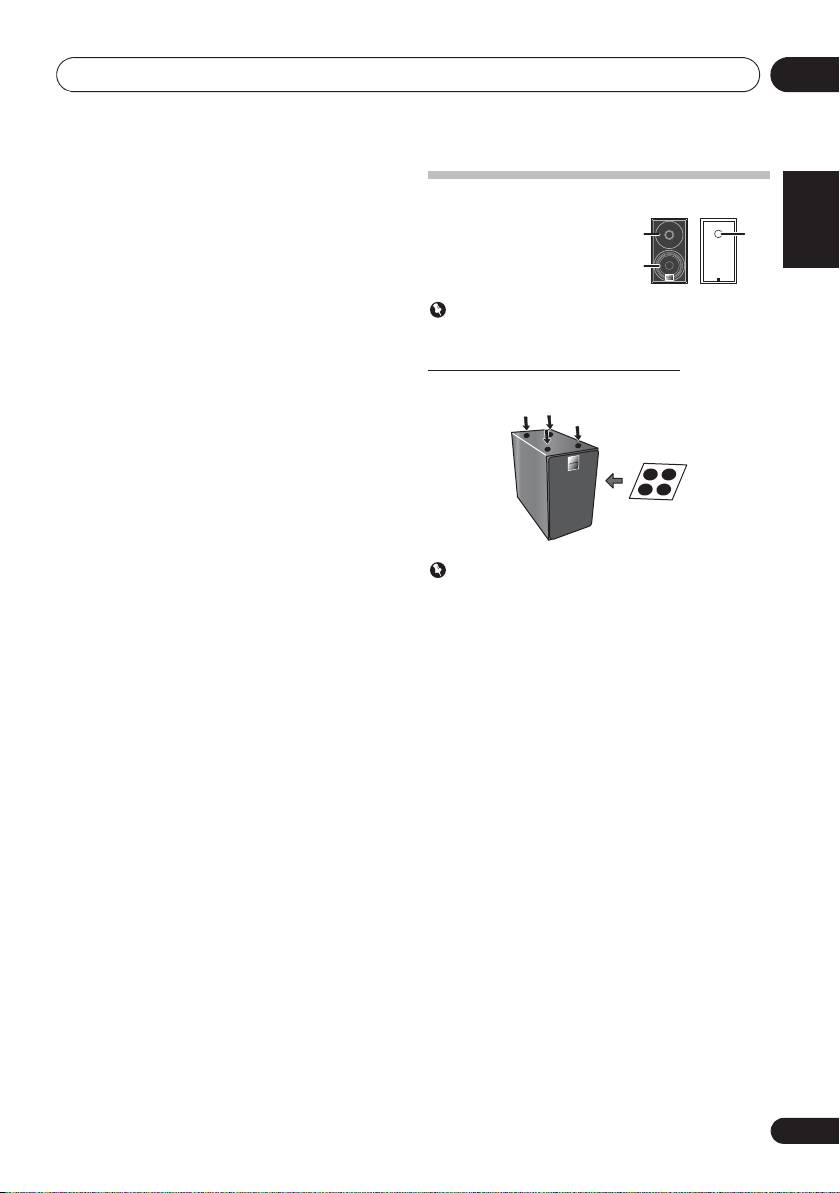
Speaker system
Use to switch the sound mode between stereo and
monaural. (page 24)
RDS ASPM
Use to search for RDS Auto station program memory
(page 25).
RDS PTY
Important
Use to search for RDS program types (page 25).
Speaker grille cannot be removed.
RDS DISPLAY
Attaching the Non-skid pads
Press to change the RDS display for information mode
(page 25).
Apply the accessory non-skid pads to the bottom surfaces of
the speakers.
12 OPEN/CLOSE
Use to open or close the disc tray (page 18).
13 Sound control buttons
Adjust the sound quality (page 13).
14 RANDOM
Press to randomize order play setting from a CD, iPod or USB
(page 19).
15
REPEAT
Press to change the repeat play setting from a CD, iPod or
Important
USB (page 19).
Use the speaker is usually in an upright position.
16 Volume control buttons
Use to set the listening volume (page 12).
17
DIMMER
Dims or brightens the display. The brightness can be
controlled in four steps (page 12).
1
3
2
1 Tweeter
2Woofer
3 Bass Reflex Duct
;&0B6<;(B(QERRN࣮࣌ࢪ㸰㸮㸯㸱ᖺ㸲᭶㸶᪥ࠉ᭶᭙᪥ࠉ༗๓㸯㸯㸲㸷ศ
