
Pioneer X-CM31-T: Chapter 3: Connections Connecting a TV Speaker connection
Chapter 3: Connections Connecting a TV Speaker connection: Pioneer X-CM31-T
Table of contents
- IMPORTANT VENTILATION CAUTION Operating Environment
- Information for users on collection and disposal of old equipment and used batteries
- Contents
- Chapter 1: Before you start What’s in the box Loading the batteries in the remote control
- Chapter 2: Part names and functions Remote control
- Part names and functions 02 Speaker system
- Front panel
- Top panel
- Chapter 3: Connections Connecting a TV Speaker connection
- Connecting antennas Plugging in
- Chapter 4: Getting started General control Setting the clock
- Sound controls Setting the wake-up timer
- Using Headphones Using the sleep timer
- Chapter 5: iPod/iPhone/iPad playback Confirming what iPod/iPhone/iPad models are supported Connecting your iPod/iPhone/iPad
- Connecting iPod/iPhone to the top panel
- Watching iPod/iPhone videos on your Playing iPad Playing iPod/iPhone
- Chapter 6: Disc playback Playing discs or files
- Advanced CD or MP3/WMA disc playback
- Programmed play (CD or MP3/WMA) About downloading MP3/WMA About folder playback order
- Specify the folder to play Switch the display contents
- Chapter 7: USB playback Playing USB storage devices
- Playing in the desired order (Programmed Play)
- Chapter 8: Using the tuner Listening to the radio broadcasts
- Using the Radio Data System (RDS) Searching for RDS programs An introduction to RDS
- Information provided by RDS Notes for RDS operation Using the Auto Station program Memory (ASPM)
- Chapter 9: Other connections Connecting auxiliary components
- Chapter 10: Additional information Troubleshooting General problem Problem Check Remedy
- When a USB storage device is connected Problem Check Remedy When an iPod/iPhone/iPad is connected Problem Remedy
- Playable discs and formats Cautions on use
- Handling discs
- About iPod/iPhone/iPad
- Specifications
;&0B6<;(B(QERRN࣮࣌ࢪ㸰㸮㸯㸱ᖺ㸲᭶㸶᪥ࠉ᭶᭙᪥ࠉ༗๓㸯㸯㸲㸷ศ
Connections03
Chapter 3:
Connections
CAUTION
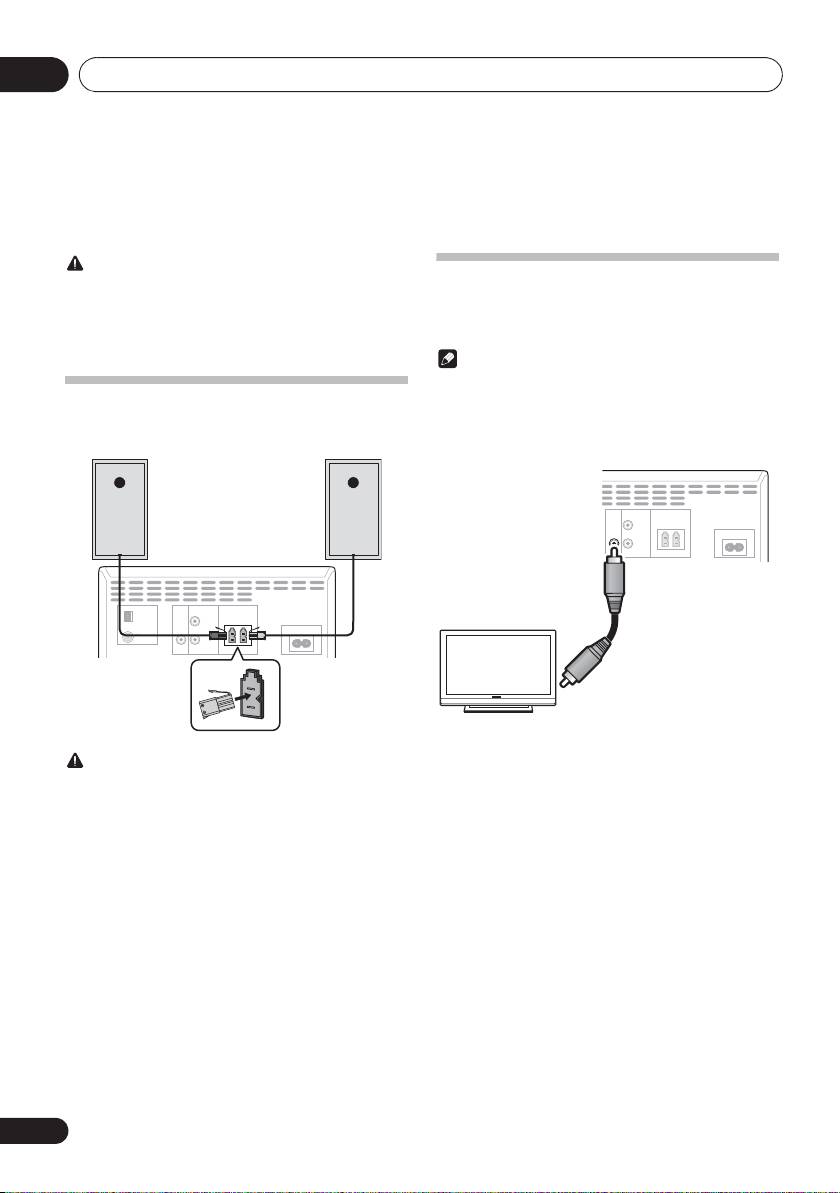
Connecting a TV
• Be sure to turn off the power and unplug the power cord
from the power outlet whenever making or changing
• When an iPod/iPhone is connected to this unit, the TV
connections.
output setting of iPod/iPhone is automatically set to
• Connect the power cord after all the connections
‘ON’.
between devices have been completed.
Note
• Some iPod allow the TV output setting to be changed
while connected.
Speaker connection
• When the iPod/iPhone is disconnected from this unit,
To connect the speaker cord to the connector, insert into the
the iPod/iPhone’s TV output setting returns to its original
speaker connector of the rear of the receiver.
state.
This unit’s rear panel
Right
Left
VIDEO LINE
SPEAKERS
speaker
speaker
OUT IN
R
AC IN
L
This unit’s rear panel
RL
Video cable
(commercially available)
Yellow
ANTENNA VIDEO LINE
SPEAKERS
AM
OUT IN
LOOP
R
TV
AC IN
FM
UNBAL 75 Ω
L
RL
To video input
terminal
CAUTION
• These speaker terminals carry HAZARDOUS LIVE
voltage. To prevent the risk of electric shock when
connecting or disconnecting the speaker cables,
disconnect the power cord before touching any
uninsulated parts.
• Do not connect any speakers other than those supplied
to this system.
• Do not connect the supplied speakers to any amplifier
other than the one supplied with this system.
Connection to any other amplifier may result in
malfunction or fire.
• Do not attach these speakers to the wall or ceiling. They
may fall off and cause injury.
• These speakers are magnetically shielded. However,
depending on the installation location, color distortion
may occur if the speaker system is installed extremely
close to the screen of a television set. If this happens,
turn off the television set, and then turn it on after 15 to
30 minutes. If the problem persists, move the speaker
system away from the television set.
10
En
