
Pioneer X-CM31-R: Handling discs
Handling discs: Pioneer X-CM31-R
Table of contents
- IMPORTANT VENTILATION CAUTION Operating Environment
- Information for users on collection and disposal of old equipment and used batteries POWER-CORD CAUTION
- Contents
- Chapter 1: Before you start What’s in the box Loading the batteries in the remote control
- Chapter 2: Part names and functions Remote control
- Part names and functions 02 Speaker system
- Front panel
- Top panel
- Chapter 3: Connections Connecting a TV Speaker connection
- Connecting antennas Plugging in
- Chapter 4: Getting started To turn the power on General control Setting the clock
- Sound controls Setting the wake-up timer
- Using Headphones
- Chapter 5: iPod/iPhone/iPad playback Confirming what iPod/iPhone/iPad models are supported Connecting your iPod/iPhone/iPad
- Connecting iPod/iPhone to the top panel Connecting iPod/iPhone/iPad using supplied stand
- Watching iPod/iPhone videos on your Playing iPad Playing iPod/iPhone
- Chapter 6: Disc playback Playing discs or files
- Advanced CD or MP3/WMA disc playback
- Programmed play (CD or MP3/WMA) About downloading MP3/WMA
- Specify the folder to play Switch the display contents
- Chapter 7: USB playback Playing USB storage devices
- Specify the folder to play Playing in the desired order (Programmed Play)
- Chapter 8: Using the tuner Listening to the radio broadcasts Saving station presets Tuning
- To recall a memorised station Using the Radio Data System (RDS) Searching for RDS programs An introduction to RDS
- Information provided by RDS Notes for RDS operation Using the Auto Station program Memory (ASPM)
- Chapter 9: Other connections Connecting auxiliary components
- Chapter 10: Additional information Troubleshooting General problem Problem Check Remedy
- When a USB storage device is connected Problem Check Remedy When an iPod/iPhone/iPad is connected Problem Remedy
- Playable discs and formats Cautions on use
- Handling discs
- About iPod/iPhone/iPad
- Specifications
Additional information 10
31
En
English Français Español
;&0B6<;(B(QERRN࣮࣌ࢪ㸰㸮㸯㸱ᖺ㸲᭶㸶᪥ࠉ᭶᭙᪥ࠉ༗๓㸯㸯㸲㸷ศ
Do not place objects on this unit
Handling discs
Do not place any objects on top of this unit.
Do not obstruct the ventilation holes.
Storing
Do not use this unit on shaggy rugs, beds, sofas, etc., or
wrapped in cloth, etc. Doing so will prevent the heat from
• Always place discs in their cases and store them
dispersing, leading to damage.
vertically, avoiding hot, humid places, places exposed to
Do not expose to heat.
direct sunlight and extremely cold places.
• Be sure to read the cautions included with the disc.
Do not place this unit on top of an amplifier or other
component that generates heat. When rack mounting it, to
avoid the heat given off by the amplifier or other audio
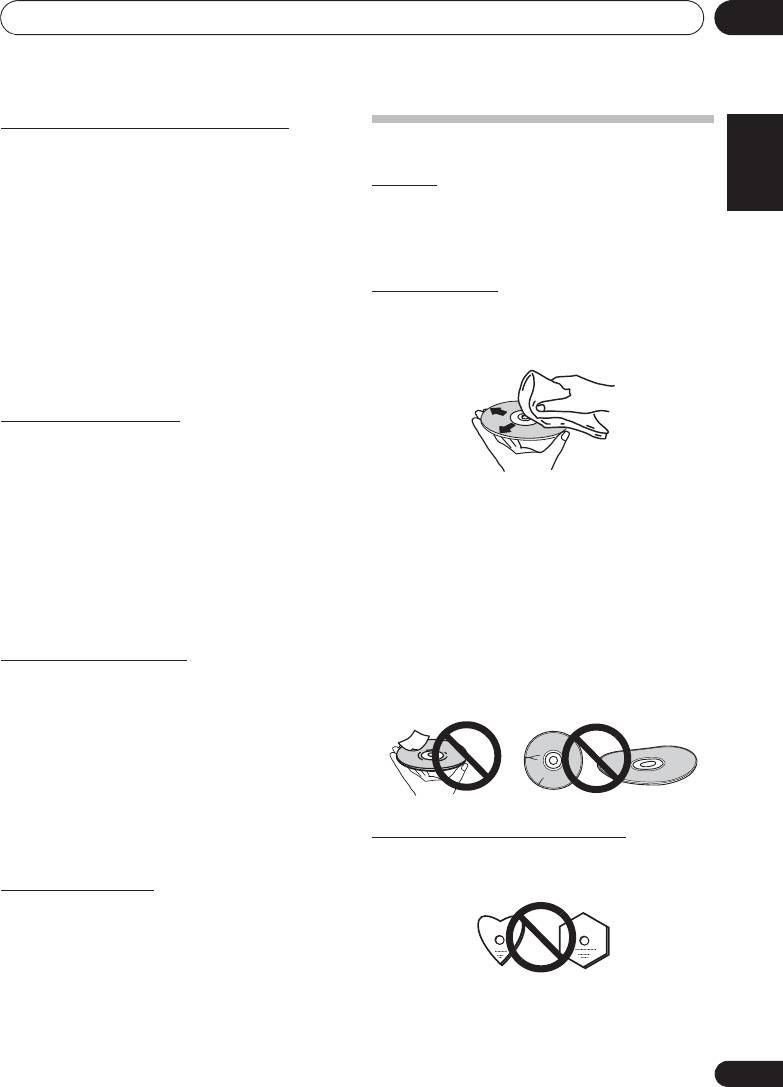
Cleaning discs
component, place it on a shelf below the amplifier.
• Discs may not play if there are fingerprints or dust on
• Turn off the unit’s power when not using it.
them. In this case, use a cleaning cloth, etc., to gently
• Depending on signal conditions, striped patterns may
wipe the disc from the inside towards the outside. Do not
appear on a TV screen and noise may enter the sound of
use dirty cleaning cloths.
radio broadcasts when the unit’s power is on. If this
happens, turn the unit’s power off.
About condensation
If this unit is moved suddenly from a cold place into a warm
room (in winter, for example) or if the temperature in the room
in which this unit is installed rises suddenly due to heater
operation, etc., water droplets (condensation) may form
inside (on operating parts and the lens). When condensation
• Do not use benzene, thinner or other volatile chemicals.
is present, this unit will not operate properly and playback is
Also do not use record spray or antistatic agents.
not possible. Let this unit stand at room temperature for 1 or
• For tough dirt, apply some water to a soft cloth, wring out
2 hours with the power turned on (the time depends on the
thoroughly, wipe off the dirt, then wipe off the moisture
extent of condensation). The water droplets will dissipate and
with a dry cloth.
playback will become possible. Condensation can also occur
• Do not use damaged (cracked or warped) discs.
in the summer if this unit is directly exposed to the air flow
• Do not let the signal surface of discs get scratched or
from an air-conditioner. If this happens, move this unit to a
dirty.
different place.
• Do not attach pieces of paper or stickers to discs. Doing
so could warp discs, making it impossible to play them.
Cleaning the product
Also note that rental discs often have labels attached to
• Unplug the power cord from the power outlet when
them, and the label’s glue may have oozed out. Check
cleaning this unit.
that there is no glue around the edges of such labels
before using rented discs.
• Clean this unit using a soft cloth. For tough dirt, apply
some neutral detergent diluted in 5 to 6 parts water to a
soft cloth, wring out thoroughly, wipe off the dirt, then
wipe again with a soft, dry cloth.
• Alcohol, thinner, benzene, insecticides, etc., could cause
the print or paint to peel off. Also, leaving rubber or vinyl
products in contact with this unit for long periods of time
could mar the cabinet.
About specially shaped discs
• When using chemical-impregnated wipes, etc., read the
cautions included with the wipes carefully.
Specially shaped discs (heart-shaped, hexagonal, etc.)
cannot be played on this unit. Do not attempt to play such
Cleaning the lens
discs, as they could damage this unit.
• This unit’s lens should not become dirty in normal use,
but if for some reason it should malfunction due to dust
or dirt, consult your nearest Pioneer authorized service
center. Although lens cleaners for players are
commercially available, we advise against using them
since some may damage the lens.
