
Pioneer X-CM31-R: Chapter 1: Before you start What’s in the box Loading the batteries in the remote control
Chapter 1: Before you start What’s in the box Loading the batteries in the remote control: Pioneer X-CM31-R
Table of contents
- IMPORTANT VENTILATION CAUTION Operating Environment
- Information for users on collection and disposal of old equipment and used batteries POWER-CORD CAUTION
- Contents
- Chapter 1: Before you start What’s in the box Loading the batteries in the remote control
- Chapter 2: Part names and functions Remote control
- Part names and functions 02 Speaker system
- Front panel
- Top panel
- Chapter 3: Connections Connecting a TV Speaker connection
- Connecting antennas Plugging in
- Chapter 4: Getting started To turn the power on General control Setting the clock
- Sound controls Setting the wake-up timer
- Using Headphones
- Chapter 5: iPod/iPhone/iPad playback Confirming what iPod/iPhone/iPad models are supported Connecting your iPod/iPhone/iPad
- Connecting iPod/iPhone to the top panel Connecting iPod/iPhone/iPad using supplied stand
- Watching iPod/iPhone videos on your Playing iPad Playing iPod/iPhone
- Chapter 6: Disc playback Playing discs or files
- Advanced CD or MP3/WMA disc playback
- Programmed play (CD or MP3/WMA) About downloading MP3/WMA
- Specify the folder to play Switch the display contents
- Chapter 7: USB playback Playing USB storage devices
- Specify the folder to play Playing in the desired order (Programmed Play)
- Chapter 8: Using the tuner Listening to the radio broadcasts Saving station presets Tuning
- To recall a memorised station Using the Radio Data System (RDS) Searching for RDS programs An introduction to RDS
- Information provided by RDS Notes for RDS operation Using the Auto Station program Memory (ASPM)
- Chapter 9: Other connections Connecting auxiliary components
- Chapter 10: Additional information Troubleshooting General problem Problem Check Remedy
- When a USB storage device is connected Problem Check Remedy When an iPod/iPhone/iPad is connected Problem Remedy
- Playable discs and formats Cautions on use
- Handling discs
- About iPod/iPhone/iPad
- Specifications
Before you start 01
5
En
English Français Español
Chapter 1:
Before you start
• Batteries may have different voltages, even if they are the
same size and shape. Do not use different types of
What’s in the box
batteries together.
Please confirm that the following accessories are in the box
• To prevent leakage of battery fluid, remove the batteries
when you open it.
if you do not plan to use the remote control for a long
• Remote Control
period of time (1 month or more). If the fluid should leak,
•Power cord
wipe it carefully off the inside of the case, then insert
• AM antenna cable
new batteries. If a battery should leak and the fluid
should get on your skin, flush it off with large quantities
• FM wire antenna
of water.
• AAA batteries (R03) x 2
• When disposing of used batteries, please comply with
• Non-skid pads x 8
governmental regulations or environmental public
•iPad stand
institution’s rules that apply in your country/area.
• Warranty card
• WARNING
• Operating instructions (this document)
Do not use or store batteries in direct sunlight or other
excessively hot place, such as inside a car or near a
heater. This can cause batteries to leak, overheat,
explode or catch fire. It can also reduce the life or
Loading the batteries in the
performance of batteries.
remote control
Using the remote control
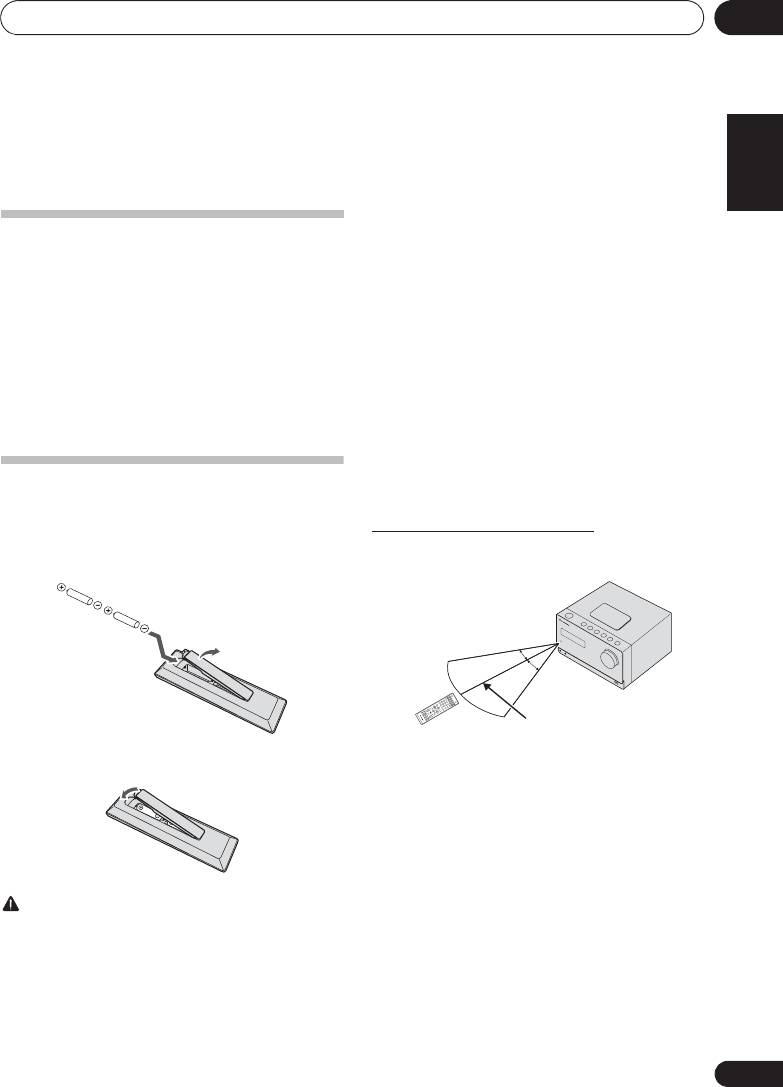
1 Open the rear lid and load the batteries as
The remote has a range of about 7 m at an angle of about 30º
illustrated below.
from the remote sensor.
Keep in mind the following when using the remote control:
2 Close the rear lid.
• Make sure that there are no obstacles between the
remote and the remote sensor on the unit.
• Remote operation may become unreliable if strong
sunlight or fluorescent light is shining on the unit’s
remote sensor.
• Remote controllers for different devices can interfere
with each other. Avoid using remotes for other
equipment located close to this unit.
• Replace the batteries when you notice a fall off in the
CAUTION
operating range of the remote.
• Do not use any batteries other than the ones specified.
Also, do not use a new battery together with an old one.
• When loading the batteries into the remote control, set
them in the proper direction, as indicated by the polarity
marks ( and ).
• Do not heat batteries, disassemble them, or throw them
into flames or water.
AUDIO IN/LIN
STANDBY/ON
123
TV O
E
iPod CD
DISPLAYFO
C
LE
789
4
M
AR RE
5
UT
CLOCK/TI
USB TUNE
ENU
6
EQULIZER
MER
SLEEP
OPEN/
R
CL
O
SE
ST/MONO ASPM
–
+
PRESET VOL
TUN
E
–
ENTER
TUNE+
0
NDOM
A
R
PEAT
BAS
T
RE
S/
B
LE
SS
P.B
A
RDS
PT
IM
M
E
R
D
U
M
T
YDISPLAY
E
/PROGR
MEMORY
D
L
E
R
–
+
U
ME
AM
;&0B6<;(B(QERRN࣮࣌ࢪ㸰㸮㸯㸱ᖺ㸲᭶㸶᪥ࠉ᭶᭙᪥ࠉ༗๓㸯㸯㸲㸷ศ
30°
30°
7 m
