
Pioneer SC-LX88-S: Basic playback Multichannel playback Listening to the radio Saving station presets Listening to station presets
Basic playback Multichannel playback Listening to the radio Saving station presets Listening to station presets: Pioneer SC-LX88-S
Table of contents
- Quick Start Guide
- English Connection and initial setup
- Using Built-in AVNavigator Connecting to the network through Connecting to a wireless LAN LAN interface Turning the power on Plugging in the receiver
- Launching the built-in AVNavigator Using iPad/iPhone/iPod touch Operating environment Using Mac Using Windows PC
- About using Wiring Navi Using Android device
- Connecting up Connecting the speakers
- Connecting a TV and playback components Connecting antennas Plugging in the receiver
- Initial Setup Before you start Automatically setting up for surround sound (MCACC)
- Basic playback Multichannel playback Listening to the radio Saving station presets Listening to station presets
- Playing an iPod Listening to Internet radio stations
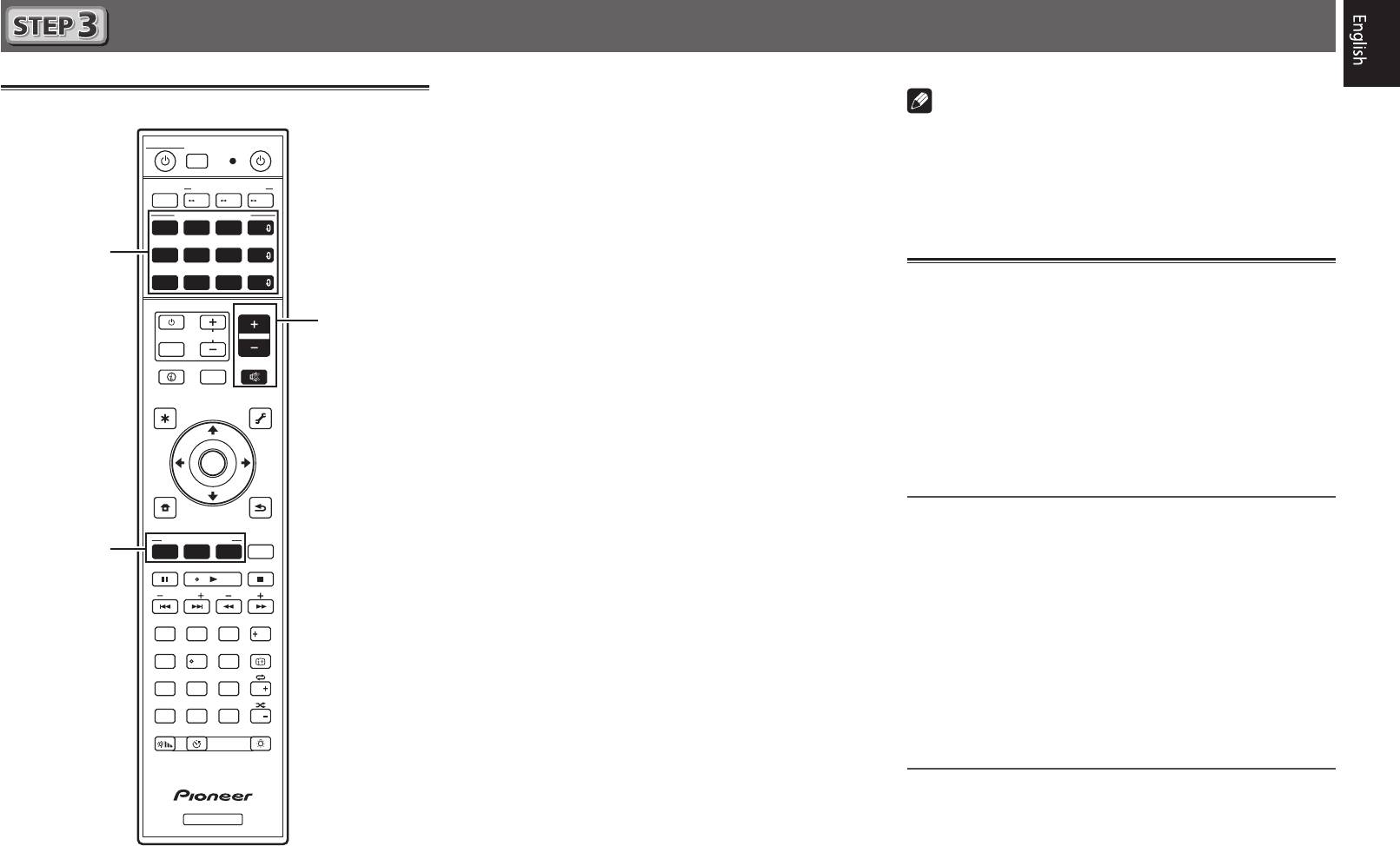
Basic playback
Multichannel playback
STANDBY/ON
SOURCE
ALL ZONE STBY
RECEIVER
SUB ZONE CONTROL
MAIN
Z2 Z3 HDZ
SOURCE CONTROL
DVDBD
SAT
HDMI
USBADPTROKU
iPod
BT
MHL
NET
TUNER
TV
CD
ALL
VOLUME
TV
VOL
INPUT
STATUS
MUTE
OUT P.
AUDIO P. VIDEO P.
TOP
TOOLS
MENU
MENU
ENTER
HOME
MENU
RETURN
LISTENING MODE
SURRAUTO
ADV
CH LV.
MPX
BAND PTY
PRESET TUNE
AUDIO
13
2
Fav
DISP
546
79
8
CH
D.ACCESS
CLASS
CLR
0
ENTER
CH
DIMMER SLEEP
LIGHT
RCU SETUP
RECEIVER
9
2
5
3
1
Switch on the playback component.
Note
E.g.) Turn the Blu-ray Disc player connected to the
HDMI
• When the remote control cannot be used to operate the unit
BD IN
terminal on.
–When operating the receiver, press
MAIN
RECEIVER
2
Switch the input of the receiver.
before using it.
E.g.) Press
BD
to select the
BD
input.
–When operating functions such as the network, TUNER, or
iPod, press the appropriate function button (
NET
,
TUNER
,
3
Press AUTO to select ’AUTO SURROUND’.
iPod
, etc.) before using.
Also press
SURR
or
ADV
for multichannel playback. Select
your preferred listening mode.
Listening to the radio
4
Start the playback component’s playback.
1
Press TUNER to select the tuner.
E.g.) Start playback of the Blu-ray Disc player.
If necessary, press
BAND
to change the band (FM or AM).
5
Use VOLUME +/– to adjust the volume level.
2
Press TUNE +/– to tune to a station.
• When a sound can not be heard from center and rear
• Press and hold
TUNE +/–
for about a second. The receiver
speakers, press
SURR
or
ADV
to change listening modes.
will start searching for the next station.
E.g.) Press the
ADV
button for several times to select
EXT.STEREO
• If you’re listening to an FM station but the reception is
.
weak, press
MPX
to select FM MONO and set the receiver
•
When there is no sound from the subwoofer
to the mono reception mode.
Cause – The front speaker is set to LARGE.
When a 2-channel audio source is input, the low-frequency
Saving station presets
component is not output from the subwoofer but is output
If you often listen to a particular radio station, it’s convenient to
from the front speaker.
have the receiver store the frequency for easy recall whenever
Solution – To output from the subwoofer, change the
you want to listen to that station.
speaker setting.
1
Press TOOLS while receiving a signal from the
Method 1: Change the front speaker setting to
SMALL
.
station you want to store.
The low-frequency component is not output from the front
speaker but is output from the subwoofer. When the low-
The preset number is blinking.
frequency playback capability of the front speaker is high,
2
Press PRESET +/– to select the station preset
we recommend the setting not be changed.
you want, then press ENTER.
Method 2: Change the subwoofer setting to
PLUS
.
The preset number stop blinking and the receiver stores
The low-frequency component is output from the front
the station.
speaker and subwoofer. For that reason, low sounds
are sometimes output too much. In such a case, we
Listening to station presets
recommend not to change or to change to Method 1.
You will need to have some presets stored to do this.
• For details, see “Speaker Setting” of the operating
instructions.
Press PRESET +/– to select the station preset
• When no sound is emitted, increase the volume to
you want.
approximately –30 dB.
