
Pioneer SC-LX57-S: Connecting a TV and playback Connecting antennas components Connecting to the network through LAN interface
Connecting a TV and playback Connecting antennas components Connecting to the network through LAN interface: Pioneer SC-LX57-S
Table of contents
- Quick Start Guide What’s in the box
- English Connection and initial setup
- Connecting up Connecting the speakers
- Connecting a TV and playback Connecting antennas components Connecting to the network through LAN interface
- Before you start Automatically setting up for surround sound (MCACC)
- Multichannel playback Listening to the radio
- Playing an iPod Listening to Internet radio stations
Connecting up (continued)
Note
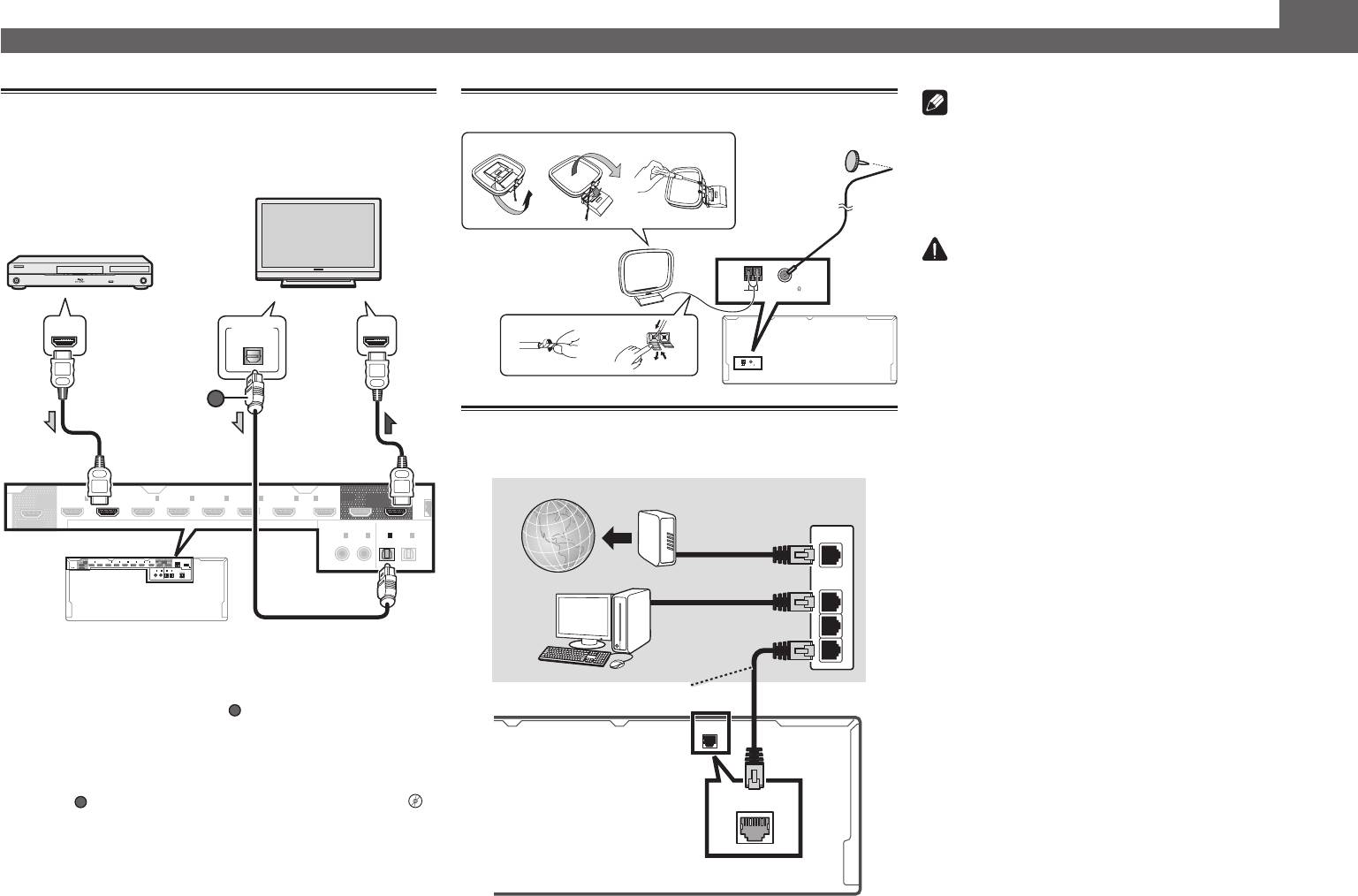
Connecting a TV and playback
Connecting antennas
components
• Refer to the operating instructions in the included CD-
ab c
ROM if you wish to connect a TV or playback component
in a method other than an HDMI connection.
• Refer to the operating instructions in the included CD-
ROM for other device connections.
3
5
CAUTION
AM LOOP FM UNBAL 75
• Handle the power cord by the plug part. Do not pull out
ANTENNA
4
the plug by tugging the cord, and never touch the power
1
2
cord when your hands are wet, as this could cause a short
circuit or electric shock. Do not place the unit, a piece of
AM LOOP FM UNBAL 75
ANTENNA
furniture, or other object on the power cord or pinch the
cord in any other way. Never make a knot in the cord or tie
it with other cables. The power cords should be routed so
that they are not likely to be stepped on. A damaged power
Connecting to the network through
cord can cause a fire or give you an electric shock. Check
LAN interface
the power cord once in a while. If you find it damaged,
ask your nearest Pioneer authorized independent service
company for a replacement.
WAN
LAN
1
2
3
LAN
(
10/100
)
LAN
(
10/100
)
4
VENTILATION CAUTION
1
ASSIGNABLE
HDMI
8
-
SELECTABLE
(HD ZONE)
OUT 3
IN
DVD
(
)
1
BD IN
SAT/CBL
(
2
IN
)
DVR/BDR
(
IN
3
)
VIDEO
(
IN
4
)
IN
6
IN
7
IN
8
OUT 2OUT 1
LAN
(
10/100
)
DC OUTPUT
COAXIALOPTICAL
(CONTROL)
for
WIRELESS LAN
(
IN
DVD
)
1
ASSIGNABLE
(
SAT/CBL
IN
2
)
IN
(
TV
)
1
(
DVR/BDR
IN
2
ASSIGNABLE
)
OUT
0.6 A MAX
OUTPUT 5 V
(
)
When installing this unit, make sure to leave space
around the unit for ventilation to improve heat radiation
(at least 20 cm at top, 10 cm at rear, and 20 cm at each
side).
WARNING
Slots and openings in the cabinet are provided for
• If the TV does not support the HDMI Audio Return Channel
function, optical digital cable (
A
ventilation to ensure reliable operation of the product,
) connection is required to
and to protect it from overheating. To prevent fire
listen to the TV sound over the receiver.
hazard, the openings should never be blocked or
• If the TV supports the HDMI Audio Return Channel function,
covered with items (such as newspapers, table-cloths,
the sound of the TV is input to the receiver via the HDMI
curtains) or by operating the equipment on thick carpet
terminal, so there is no need to connect an optical digital
or a bed.
cable (
A
). In this case, set
ARC
at
HDMI Setup
to
ON
l
D3-4-2-1-7b*_A1_En
“
HDMI Setup
”
• Please refer to the TV’s operation manual for directions on
connections and setup for the TV.
(HD ZONE)
OUT 3
IN
(
DVD
1
)
BD IN
IN
(
SAT/CBL
2
)
(
IN
DVR/BDR
3
)
IN
(
VIDEO
4
)
IN
6
IN
7
IN
8
OUT 2 OUT 1
LAN
(CONTROL)
SELECTABLE
COAXIAL OPTICAL
ASSIGNABLE
ASSIGNABLE
IN
(
1
2
DVD
)
(
SAT/CBL
IN
)
IN
(
1
2
TV
)
(
DVR/BDR
IN
)
HDMI/DVI-compatible TV
FM wire
antenna
HDMI/DVI-compatible
Blu-ray DIsc player
AM loop antenna
DIGITAL OUT
HDMI INHDMI OUT
OPTICAL
A
Internet
Modem
Router
Computer
LAN cable (sold separately)
