
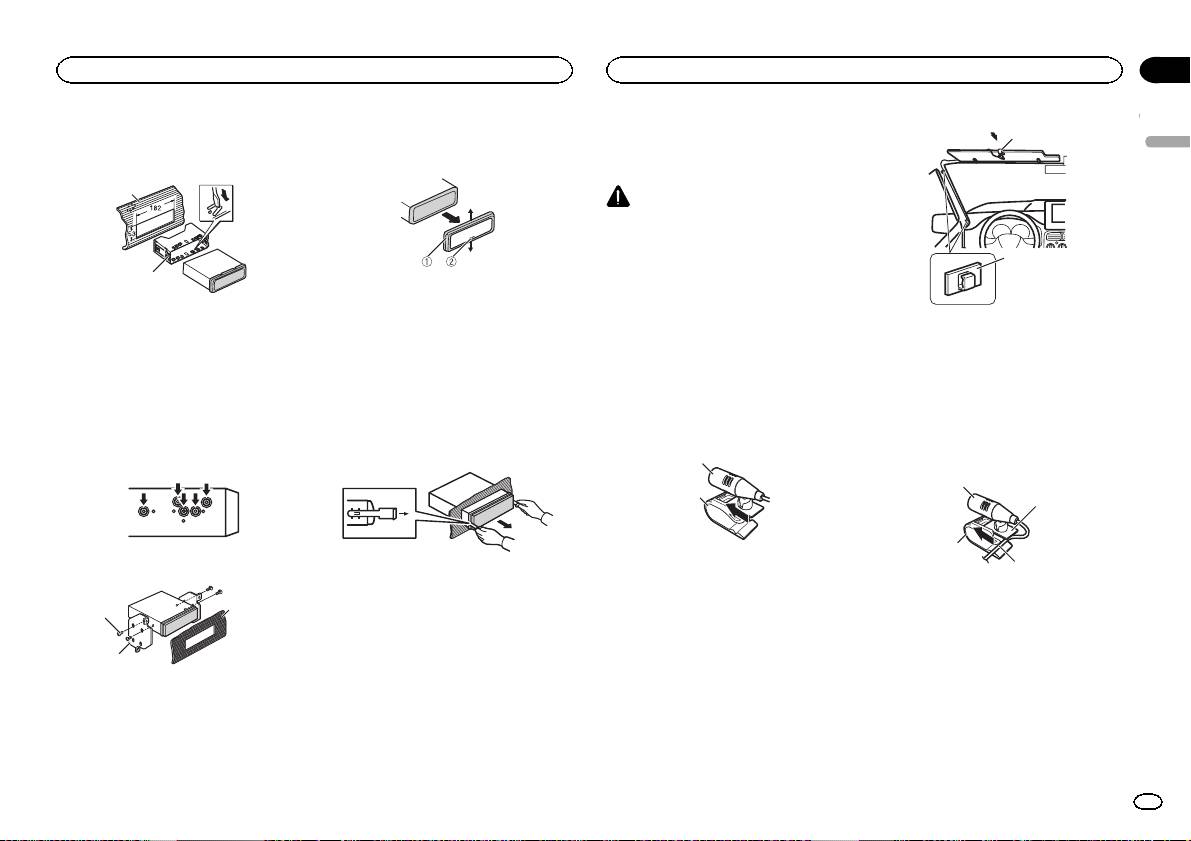
Pioneer MVH-350BT: Installing the microphone When installing the microphone on the sun visor When installing the microphone DIN Rear-mount on the steering column
Installing the microphone When installing the microphone on the sun visor When installing the microphone DIN Rear-mount on the steering column: Pioneer MVH-350BT
Table of contents
- About this unit About this manual In case of trouble
- Head unit Display indication Set up menu
- Tuner Basic operations Frequently used menu operations
- Switching the display Function settings PTY list Using PTY functions
- USB storage device Switching the display Operations using special buttons iPod Basic operations Basic operations Selecting and playing files/ tracks from the name list Switching the display Function settings
- Operations using special buttons Browsing for a song Operating this unit’s iPod function from your iPod Function settings Playing songs related to the currently playing song
- Connection menu operation Using Bluetooth wireless technology Using Bluetooth telephone
- Phone menu operation
- Function and operation Function settings Switching the display Bluetooth Audio Setting up for Bluetooth audio Operations using special buttons Audio adjustments
- System menu
- Switching the dimmer setting
- Connections Using an AUX source If an unwanted display appears System menu
- Power cord Installation DIN front/rear mount DIN Front-mount
- Installing the microphone When installing the microphone on the sun visor When installing the microphone DIN Rear-mount on the steering column
- Troubleshooting Error messages Adjusting the microphone angle
- Message Cause Action USB storage device/iPod Bluetooth device
- Handling guidelines Compressed audio compatibility (USB) iPod compatibility
- Bluetooth profiles Russian character chart
- Specifications
2 Secure the mounting sleeve by using a
Removing the unit
Installing the microphone
1
screwdriver to bend the metal tabs (90°) into
1 Remove the trim ring.
Only for MVH-350BT
place.
1
CAUTION
It is extremely dangerous to allow the micro-
phone lead to become wound around the steer-
ing column or shift lever. Be sure to install the
2
unit in such a way that it will not obstruct driv-
2
ing.
1 Trim ring
2 Notched tab
Note
1 Dashboard
! Releasing the front panel allows easier ac-
Install the microphone in a position and orienta-
2 Mounting sleeve
1 Microphone clip
cess to the trim ring.
tion that will enable it to pick up the voice of the
# Make sure that the unit is installed securely in
2 Clamp
! When reattaching the trim ring, point the
person operating the system.
place. An unstable installation may cause skipping
Use separately sold clamps to secure the
side with the notched tab down.
or other malfunctions.
lead where necessary inside the vehicle.
When installing the microphone
2 Insert the supplied extraction keys into
on the sun visor
When installing the microphone
DIN Rear-mount
both sides of the unit until they click into
place.
1 Install the microphone on the micro-
on the steering column
1 Determine the appropriate position
phone clip.
1 Install the microphone on the micro-
where the holes on the bracket and the side
3 Pull the unit out of the dashboard.
phone clip.
of the unit match.
1
2
2
2 Tighten two screws on each side.
1 Microphone
2 Microphone clip
Removing and re-attaching the front
panel
3
2 Install the microphone clip on the sun
1
You can remove the front panel to protect your
visor.
unit from theft.
With the sun visor up, install the microphone
Press the detach button and push the front
clip. (Lowering the sun visor reduces the voice
2
panel upward and pull it toward you.
recognition rate.)
For details, refer to Removing the front panel to
1 Tapping screw (5 mm × 8 mm)
protect your unit from theft and Re-attaching the
2 Mounting bracket
front panel on page 4.
3 Dashboard or console
4
Section
Installation
Installation
03
English
1
3
1 Microphone
2 Microphone base
3 Microphone clip
4 Fit the microphone lead into the groove.
# Microphone can be installed without using mi-
crophone clip. In this case, detach the microphone
base from the microphone clip. To detach the micro-
phone base from the microphone clip, slide the mi-
crophone base.
En
15
