
Pioneer MVH-350BT: Head unit Display indication Set up menu
Head unit Display indication Set up menu: Pioneer MVH-350BT
Table of contents
- About this unit About this manual In case of trouble
- Head unit Display indication Set up menu
- Tuner Basic operations Frequently used menu operations
- Switching the display Function settings PTY list Using PTY functions
- USB storage device Switching the display Operations using special buttons iPod Basic operations Basic operations Selecting and playing files/ tracks from the name list Switching the display Function settings
- Operations using special buttons Browsing for a song Operating this unit’s iPod function from your iPod Function settings Playing songs related to the currently playing song
- Connection menu operation Using Bluetooth wireless technology Using Bluetooth telephone
- Phone menu operation
- Function and operation Function settings Switching the display Bluetooth Audio Setting up for Bluetooth audio Operations using special buttons Audio adjustments
- System menu
- Switching the dimmer setting
- Connections Using an AUX source If an unwanted display appears System menu
- Power cord Installation DIN front/rear mount DIN Front-mount
- Installing the microphone When installing the microphone on the sun visor When installing the microphone DIN Rear-mount on the steering column
- Troubleshooting Error messages Adjusting the microphone angle
- Message Cause Action USB storage device/iPod Bluetooth device
- Handling guidelines Compressed audio compatibility (USB) iPod compatibility
- Bluetooth profiles Russian character chart
- Specifications
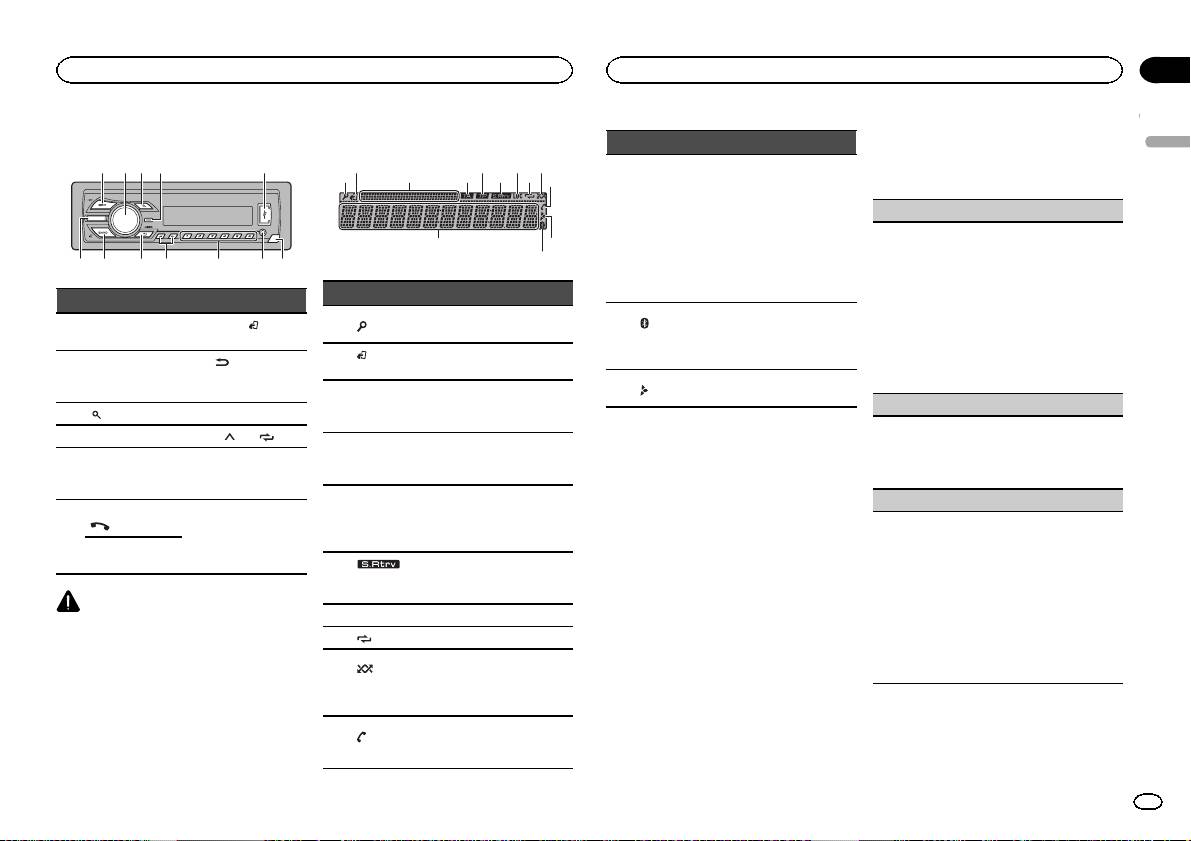
Head unit
a b
4
7
1 2 3 5
98c6
Display indication
2 5 7 9
31 4 86
a
db
Part Part
BAND/
(iPod
1 SRC/OFF 7
control)
(back)/
MULTI-CONTROL
2
8
DIMMER
(M.C.)
(dimmer)
3
(list) 9 c/d
4 DISP a 1/
to 6/
AUX input jack
5 USB port b
(3.5 mm stereo
jack)
MVH-350BT
(phone)
6
c Detach button
MVH-150UI
iPod
CAUTION
! Use an optional Pioneer USB cable (CD-
U50E) to connect the USB storage device as
any device connected directly to the unit will
protrude out from the unit, which could be
dangerous.
! Do not use unauthorized products.
c
Section
Operating this unit
Operating this unit
02
4 Perform the following procedures to set
Indicator State
the menu.
English
To proceed to the next menu option, you need to
! Tuner: band and fre-
confirm your selection.
quency
! RDS: program service
Main infor-
LANGUAGE (multi-language)
name, PTY information
b
mation sec-
and other literal informa-
This unit can display the text information from a
tion
tion
compressed audio file even for information em-
! USB storage device and
bedded in English or Russian.
iPod: elapsed playback
! If the embedded language and the selected
Indicator State
time and text information
language setting are not the same, text infor-
mation may not display properly.
The list function is being oper-
Only for MVH-350BT
1
(list)
! Some characters may not be displayed prop-
ated.
Connected to a Bluetooth de-
c
(Bluetooth
erly.
vice.
(iPod
This unit’s iPod function is op-
indicator)
1 Turn M.C. to select the desired setting.
2
The line is on hold.
control)
erated from your iPod.
ENG (English)—РУС (Russian)
Appears when a lower tier of
2 Press M.C. to confirm the selection.
Sub infor-
d
folder or menu exists.
3
mation sec-
Sub information is displayed.
CLOCK SET (setting the clock)
tion
1 Turn M.C. to adjust hour.
TA (traffic
Set up menu
2 Press M.C. to select minute.
4
announce-
TA function is on.
3 Turn M.C. to adjust minute.
When you turn the ignition switch to ON after in-
ments)
4 Press M.C. to confirm the selection.
stallation, set up menu appears on the display.
TP (traffic
You can set up the menu options below.
FM STEP (FM tuning step)
program
5
A TP station is tuned in.
identifica-
Normally, the FM tuning step employed by seek
1 After installation of this unit, turn the
tion)
tuning is 50 kHz. When AF or TA is on, the tuning
ignition switch to ON.
step automatically changes to 100 kHz. It may be
SET UP appears.
The sound retriever function
preferable to set the tuning step to 50 kHz when
6
(sound re-
is on.
AF is on.
2 Turn M.C. to switch to YES.
triever)
! The tuning step remains at 50 kHz during man-
# If you do not operate for 30 seconds, the set up
7 LOC Local seek tuning is on.
ual tuning.
menu will not be displayed.
1 Turn M.C. to select the FM tuning step.
# If you prefer not to set up at this time, turn M.C.
8
(repeat) Track or folder repeat is on.
50 (50 kHz)—100 (100 kHz)
to switch to NO. Press to select.
Random play is on.
2 Press M.C. to confirm the selection.
If you select NO, you cannot set up in the set up
(ran-
The iPod source is selected
QUIT appears.
menu.
9
dom/shuf-
and the shuffle or shuffle all
fle)
function is on.
3 Press M.C. to select.
5 To finish your settings, turn M.C. to select
Only for MVH-350BT
YES.
(auto an-
a
Shows when the automatic
# If you prefer to change your setting again, turn
swer)
answering function is on.
M.C. to switch to NO. Press to select.
En
3
