
Pioneer X-HM20-S: System connections (continued) Remote control
System connections (continued) Remote control: Pioneer X-HM20-S
Table of contents
- Operating Environment VENTILATION CAUTION
- Condensation
- Introduction Accessories CONTENTS
- Precautions Controls and indicators
- Controls and indicators (continued)
- System connections
- System connections (continued) Remote control
- General control
- Setting the clock (Remote control only) (continued)
- Listening to the iPod, iPhone or iPad (X-HM20 only) (continued)
- Listening to the iPod, iPhone or iPad (X-HM20 only) (continued)
- Listening to a CD or MP3/WMA disc
- Advanced CD or MP3/WMA disc playback
System connections (continued)
Remote control
n AC power connection
After checking all the connections have been made
correctly, plug the AC power lead of this unit into the wall
socket.
Note:
Unplug the AC power lead from the wall socket if the unit
will not be in use for a prolonged period of time.
Caution:
l Handle the power cord by the plug part. Do not pull out
the plug by tugging the cord, and never touch the
power cord when your hands are wet, as this could
cause a short circuit or electric shock. Do not place the
unit, a piece of furniture, or other object on the power
cord or pinch the cord in any other way. Never make a
knot in the cord or tie it with other cables. The power
cords should be routed so that they are not likely to be
WARNNIG:
stepped on. A damaged power cord can cause a fire or
l Do not use or store
battery
in direct sunlight or other
give you an electric shock. Check the power cord once
excessively hot place, such as inside a car or near a
in a while. If you find it damaged, ask your nearest
heater. This can cause the
battery
to leak, overheat,
Pioneer authorized independent service company for a
explode or catch fire. It can also reduce the life or
replacement.
performance of
battery
.
l Do not use any power cord other than the one supplied
Caution:
with this unit.
l
Remove the battery if the unit will not be used for a long
l Do not use the supplied power cord for any purpose
period of time. This will prevent potential damage due to
other than that described above.
battery leakage.
l
Do not use rechargeable battery (nickel-cadmium battery,
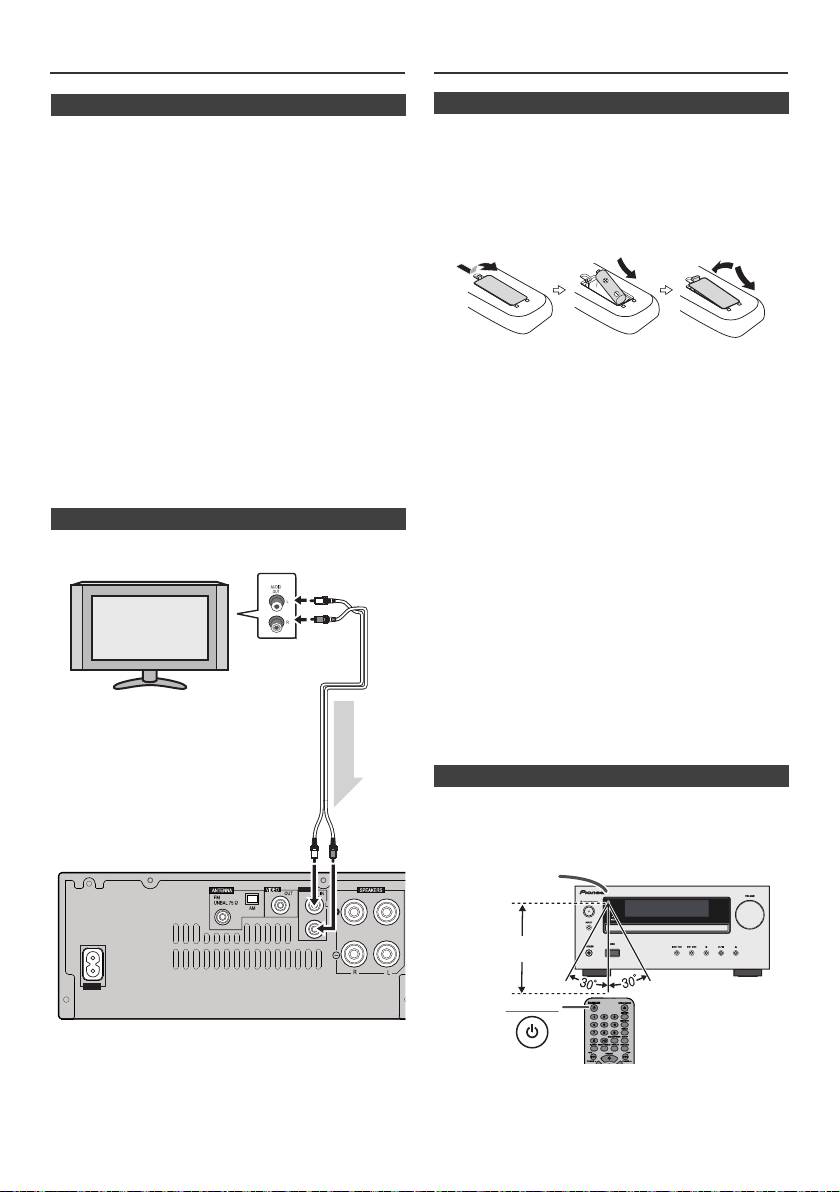
n Connecting a TV, etc.
etc.).
l
Installing the battery incorrectly may cause the unit to
Connect to the TV using an audio cable
.
malfunction.
Notes concerning use:
l
Replace the battery if the operating distance is reduced or
if the operation becomes erratic. Purchas an “AA” size
battery.
l
Periodically clean the transmitter on the remote control
and the sensor on the unit with a soft cloth.
l
Exposing the sensor on the unit to strong light may
interfere with operation. Change the lighting or the
direction of the unit if this occurs.
l
Keep the remote control away from moisture, heat, shock,
and vibrations.
l When disposing of used
battery
, please comply with
governmental regulations or environmental public
instruction's rules that apply in your country or area.
Check the remote control after checking all the connections.
Point the remote control directly at the remote sensor on the
unit. The remote control can be used within the range shown
below:
To select Line In function:
l
On main unit: Press INPUT button repeatedly until
Line In is displayed.
l
On remote control: Press LINE button
repeatedly until Line In is displayed.
En-8
11/5/25 X-HM10_20_En.fm
LINE
AUX
LOOP
AC IN
TV
To audio
output sockets
Audio cable
(commercially
available)
Audio signal
To L IN E
input
Main unit
sockets
n Battery installation
1
Open the battery cover.
2
Insert the supplied battery according to the direction
indicated in the battery compartment.
When inserting or removing the battery, push it towards the
(–) battery terminal.
3
Close the cover.
n Test of the remote control
STANDBY/ON
Remote sensor
7 m
