
Pioneer X-HM20-S: Listening to the iPod, iPhone or iPad (X-HM20 only) (continued)
Listening to the iPod, iPhone or iPad (X-HM20 only) (continued): Pioneer X-HM20-S
Table of contents
- Operating Environment VENTILATION CAUTION
- Condensation
- Introduction Accessories CONTENTS
- Precautions Controls and indicators
- Controls and indicators (continued)
- System connections
- System connections (continued) Remote control
- General control
- Setting the clock (Remote control only) (continued)
- Listening to the iPod, iPhone or iPad (X-HM20 only) (continued)
- Listening to the iPod, iPhone or iPad (X-HM20 only) (continued)
- Listening to a CD or MP3/WMA disc
- Advanced CD or MP3/WMA disc playback
Listening to the iPod, iPhone or iPad
(X-HM20 only) (continued)
n Watching videos on a TV connected to
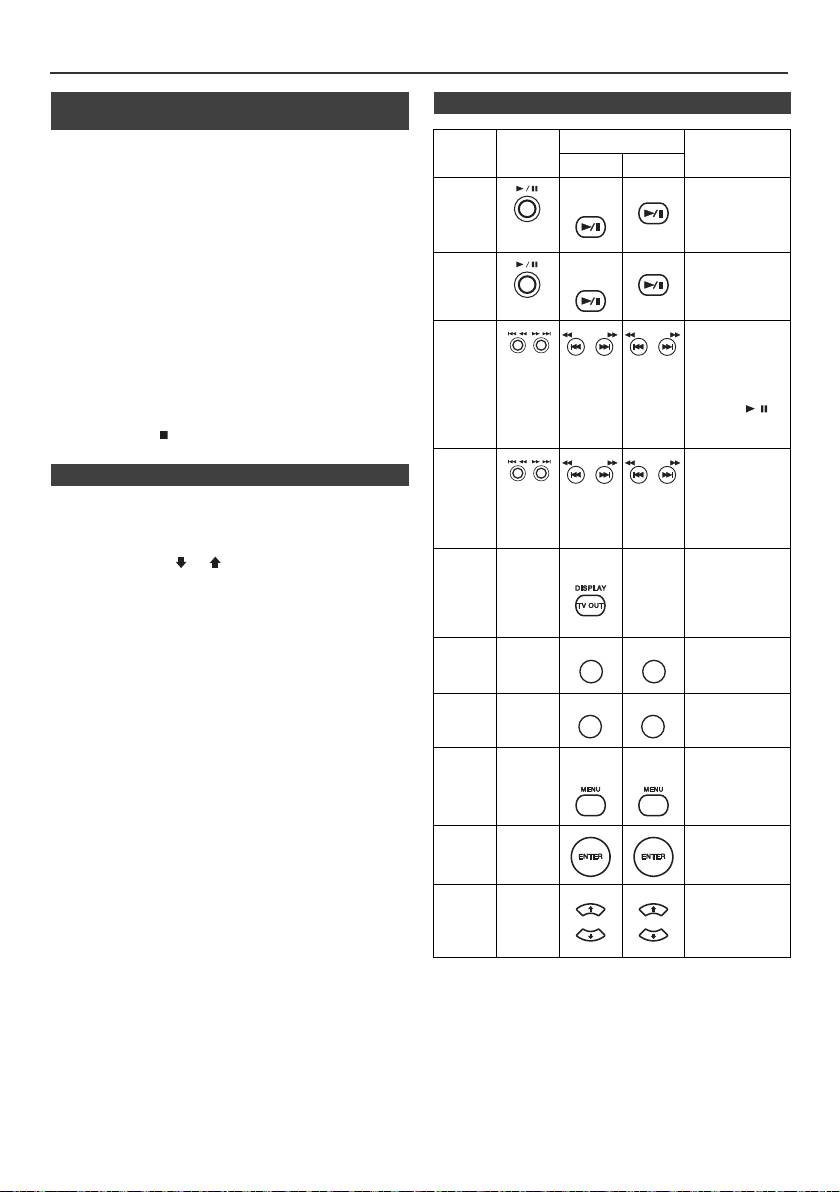
n Various iPod, iPhone and iPad functions
iPod or iPhone
Function
Main
Remote control
Operation
1
Press the DISPLAY TV OUT button for more than 2 seconds.
unit
Dock USB
“TV Display” will appear on display.
iPod/
CD/USB
2
Press the ENTER button to start playback.
Play
Press in the
iPhone
pause mode.
Notes:
l
If the TV Out setting is already turned on at video menu, the
video is automatically displayed on the TV screen when
ENTER key is pressed.
Pause
iPod/
CD/USB
Press in the
l
TV out display is not support through USB terminal. (iPad)
iPhone
playback mode.
l
To return to watching video on iPod or iPhone screen, press
the MENU button to enter video menu. Then press the
DISPLAY TV OUT button for more than 2 seconds until “iPod
Display” appears.
Track
Press in the
l
During iPod or iPhone video playback, pressing the
up/ down
playback or
DISPLAY TV OUT button will not toggle video out display
TUNING −
TUNING +
TUNING −
TUNING +
pause mode.
between iPod and TV.
If you press the
button in the
Caution:
pause mode,
l
Unplug all accessories for the iPod or iPhone before inserting
press the /
it into the iPod docking station.
button to start the
l Stop button ( ) at main unit is invalid during iPod
desired track.
function.
Fast
Press and hold
n Navigating the iPod, iPhone or iPad menus
forward/
down in the
TUNING −
TUNING +
TUNING −
TUNING +
playback mode.
reverse
1
Press the iPod/iPhone MENU button to view the menu on
Release the
iPod, iPhone or iPad unit. Press it again to go back to
button to resume
playback.
previous menu.
iPod/
2
Use the PRESET (
or
) button to select an item on the
Display
____
____
Press for more
iPhone
than 2 seconds to
menu and then press ENTER button.
toggle the video
Note:
out display
between iPod or
When navigating the iPod, iPhone or iPad menu with remote
TV.
control, do not operate any of the buttons on the iPod or iPhone
unit. The volume level is adjusted by pressing the VOL (+ or –)
Repeat
____
Press to toggle
REPEAT
button on the main unit or the remote control. Adjusting the
repeat mode.
volume on the iPod, iPhone or iPad units give no effect.
iPod and iPhone operations:
Shuffle
____
Press to toggle
The operations described below depend on the generation iPod
shuffle mode.
and iPhone you are using.
iPod
____
iPod/
iPod/
Press to view the
System on operation:
Menu
iPhone
iPhone
iPod menu during
When the main unit is powered on, iPod, iPhone or iPad units will
iPod function.
automatically power on when docked in the unit.
System off (stand-by operation):
When the main unit is turned to stand-by mode, the docked iPod,
iPod
____
Press to confirm
iPhone or connected iPad unit will automatically turn to stand-by
Enter
the selection.
mode.
iPod
____
Press to select
Cursor
the iPod menu.
Up/Down
En-12
11/5/25 X-HM10_20_En.fm
REPEAT
RANDOM
RANDOM
PRESET
PRESET
PRESET
PRESET
