
Pioneer DEH-150MPG: About this unit Head unit Display indication Set up menu
About this unit Head unit Display indication Set up menu: Pioneer DEH-150MPG
Table of contents
- About this unit Head unit Display indication Set up menu
- Frequently used menu operations Basic operations
- Tuner Function settings Storing and recalling stations for each band
- Audio adjustments CD/CD-R/CD-RW
- System menu
- Switching the dimmer setting System menu Initial menu
- Connections Using an AUX source
- Installation DIN front/rear mount
- Troubleshooting Error messages
- Handling guidelines Compressed audio compatibility
- Specifications Russian character chart
Thank you for purchasing this PIONEER
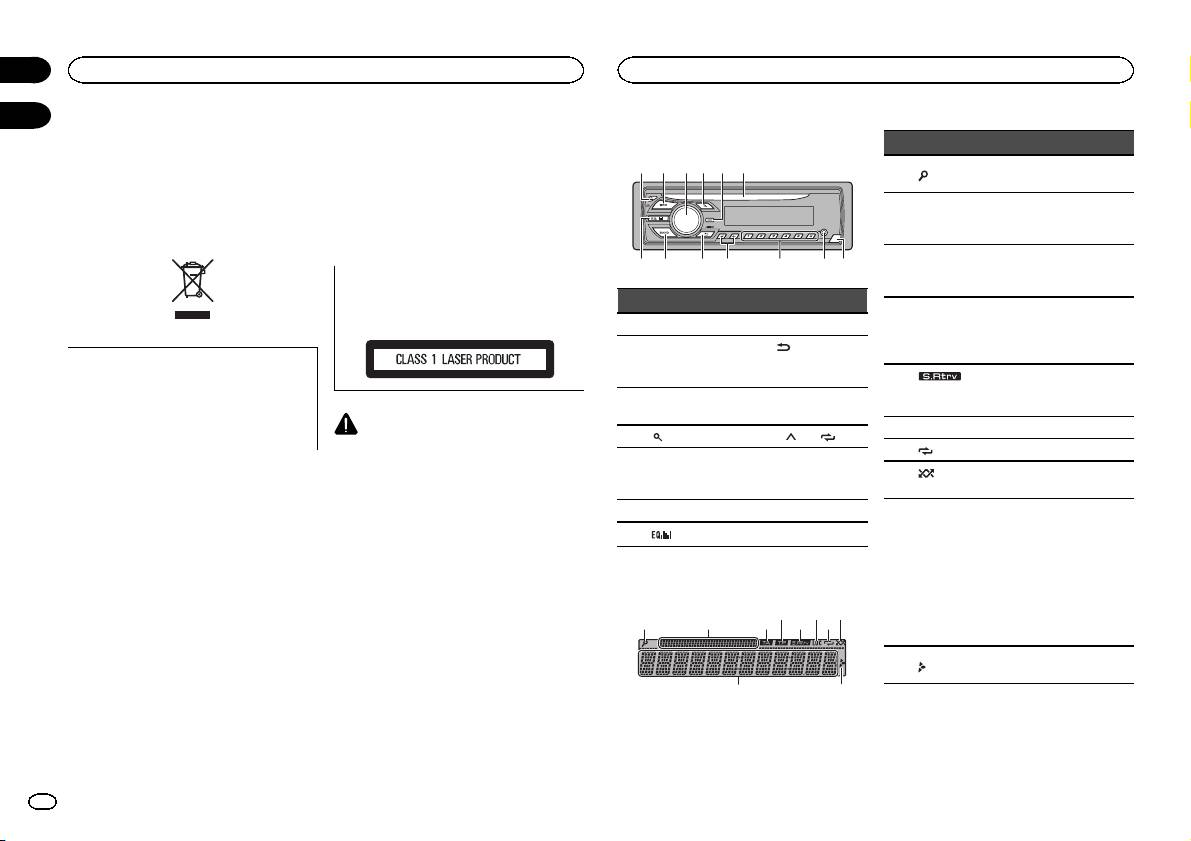
About this unit
Head unit
product
The tuner frequencies on this unit are allocated
To ensure proper use, please read through this
for use in Western Europe, Asia, the Middle
manual before using this product. It is especially
East, Africa and Oceania. Use in other areas
important that you read and observe WARN-
may result in poor reception. The RDS (radio
INGs and CAUTIONs in this manual. Please
data system) function only operates in areas
keep the manual in a safe and accessible place for
with broadcasting RDS signals for FM stations.
future reference.
CAUTION
This product is a class 1 laser product classi-
fied under the Safety of laser products, IEC
60825-1:2007.
If you want to dispose this product, do not
mix it with general household waste. There is
a separate collection system for used elec-
tronic products in accordance with legislation
that requires proper treatment, recovery and
CAUTION
recycling.
! Do not allow this unit to come into contact
with liquids. Electrical shock could result.
Private households in the member states of the
Also, damage to this unit, smoke, and over-
heating could result from contact with
EU, in Switzerland and Norway may return their
used electronic products free of charge to desig-
liquids.
nated collection facilities or to a retailer (if you
! The Pioneer CarStereo-Pass is for use only in
purchase a similar new one).
Germany.
For countries not mentioned above, please con-
! Always keep the volume low enough to hear
tact your local authorities for the correct method
outside sounds.
of disposal.
! Avoid exposure to moisture.
By doing so you will ensure that your disposed
! If the battery is disconnected or discharged,
product undergoes the necessary treatment, re-
any preset memory will be erased.
covery and recycling and thus prevent potential
Note
negative effects on the environment and human
Function setting operations are completed even
health.
if the menu is canceled before the operations
are confirmed.
In case of trouble
Should this unit fail to operate properly, please
contact your dealer or nearest authorized
PIONEER Service Station.
b c
5
8
1 2 3 4 6
a9d7
Part Part
1 h (eject) 8 BAND
(back)/
2 SRC/OFF 9
DIMMER
(dimmer)
MULTI-CONTROL
3
a c/d
(M.C.)
4
(list) b 1/ to 6/
AUX input jack
5 DISP c
(3.5 mm stereo
jack)
6 Disc loading slot d Detach button
7
(equalizer)
Display indication
21 3 75
9
Section
01
Before you start
Operating this unit
02
Indicator State
The list function is being oper-
1
(list)
ated.
Sub infor-
2
mation sec-
Sub information is displayed.
tion
TA (traffic
3
announce-
TA function is on.
ments)
TP (traffic
program
4
A TP station is tuned in.
identifica-
tion)
The sound retriever function
5
(sound re-
is on.
triever)
6 LOC Local seek tuning is on.
7
(repeat) Track or folder repeat is on.
(ran-
8
Random play is on.
dom)
! Tuner: band and fre-
quency
! RDS: program service
Main infor-
name, PTY information
9
mation sec-
and other literal informa-
tion
tion
! CD player: elapsed play-
4 6 8
back time and text infor-
mation
Appears when a lower tier of
a
folder or menu exists.
a
Set up menu
When you turn the ignition switch to ON after in-
stallation, set up menu appears on the display.
You can set up the menu options below.
2
En
