
Pioneer A-10-S: Controls and displays
Controls and displays: Pioneer A-10-S
Table of contents
- IMPORTANT
- Contents
- Before you start
- Connecting up
- Controls and displays
- Operation
- Additional information
A30_SYXE8.book 7 ページ 2012年2月16日 木曜日 午前8時58分
Controls and displays 03
English
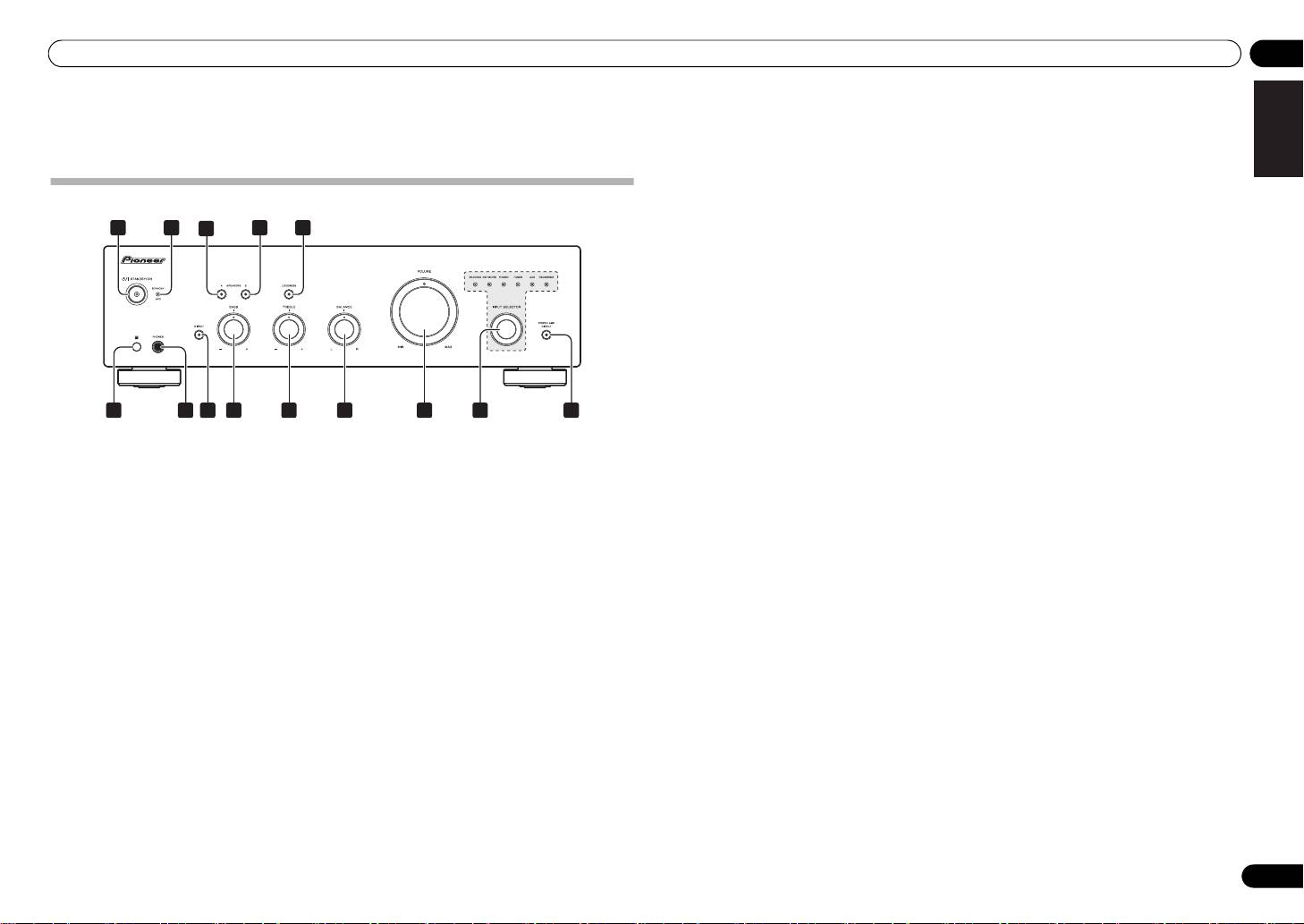
Chapter 3:
6 Remote sensor (Except A-10)
13
INPUT SELECTOR
knob/indicators
Receives the signals from the remote control (page 4).
Turn the knob clockwise or counterclockwise so that the
indicator lights for your desired input source. Turning
Controls and displays
7
PHONES
jack
the knob clockwise causes the lit indicator to right.
Use to connect headphones. No sound is produced
Turning counterclockwise causes it to left. When the
when the POWER AMP DIRECT button is ON.
remote control’s MUTE button is pressed to mute the
sound, the indicator for the input source selected with
Front panel
8 DIRECT button/indicator
the INPUT SELECTOR knob flashes.
On : The indicator lights: When this button is set to ON,
1
2 54
3
sound signals are output directly, without being passed
14
POWER AMP DIRECT
button/indicator
A-30
through the various adjustment circuits (BASS, TREBLE,
(A-30 only)
BALANCE, LOUDNESS). This allows reproduction of the
Press this button when the A-30 is to be used as a power
signals with greater fidelity, but it disables any settings
amplifier (page 10).
made with the BASS, TREBLE, BALANCE or LOUDNESS
controls.
Off : The indicator goes off: The signal passes through
DeutschFrançais
the various frequency adjusting circuits. When the
indicator is OFF, adjustments can be made with the
BASS, TREBLE, BALANCE, and LOUDNESS controls.
9
BASS
tone control
Use to adjust the low-frequency tone. The center position
is the flat (normal) position. When turned to the right,
6
7
8
9
10 11 12
13 14
low-frequency tones are emphasized; when turned to the
left, low-frequency tones are de-emphasized.
Italiano Español Русский
1
/I
STANDBY/ON
4
SPEAKERS B
button/indicator
• This button does not operate when the DIRECT
Switches the amplifier between off and on.
Use this button to listen to the speaker system
button is in the on position.
When power is turned on, the power indicator in the
connected to SPEAKERS B terminals.
center of the button will light.
On : The indicator lights. Sound is heard from the
10
TREBLE
tone control
• On the A-10 model, this switches the amplifier
speaker system. (Sound will also be produced from the
Use to adjust the high-frequency tone. The center
between standby and on.
PHONES jack.)
position is the flat (normal) position. When turned to the
Off : The indicator goes off. No sound is heard from the
right, high-frequency tones are emphasized; when
Nederlands
2
STANDBY/APD
indicator
speaker system. Set to this position when listening with
turned to the left, high-frequency tones are de-
When power is set to standby, the indicator lights red.
headphones.
emphasized.
When the Auto Power Down (APD) function is on, the
• This button does not operate when the DIRECT
indicator lights green (page 11).
5
LOUDNESS
button/indicator
button is in the on position.
Use when listening at low volume levels.
3
SPEAKERS A
button/indicator
On : The indicator lights: Boosts low and high
11
BALANCE
control
Use this button to listen to the speaker system
frequencies to give added punch to playback even at a
Should normally be left in the center position. Adjust
connected to SPEAKERS A terminals.
low volume level.
balance if the sound is louder from one of the speakers.
On : The indicator lights. Sound is heard from the
If the right side is louder, turn toward the L (left) position
Off : The indicator goes off: Should normally be left in
speaker system. (Sound will also be produced from the
and if the left side is louder, turn toward the R (right)
this position.
PHONES jack.)
position.
• This button does not operate when the DIRECT
Off : The indicator goes off. No sound is heard from the
• This button does not operate when the DIRECT
button is in the on position.
speaker system. Set to this position when listening with
button is in the on position.
headphones.
• When sound volume is raised, the amount of
change produced by the LOUDNESS circuit is
12 VOLUME control
reduced.
Use to adjust the volume level. (Also allows adjustment
of the headphone sound volume.)
7
En
03 Controls and displays
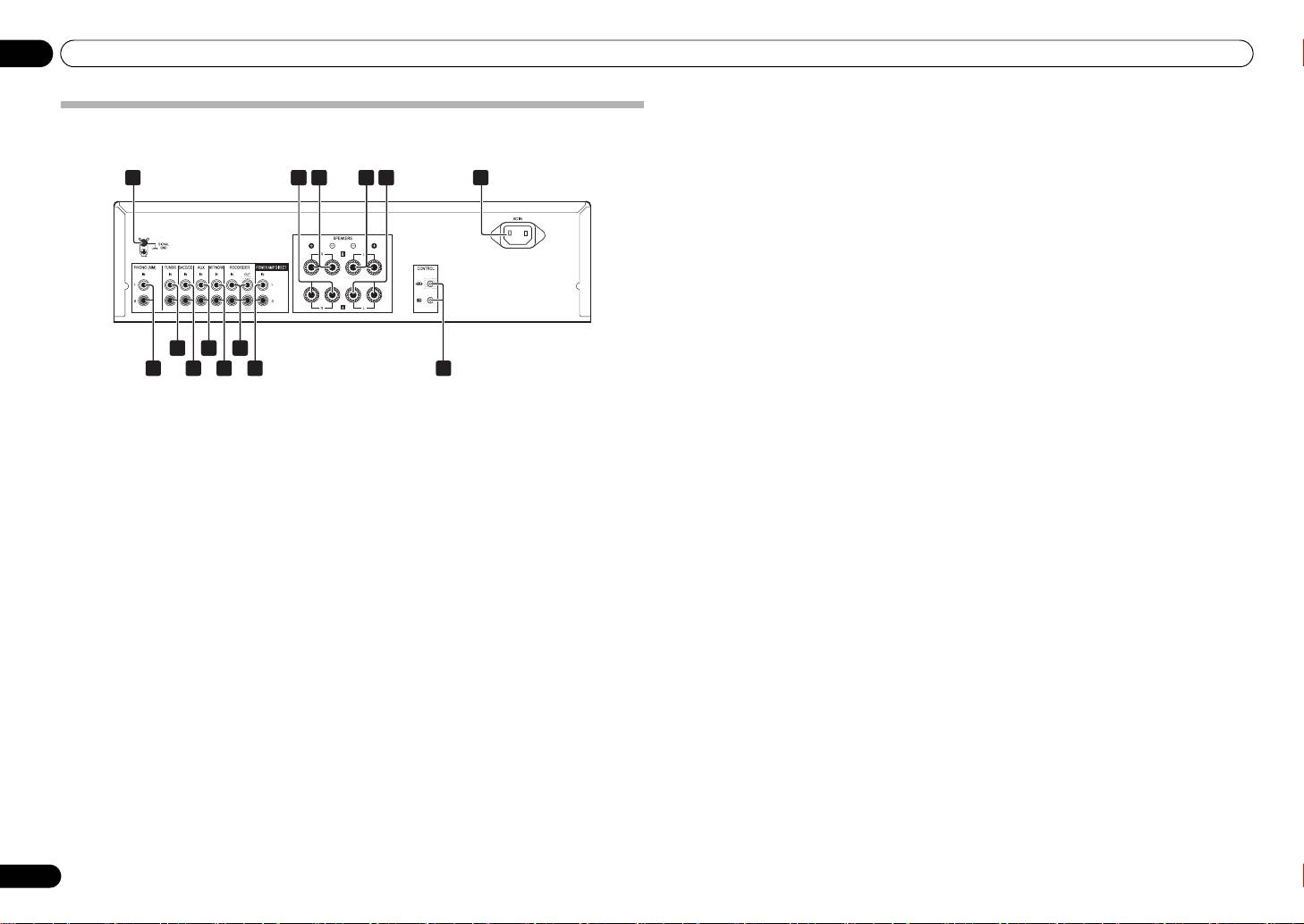
Rear panel
See pages 5-6 for details regarding connections.
1 GND (Turntable ground) terminal
10
AUX
IN
terminals
This ground terminal is designed to help reduce noise
when a turntable is connected. It is not a safety ground.
11
NETWORK
IN
terminals
2
SPEAKERS A
terminals (Right channel)
12
RECORDER IN/OUT
terminals
3
SPEAKERS B
terminals (Right channel)
13
POWER AMP DIRECT
IN
terminals (A-30
only)
4
SPEAKERS B
terminals (Left channel)
When using the A-30 as a power amplifier, connect the
pre-amplifier here (page 10).
5
SPEAKERS A
terminals (Left channel)
14
CONTROL IN/OUT
jack (Except A-10)
6
AC IN
jack
Connect power cord to here and an AC wall socket.
7
PHONO (MM)
IN
terminals
8
TUNER
IN
terminals
9
SACD/CD
IN
terminals
8
En
1 6
2
2 23 24 25
A-30
28 2
10
12
2
7
9
1311
14
A30_SYXE8.book 8 ページ 2012年2月16日 木曜日 午前8時58分
A30_SYXE8.book 9 ページ 2012年3月6日 火曜日 午前11時13分
Controls and displays 03
English
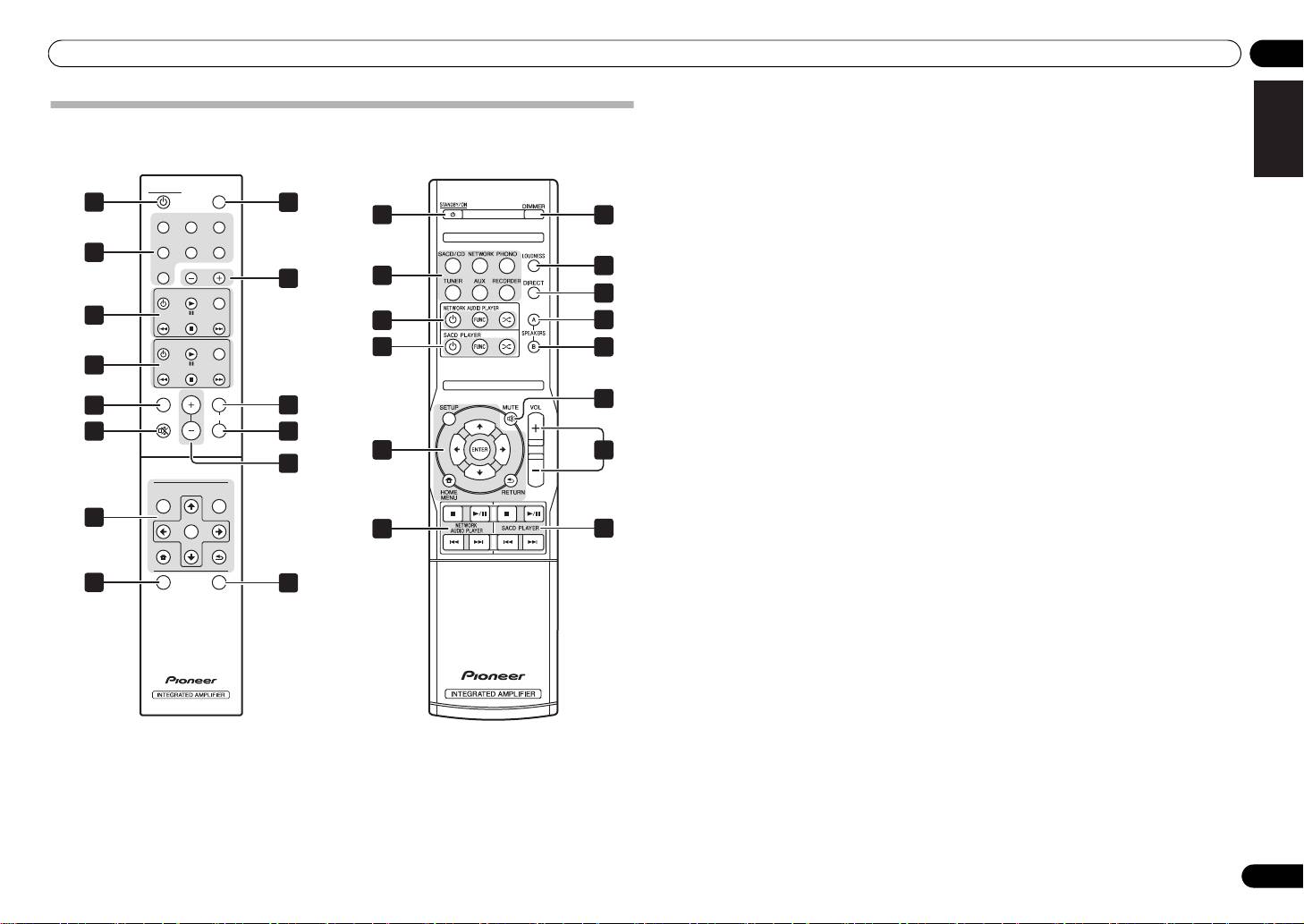
1
STANDBY/ON
Remote control (Except A-10)
Switches the amplifier between standby and on.
2 Input selector buttons
A-30
A-20
Press to select an input source. These select the
component connected to the corresponding input on the
STANDBY/ON DIMMER
rear panel.
1
8
• When the A-30 is connected, the OPTION button is
SACD/CD NETWORK PHONO
1
8
disabled.
TUNER
AUX RECORDER
3 SACD PLAYER control buttons
2
Use to control Pioneer SACD player.
OPTION
5
(Cannot be used to perform playback/pause on the
INPUT
9
2
PD-D6/PD-D6MK2/PD-D9/PD-D9MK2 models.)
SACD PLAYER
FUNC
7
4 NETWORK AUDIO PLAYER control
3
DeutschFrançais
34
10
buttons
NETWORK AUDIO PLAYER
FUNC
Use to control Pioneer network audio player.
3
11
4
5
LOUDNESS
Use to set the loudness circuit ON/OFF (page 7).
LOUDNESS
VOLUME
6
6
MUTE
5
A
10
MUTE
SPEARKERS
Mutes/unmutes the sound.
6
B
11
Italiano Español Русский
7
DIRECT
34
12
Press to access Direct listening (page 7).
12
8
DIMMER
NETWORK AUDIO PLAYER
SOUNDSETUP
This button allows the illumination of the unit's front
panel indicators to be set in three levels (does not affect
4
ENTER
the STANDBY indicator).
34
3
Nederlands
HOME MENU
RETURN
9
INPUT +/–
Use to change the input source. The source changes as
below.
7
DIRECT
APD
13
SACD/CD NETWORK PHONO TUNER
AUX RECORDER Return to the beginning.
10
SPEAKERS A
button/indicator
Use this button to listen to the speaker system
connected to SPEAKERS A terminals.
11
SPEAKERS B
button/indicator
Use this button to listen to the speaker system
connected to SPEAKERS B terminals.
12
VOLUME +/–
Use to set the listening volume.
13
APD
Use to set the Auto Power Down function to ON/OFF
(page 11).
9
En


