
Pioneer X-SMC00BT-W: Chapter 5: iPod/iPhone/iPad mini playback Connecting your iPod/iPhone Confirming what iPod/iPhone/iPad mini models are supported
Chapter 5: iPod/iPhone/iPad mini playback Connecting your iPod/iPhone Confirming what iPod/iPhone/iPad mini models are supported: Pioneer X-SMC00BT-W
Table of contents
- CAUTION Operating Environment
- Information for users on collection and disposal of old equipment and used batteries Radio wave caution POWER-CORD CAUTION
- Contents
- Chapter 1: Before you start What’s in the box Loading the batteries in the remote control
- Using the remote control
- Chapter 2: Part names and functions Remote control
- Hang from the wall to use
- Front panel
- Top panel/Rear panel
- Change the interchangeable panel
- Chapter 3: Connections Plugging in Connecting antenna
- Chapter 4: Getting started To turn the power on General control
- Sound controls Setting the wake-up timer
- Calling the wake-up timer Using Headphones Using the sleep timer
- Chapter 5: iPod/iPhone/iPad mini playback Connecting your iPod/iPhone Confirming what iPod/iPhone/iPad mini models are supported
- Playing iPod/iPhone/iPad mini
- Chapter 6: Disc playback Playing discs or files
- Advanced CD or MP3/WMA disc playback
- Disc playback06 Programmed play (CD or MP3/WMA) About downloading MP3/WMA About folder playback order
- Specify the folder to play Switch the display contents
- Chapter 7: USB playback Playing USB storage devices
- Specify the folder to play Playing in the desired order (Programmed Play)
- Chapter 8: Using the tuner Listening to the radio broadcasts
- Using the Radio Data System (RDS) Searching for RDS programs An introduction to RDS
- Information provided by RDS Notes for RDS operation Using the Auto Station Program Memory (ASPM)
- Chapter 9: Other connections Connecting auxiliary components
- Chapter 10: Bluetooth Audio playback Music playback using Bluetooth wireless Pairing with the unit (Initial registration) technology
- Listen to music on the unit from a Radio wave caution Bluetooth capable device Scope of operation
- Radio wave reflections Precautions regarding connections to products supported by this unit
- Chapter 11: Additional information Troubleshooting General problem Problem Check Remedy
- Problem Check Remedy When a USB storage device is connected Problem Check Remedy
- Problem Check Remedy When an iPod/iPhone/iPad mini is connected Problem Remedy
- Playable discs and formats Cautions on use
- Handling discs
- About iPod/iPhone Restoring all the settings to the defaults
- Specifications
iPod/iPhone/iPad mini playback05
Chapter 5:
iPod/iPhone/iPad mini playback
Merely by connecting your iPod/iPhone/iPad mini to this unit,
you can enjoy high-quality sound from your iPod/iPhone/iPad
Connecting your iPod/iPhone
mini. Playback setting for iPod/iPhone/iPad mini music can
be performed from this unit or the iPod/iPhone/iPad mini
CAUTION
itself.
• When connecting iPod/iPhone devices, always use the
dock adapter provided with iPod/iPhone devices, or a
commercially available adapter designed to support
Confirming what iPod/iPhone/iPad
iPod/iPhone. The iPod/iPhone cannot be connected
without a dock adapter; attempting to connect an iPod/
mini models are supported
iPhone without it will cause damage or malfunction.
• An iPod/iPhone universal dock adapter is not supplied
The iPod/iPhone/iPad mini playable on this unit are shown
with this unit.
below.
Important
iPod/iPhone
iPod/iPhone/iPad mini Dock connector
• If you use a commercially available protective cover with
Terminal
your iPod/iPhone, you may not be able to connect your
iPod nano 3G/4G/5G/6G
iPod/iPhone to the unit.
iPod nano 7G
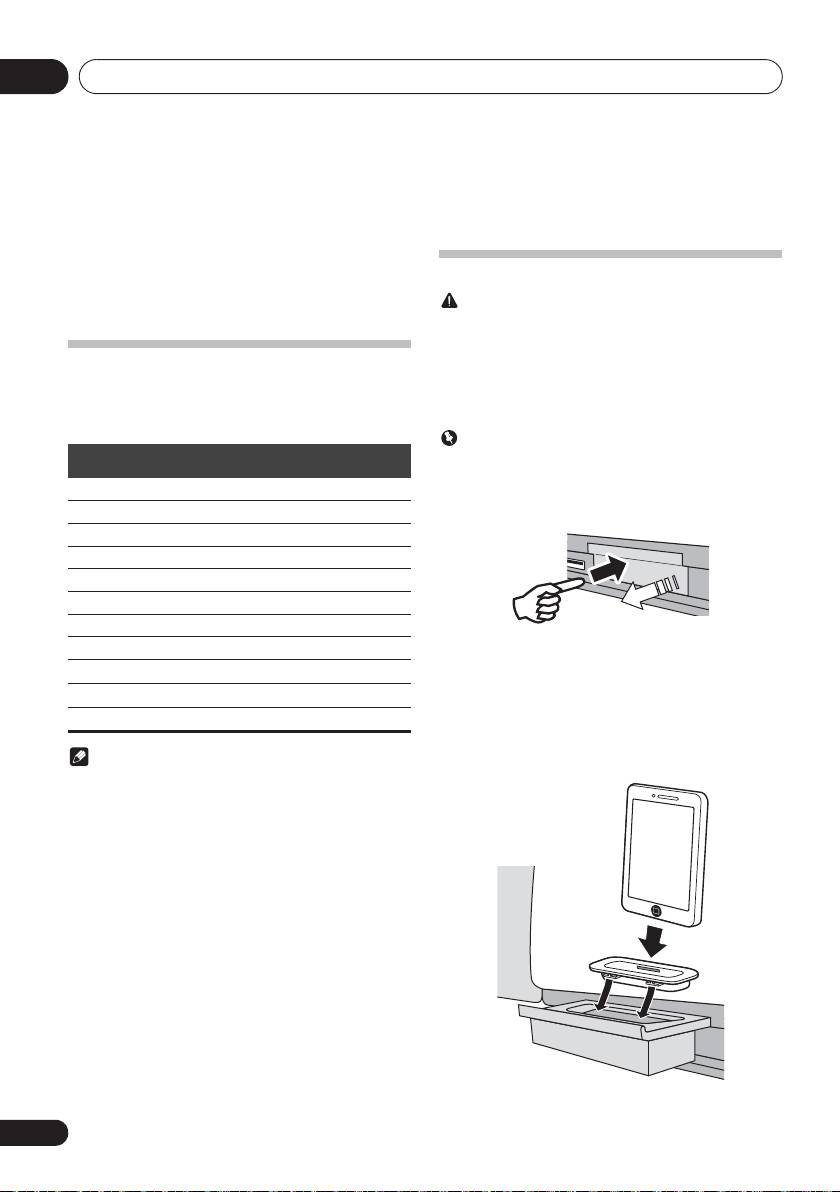
1 Press the PUSH OPEN.
iPod touch 1G/2G/3G/4G
PUSH OPEN
iPod touch 5G
iPhone
iPhone 3G
Push
iPhone 3GS
2 Attach the dock adapter to iPod/iPhone
iPhone 4
connector port.
iPhone 4S
When attaching the dock adapter, be sure to orient the
frontback directions of the dock adapter correctly. To attach,
iPhone 5
first place the protruding tabs on the front side of the adapter
iPad mini
into the depressions on the iPod/iPhone connector port and
press into position. When attaching the adapter, be careful
not to strike the connectors.
Note
3 Connect your iPod/iPhone.
• Pioneer does not guarantee that this unit plays iPod/
iPhone/iPad mini models other than the ones specified.
• Some functions may be restricted depending on the
model or software version.
• iPod/iPhone/iPad mini is licensed for reproduction of
non-copyrighted materials or materials the user is legally
permitted to reproduce.
• Features such as the equalizer cannot be controlled
using this system, and we recommend switching the
equalizer off before connecting.
• Pioneer cannot under any circumstances accept
responsibility for any direct or indirect loss arising from
any inconvenience or loss of recorded material resulting
from iPod/iPhone/iPad mini failure.
• For detailed instructions on using the iPod/iPhone/iPad
mini, please refer to the manual supplied with the iPod/
iPhone/iPad mini.
• This system has been developed and tested for the
software version of iPod/iPhone/iPad mini indicated on
the website of Pioneer (http://pioneer.jp/homeav/
support/ios/eu/).
• Installing software versions other than indicated on the
website of Pioneer to your iPod/iPhone/iPad mini may
result in incompatibility with this system.
• This unit cannot be used to record CD, tuner or other
content on an iPod/iPhone/iPad mini.
16
En
PUSH OPEN
;60&B6<;(B(QERRN࣮࣌ࢪ㸰㸮㸯㸱ᖺ㸯᭶㸰㸯᪥ࠉ᭶᭙᪥ࠉ༗ᚋ㸳㸯㸴ศ
3
2
