
Pioneer X-HM20-K: Precautions Controls and indicators
Precautions Controls and indicators: Pioneer X-HM20-K
Table of contents
- Operating Environment VENTILATION CAUTION
- Condensation
- ENGLISH Introduction Accessories CONTENTS
- Precautions Controls and indicators
- Controls and indicators (continued) n Remote control n Display
- System connections
- System connections (continued) Remote control
- General control Setting the clock (Remote control only)
- Setting the clock (Remote control only) (continued) n iPad connection (USB Terminal) Listening to the iPod, iPhone or iPad (X-HM20 only)
- Listening to the iPod, iPhone or iPad (X-HM20 only) (continued)
- Listening to the iPod, iPhone or iPad (X-HM20 only) (continued)
- Listening to a CD or MP3/WMA disc
- Advanced CD or MP3/WMA disc playback
- Advanced CD or MP3/WMA disc MP3/WMA folder mode (only for MP3/ playback (continued) WMA files)
- MP3/WMA folder mode (only for MP3/ Listening to USB mass storage WMA files) (continued) device/MP3 player
- Listening to USB mass storage device/MP3 player (continued)
- Listening to the radio
- Using the Radio Data System (RDS)
- Using the Radio Data System (RDS) (continued)
- Using the Radio Data System (RDS) Timer and sleep operation (Remote (continued) control only)
- Timer and sleep operation (Remote control only) (continued)
- Timer and sleep operation (Remote Headphones control only) (continued)
- Troubleshooting chart
- Troubleshooting chart (Continued)
- Specifications
- Notice
Precautions
l The ventilation should not be impeded by covering the
n General
ventilation openings with items, such as newspapers,
tablecloths, curtains, etc.
l Use the unit on a firm, level surface free from vibration.
l No naked flame sources, such as lighted candles,
l Place the speakers at least 30 cm away from any CRT
should be placed on the apparatus.
TV to avoid colour variations across the TV screen. If
l Attention should be drawn to the environmental
the variations persist, move the speakers further away
aspects of battery disposal.
from the TV. LCD TV is not prone to such variation.
l Keep the unit away from direct sunlight, strong
l The apparatus is designed for use in moderate
magnetic fields, excessive dust, humidity and
climates.
electronic/electrical equipment (home computers,
Warning:
facsimiles, etc.) which generate electrical noise.
The voltage used must be the same as that specified on
l Do not place anything on top of the unit.
this unit. Using this product with a higher voltage other
l Do not expose the unit to moisture, to temperatures
than that which is specified is dangerous and may result in
higher than 60°C (140°F) or to extremely low
a fire or other type of accident causing damage. PIONEER
temperatures.
will not be held responsible for any damage resulting from
l If your system does not work properly, disconnect the
use of this unit with a voltage other than that which is
AC power lead from the wall socket. Plug the AC power
lead back in, and then turn on your system.
specified.
l In case of an electrical storm, unplug the unit for safety.
l Hold the AC power plug by the head when removing it
n Volume control
from the wall socket, as pulling the lead can damage
The sound level at a given volume setting depends on
internal wires.
speaker efficiency, location, and various other factors. It is
l The AC power plug is used as a disconnect device and
advisable to avoid exposure to high volume levels. Do not
shall always remain readily operable.
turn the volume on to full at switch on. Listen to music at
l Do not remove the outer cover, as this may result
moderate levels. Excessive sound pressure from
in electric shock. Refer internal service to your
earphones and headphones can cause hearing loss.
local PIONEER service facility.
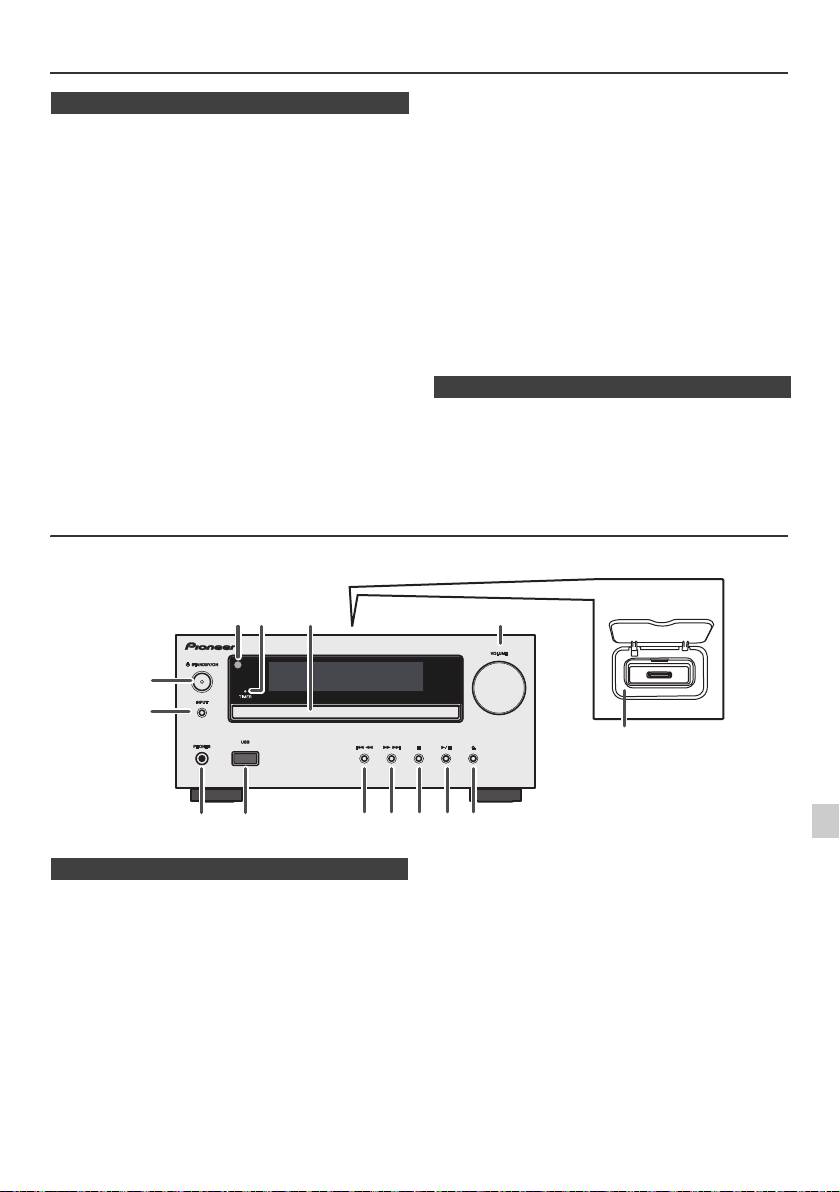
Controls and indicators
iPod/iPhone functions are only available for X-HM20.
1
2
Page
Page
3
1. Remote sensor . . . . . . . . . . . . . . . . . . . . . . . . . . . 8
10. Tuner Preset Down, CD/USB Track Down,
2. Timer indicator . . . . . . . . . . . . . . . . . . . . . . . . . . 22
iPod/iPhone Skip Down . . . . . . . . . . . . . . . . .12, 13
3. Disc Tray . . . . . . . . . . . . . . . . . . . . . . . . . . . . . . . 13
11. Tuner Preset Up, CD/USB Track Up,
4
4. Docking Station for iPod or iPhone . . . . . . . . . 11
iPod/iPhone Skip Up . . . . . . . . . . . . . . . . . . .12, 13
5. Volume Control . . . . . . . . . . . . . . . . . . . . . . . . . . . 9
12. Disc/USB Stop Button . . . . . . . . . . . . . . . . . .12, 13
5
6. STANDBY/ON Button . . . . . . . . . . . . . . . 11, 13, 18
13. Disc/USB/iPod/iPhone Play or
7. INPUT Button . . . . . . . . . . . . . . . . 9, 11, 13, 16, 18
Pause Button . . . . . . . . . . . . . . . . . . . . . . . . .12, 13
8. Headphone Socket . . . . . . . . . . . . . . . . . . . . . . . 23
14. Disc Tray Open/Close Button . . . . . . . . . . . . . . 13
6
9. USB Terminal . . . . . . . . . . . . . . . . . . . . . . . . . . . 16
7
8
9
En-5
11/5/25 X-HM10_20_En.fm
1
52 3
6
7
4
8 10 11 12 13 14
9
X-HM20 only
n Front panel
