
Pioneer X-HM20-K: Listening to the radio
Listening to the radio: Pioneer X-HM20-K
Table of contents
- Operating Environment VENTILATION CAUTION
- Condensation
- ENGLISH Introduction Accessories CONTENTS
- Precautions Controls and indicators
- Controls and indicators (continued) n Remote control n Display
- System connections
- System connections (continued) Remote control
- General control Setting the clock (Remote control only)
- Setting the clock (Remote control only) (continued) n iPad connection (USB Terminal) Listening to the iPod, iPhone or iPad (X-HM20 only)
- Listening to the iPod, iPhone or iPad (X-HM20 only) (continued)
- Listening to the iPod, iPhone or iPad (X-HM20 only) (continued)
- Listening to a CD or MP3/WMA disc
- Advanced CD or MP3/WMA disc playback
- Advanced CD or MP3/WMA disc MP3/WMA folder mode (only for MP3/ playback (continued) WMA files)
- MP3/WMA folder mode (only for MP3/ Listening to USB mass storage WMA files) (continued) device/MP3 player
- Listening to USB mass storage device/MP3 player (continued)
- Listening to the radio
- Using the Radio Data System (RDS)
- Using the Radio Data System (RDS) (continued)
- Using the Radio Data System (RDS) Timer and sleep operation (Remote (continued) control only)
- Timer and sleep operation (Remote control only) (continued)
- Timer and sleep operation (Remote Headphones control only) (continued)
- Troubleshooting chart
- Troubleshooting chart (Continued)
- Specifications
- Notice
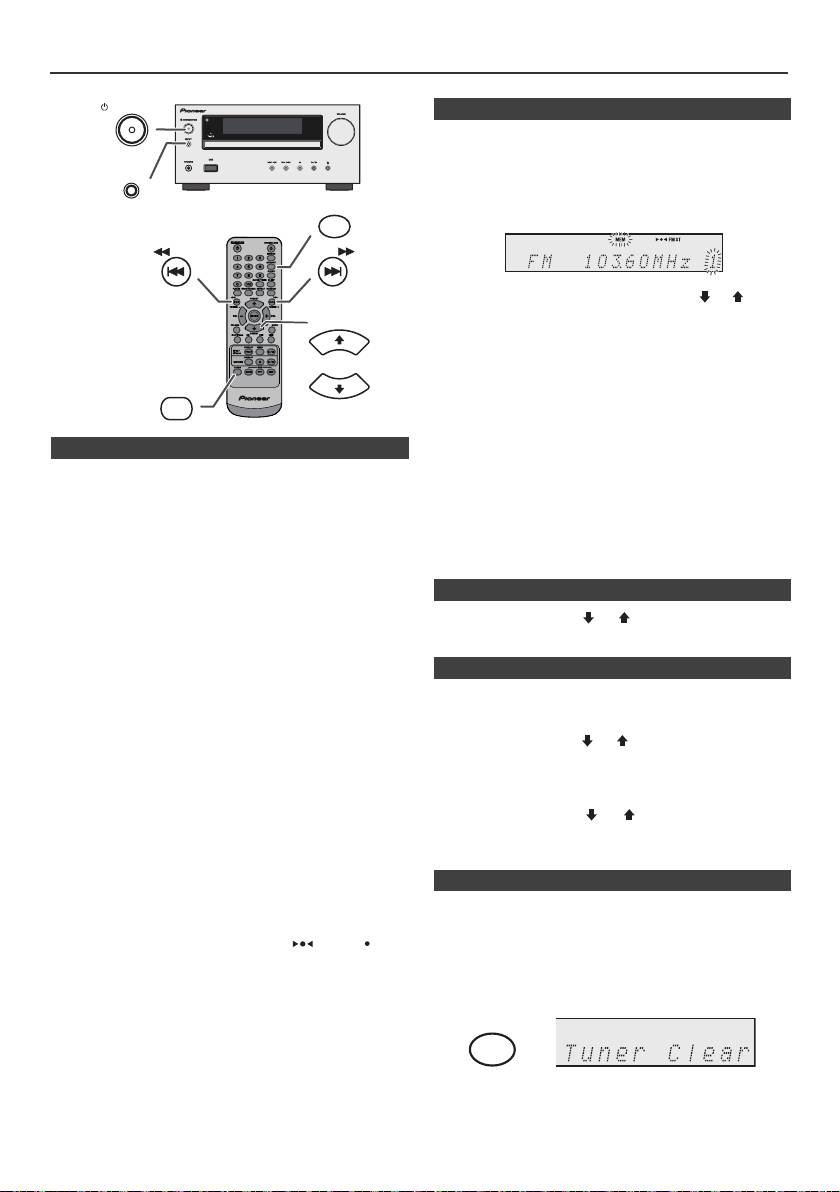
Listening to the radio
STANDBY/ON
n Memorising a station
You can store 40 AM and FM stations in memory and
recall them at the push of a button. (Preset tuning)
INPUT
1
Perform steps 1 - 3 in “Tuning”.
MEMORY
2 Press the MEMORY button.
TUNING −
TUNING +
3 Within 30 seconds, press the PRESET
(
or
)
button
to select the preset channel number. Store the stations
PRESET
in memory, in order, starting with preset channel 1.
4 Within 30 seconds, press the MEMORY button to store
that station in memory. If the “MEMORY” and preset
number indicators disappear before the station is
TUNER
PRESET
memorised, repeat the operation from step 2.
5 Repeat steps 1 - 4 to set other stations, or to change a
preset station. When a new station is stored in the
n Tuning
memory, the station previously memorised for that
preset channel number will be erased.
1
Press the STANDBY/ON button to turn the power on.
Note:
2 Press the TUNER button repeatedly to select the
The backup function protects the memorised stations for a
desired frequency band (FM or AM).
few hours should there be a power failure or the AC power
3 Press the TUNING + or - button on the remote control to
lead become disconnected.
tune in to the desired station.
l Manual tuning:
n To recall a memorised station
Press the TUNING
+
or - button repeatedly to tune in
1 Press the PRESET
(
or
)
button for less than 0.5
to the desired station.
seconds to select the desired station.
l Auto tuning:
When the TUNING + or - button is pressed for more
n To scan the preset stations
than 0.5 seconds, scanning will start automatically
and the tuner will stop at the first receivable
The stations saved in the memory can be scanned
broadcast station.
automatically. (Preset memory scan)
Notes:
1
Press the PRESET
(
or
)
button for more than 0.5
l When radio interference occurs, auto scan tuning may
seconds. The preset number will flash and the
stop automatically at that point.
programmed stations will be tuned in sequentially, for 5
l Auto scan tuning will skip weak signal stations.
seconds each.
l To stop the auto tuning, press the TUNING + or - button
again.
2 Press the PRESET
(
or
)
button again when the
l When an RDS (Radio Data System) station is tuned in,
desired station is located.
the frequency will be displayed first, and then the RDS
indicator will light up. Finally, the station name will
appear.
l Full auto tuning can be achieved for RDS stations
n To erase entire preset memory
“ASPM”, see page 19.
To receive an FM stereo transmission:
1
Press the TUNER button on remote control or press the
l Press the TUNER button to select stereo mode and
INPUT button on main unit repeatedly to select Tuner
“ST” indicator will be displayed. “ ” and “ ” will
function.
appear when an FM broadcast is in stereo.
l If the FM reception is weak, press the TUNER button
2 In Tuner function, press the CLEAR button until “Tuner
to extinguish the “ST” indicator. The reception changes
Clear“ appears.
to monaural, and the sound becomes clearer.
En-18
11/5/25 X-HM10_20_En.fm
CLEAR
