
Pioneer VSX-S310-S: Connecting to the network through LAN interface
Connecting to the network through LAN interface: Pioneer VSX-S310-S
Table of contents
- AV Receiver What’s in the box
- Safety Brochure
- Connecting up Connecting the speakers
- VSX-S310 connection diagram
- Connecting a TV and playback Connecting antennas components
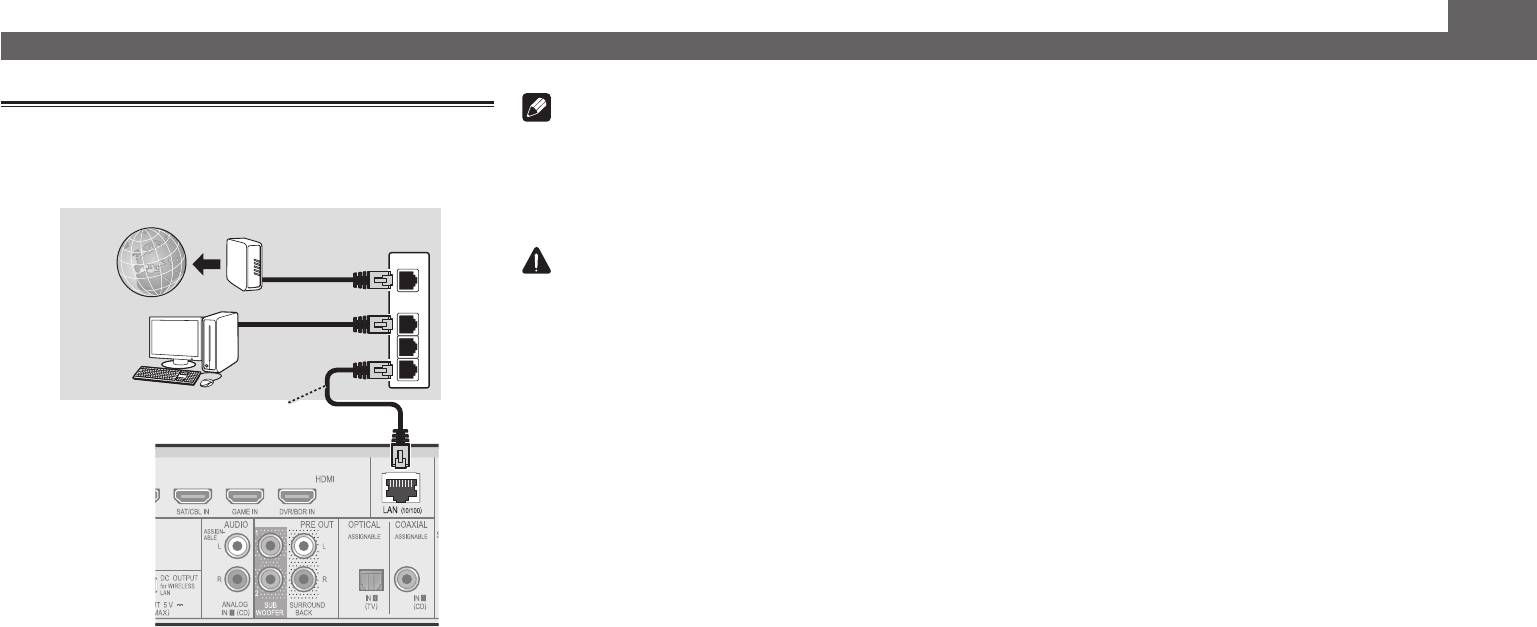
- Connecting to the network through LAN interface
- Initial Setup Before you start Automatically setting up for surround sound (MCACC)
- Basic playback Multichannel playback Listening to the radio
- Playing an iPod Listening to Internet radio stations
Connecting up (continued)
Note
Connecting to the network through
• Refer to the operating instructions in the included CD-
LAN interface
ROM if you wish to connect a TV or playback component
in a method other than an HDMI connection.
VSX-S510 only
• Refer to the operating instructions in the included CD-
Internet
Modem
ROM for other device connections.
Router
WAN
CAUTION
• Handle the power cord by the plug part. Do not pull out
LAN
the plug by tugging the cord, and never touch the power
1
Computer
cord when your hands are wet, as this could cause a short
2
circuit or electric shock. Do not place the unit, a piece of
3
furniture, or other object on the power cord or pinch the
cord in any other way. Never make a knot in the cord or tie
LAN cable (sold separately)
it with other cables. The power cords should be routed so
that they are not likely to be stepped on. A damaged power
cord can cause a fire or give you an electric shock. Check
the power cord once in a while. If you find it damaged,
ask your nearest Pioneer authorized independent service
company for a replacement.
VSX-S510
6
