
Pioneer VSX-S300-S: Connecting the speakers Flow of settings on the receiver
Connecting the speakers Flow of settings on the receiver: Pioneer VSX-S300-S
Table of contents
- What’s in the box AUDIO/VIDEO MULTI-CHANNEL RECEIVER Thank you for buying this Pioneer product. This Quick Start Guide includes instructions for basic connections and operations to allow simple use of the receiver. For detailed descriptions of the receiver, see the “Operating Instructions” provided on the included CD-ROM ( ).
- Connecting the speakers Flow of settings on the receiver
- Connecting a TV and playback component Plugging the receiver
- Basic setup Automatically setting up for surround sound (MCACC) Canceling the Auto Power Down Canceling the demo display
- Basic playback
2
En
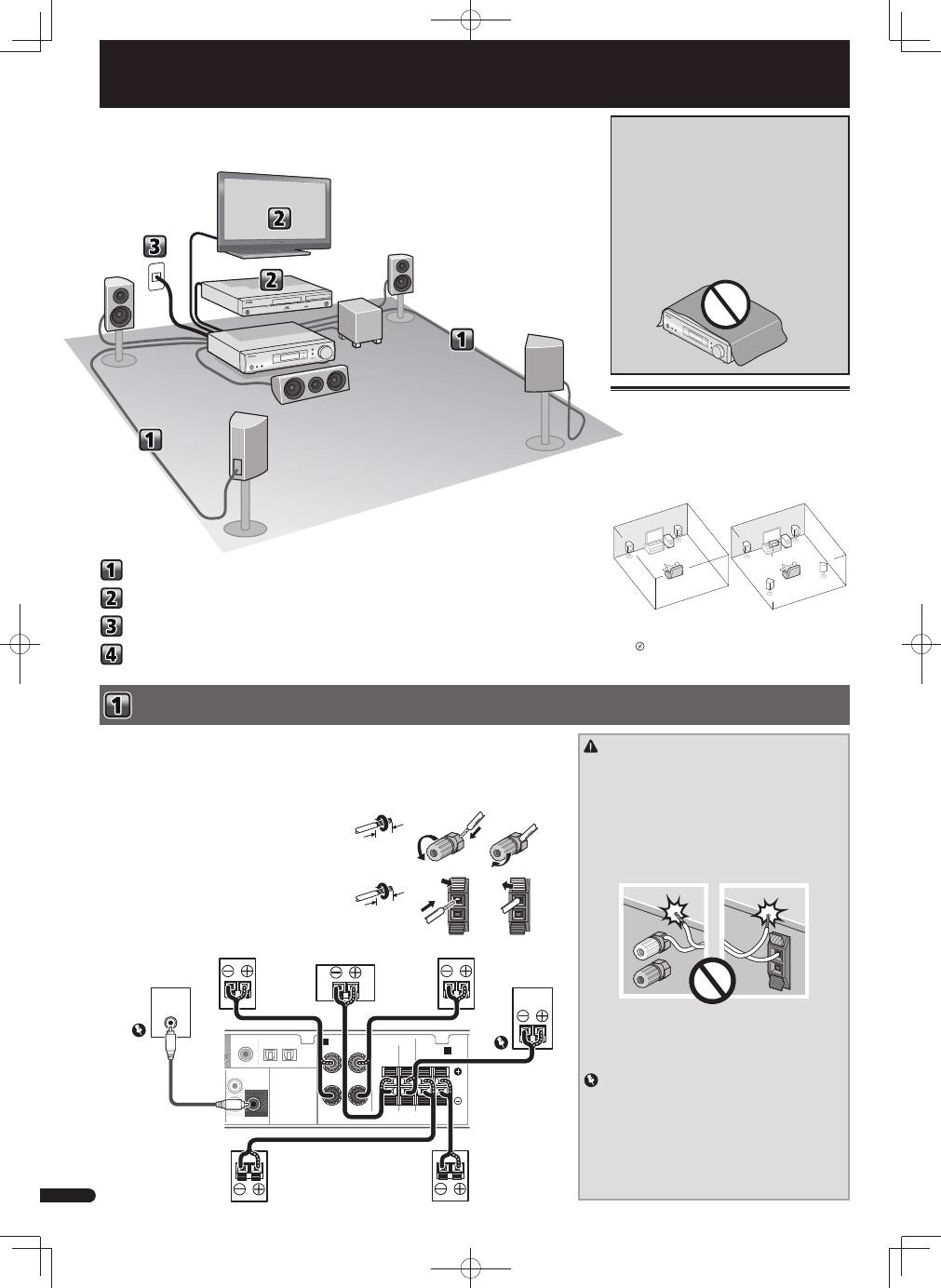
Connecting the speakers
Connecting the speakers
Connecting a TV and playback component
Plugging the receiver
Basic setup
CAUTION
• These speaker terminals carry
HAZARDOUS LIVE
voltage.
To prevent the risk of electric shock when connecting or
disconnecting the speaker cables, disconnect the power
cord before touching any uninsulated parts.
• Make sure that all the bare speaker wire is twisted
together and inserted fully into the speaker terminal. If
any of the bare speaker wire touches the back panel it
may cause the power to cut off as a safety measure.
• Do not allow the speaker cable core to come into contact
with the receiver body.
– If the speaker cable core comes into contact with any
metal portion of the receiver’s body, it may damage the
speakers and cause smoke and fire.
Insert speaker cables securely into the terminals and
check that the cable does not come out of easily.
Important
• SPEAKERS SUBWOOFER terminals are Pioneer’s passive
subwoofer S-SLW500 connection terminals. If using
another model of subwoofer, be sure to use a model with
built-in amp and connect to the PREOUT SUBWOOFER
terminal.
• Please connect either passive or powered subwoofers,
as connecting both makes it impossible to achieve the
correct sound effect.
SPEAKERS
AUDIO
SURR BACK/
FRONT HEIGHT
PRE OUT
OPTICAL
SUBWOOFER
R
L
(Single)
COAXIAL
CD IN
TV IN DIGITAL AUX IN
FRONT
R
L
A
CENTER
SUB
WOOFER SURROUND /
R
L
B
LINE LEVEL
INPUT
Front Right
Center
Front Left
Subwoofer
S-SLW500
Powerd
Subwoofer
Surround
Right
Surround
Left
Make sure you connect the speaker on the right to the right (R) terminal and the speaker on the left to the
left (L) terminal. Also make sure the positive and negative (+/–) terminals on the receiver match those on
the speakers.
You can use speakers with a normal impedance between 4
Ω
and 16
Ω
.
Bare wire connections
Front speaker terminals:
1
Twist exposed wire strands together.
2
Loosen terminal and insert exposed wire.
3
Tighten terminal.
Other speaker terminals:
1
Twist exposed wire strands together.
2
Push open the tabs and insert exposed wire.
3
Release the tabs.
Placing the speakers
The receiver will work with just two stereo speakers (the
front speakers in the diagram) but using at least three
speakers is recommended, and a complete setup is
best for surround sound.
To achieve the best possible surround sound, install
your speakers as shown below.
2.1 channel surorund system: 5.1 channel surorund system:
R
L
SW
R
SL
L
SW
C
SR
• In addition, surround back speakers, front height
speakers or Speaker B can also be connected.
"Connect the surround back or front height
speakers"
1
2
3
1
2
3
English
Flow of settings on the receiver
VENTILATION CAUTION
When installing this unit, make sure to leave space
around the unit for ventilation to improve heat radiation
(at least 10 cm at top, 5 cm at rear, and 5 cm at each
side).
WARNING
Slots and openings in the cabinet are provided for
ventilation to ensure reliable operation of the product,
and to protect it from overheating. To prevent fire
hazard, the openings should never be blocked or
covered with items (such as newspapers, table-cloths,
curtains) or by operating the equipment on thick carpet
or a bed.
D3-4-2-1-7b*_A1_En
Be sure to complete
all connections before
connecting this unit to
the AC power source.
The unit is a full-fledged AV receiver equipped with an
abundance of functions and terminals. It can be used
easily after following the procedure below to make the
connections and settings.
L
Front left
SW
Subwoofer
C
Center
TV
This receiver
Blu-ray Disc player
R
Front right
SL
Surround left
SR
Surround right
10 mm
10 mm
VSX-S300̲SYXCN̲QSG̲設変book.indb 2
VSX-S300̲SYXCN̲QSG̲設変book.indb 2
2012/04/23 14:17:06
2012/04/23 14:17:06
