
Pioneer VSX-S300-S: Connecting a TV and playback component Plugging the receiver
Connecting a TV and playback component Plugging the receiver: Pioneer VSX-S300-S
Table of contents
- What’s in the box AUDIO/VIDEO MULTI-CHANNEL RECEIVER Thank you for buying this Pioneer product. This Quick Start Guide includes instructions for basic connections and operations to allow simple use of the receiver. For detailed descriptions of the receiver, see the “Operating Instructions” provided on the included CD-ROM ( ).
- Connecting the speakers Flow of settings on the receiver
- Connecting a TV and playback component Plugging the receiver
- Basic setup Automatically setting up for surround sound (MCACC) Canceling the Auto Power Down Canceling the demo display
- Basic playback
English
Français
Italiano
Español
Nederlands
Deutsch
3
En
Connecting a TV and playback component Plugging the receiver
Important
• If the receiver is connected to a TV using an HDMI
cable, the on-screen display (OSD) will not be
displayed. Be sure to use a standard RCA analog
video cable to connect. In this case, switch the TV
input to analog to see the OSD screen (for setup,
etc.) on the TV.
• When the Control with HDMI function is ON and
the receiver is connected to a compatible TV with
an HDMI cable, and you switch the input of the
TV to composite, the input of the receiver may
automatically switch to TV. If this happens, switch
the receiver’s input back to the original input, or
turn OFF the Control with HDMI function.
"HDMI Setup"
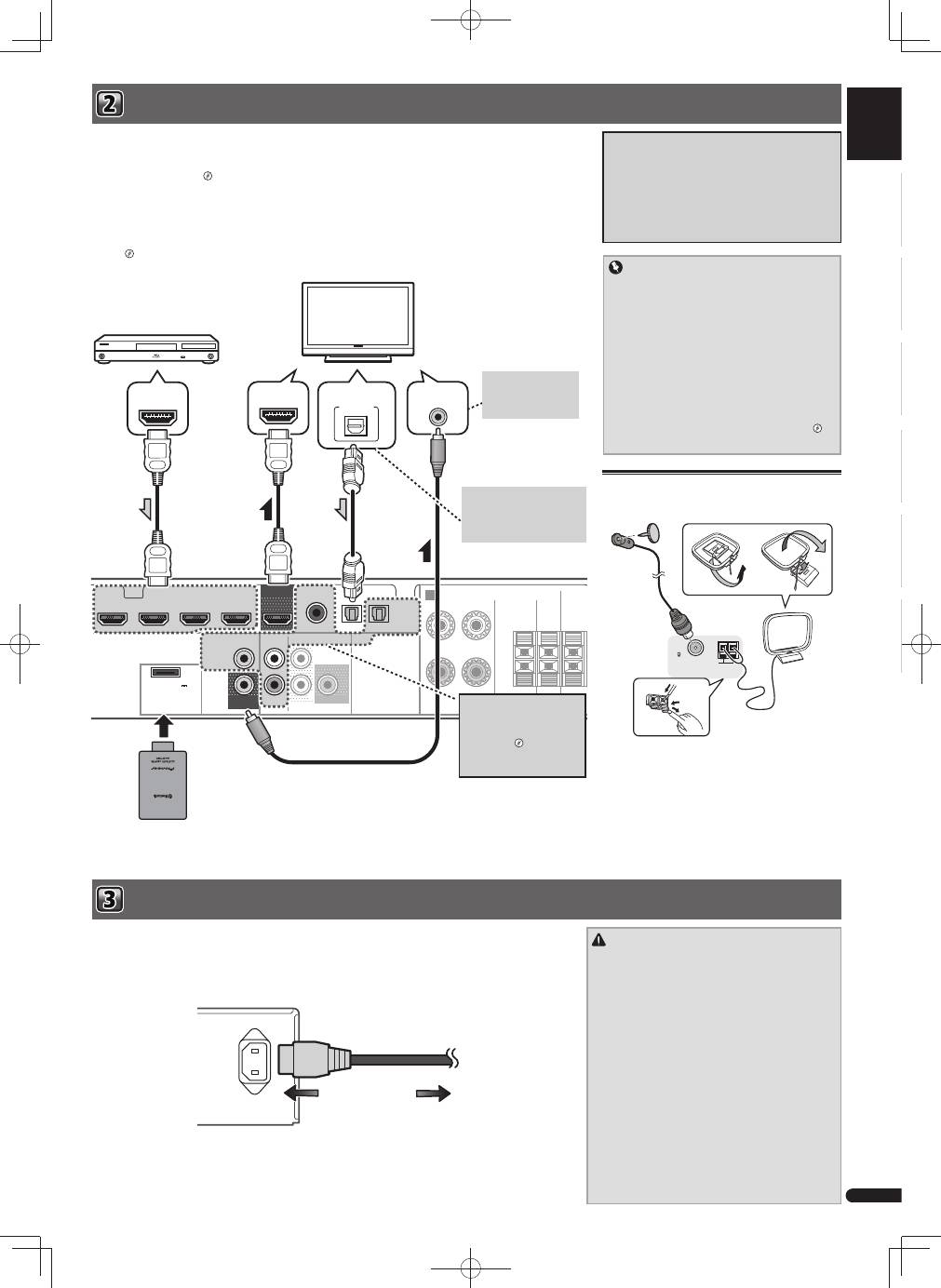
If you have an HDMI or DVI (with HDCP) equipped component (Blu-ray Disc player, etc.), you can connect it to this
receiver using a commercially available HDMI cable.
If the TV and playback components support the Control with HDMI feature, the convenient Control with HDMI
functions can be used.
"Control with HDMI function"
• The following connection/setting is required to listen to the sound of the TV over this receiver.
– If the TV does not support the HDMI Audio Return Channel function, connect the receiver and TV with audio
cables (as shown).
– If the TV supports the HDMI Audio Return Channel function, the sound of the TV is input to the receiver via the
HDMI terminal, so there is no need to connect an audio cable. In this case, set ARC at HDMI Setup to ON.
"HDMI Setup"
About video outputs connection
This receiver is not loaded with a video converter.
When you use HDMI cables for connecting to the
input device, the same cables should be used for
connecting to the TV.
The signals input from the analog (composite) video
input of this unit will not be output from the HDMI
OUT.
HDMI
SPEAKERS
AUDIO
VIDEO
SURR BACK/
FRONT HEIGHT
PRE OUT
ASSIGNABLE
OPTICAL
SUBWOOFER
R
L
(Single)
OUT
MONITOR
OUT
ANALOG
AUX
IN
(
ANALOG
AUX
)
IN
COAXIAL
CD IN
STB IN
GAME IN
BD/BDR IN
DVD/DVR IN
TV IN DIGITAL AUX IN
FRONT
R
L
A
ADAPTER PORT
(
OUTPUT 5 V
0.1 A MAX
)
CENTER
SUB
WOOFER SURROU
R
VIDEO IN
HDMI IN
HDMI OUT
DIGITAL AUDIO OUT
OPTICAL
HDMI/DVI-compatible components
(Blu-ray Disc player, etc.)
HDMI/DVI-compatible TV
This connection is
necessary in order to
see the OSD of the unit
on the TV.
If the TV does not support the
HDMI Audio Return Channel
function, this connection is
required to listen to the TV
sound over the receiver.
If the device you wish to
connect does not have an
HDMI output terminal, it
can be connected via these
terminals.
"
Connecting
your component with no HDMI
terminal
"
CAUTION
• Handle the power cord by the plug part. Do not pull
out the plug by tugging the cord, and never touch the
power cord when your hands are wet, as this could
cause a short circuit or electric shock. Do not place
the unit, a piece of furniture, or other object on the
power cord or pinch the cord in any other way. Never
make a knot in the cord or tie it with other cables. The
power cords should be routed so that they are not
likely to be stepped on. A damaged power cord can
cause a fire or give you an electric shock. Check the
power cord once in a while. If you find it damaged,
ask your nearest Pioneer authorized independent
service company for a replacement.
• Do not use any power cord other than the one
supplied with this unit.
• Do not use the supplied power cord for any purpose
other than that described below.
• The receiver should be disconnected by removing the
mains plug from the wall socket when not in regular
use, e.g., when on vacation.
Connecting antennas
Connect FM wire antenna and the the AM loop antenna
as shown below.
ANTENNA
FM
UNBAL
75
AM LOOP
Only plug in after you have connected all your components to this receiver, including the speakers.
1
Plug the supplied power cord into the AC IN socket on the back of the receiver.
2
Plug the other end into a power outlet.
AC IN
To power outlet
Bluetooth
® ADAPTER
AS-BT100 or AS-BT200
(sold separately)
Refer to the Operating Instructions in CD-ROM for
instructions on how to connect and setup the
Bluetooth
ADAPTER and how to play music.
The Bluetooth® word mark and logos are registered
trademarks owned by Bluetooth SIG, Inc. and any use
of such marks by PIONEER CORPORATION is under
license. Other trademarks and trade names are those of
their respective owners.
VSX-S300̲SYXCN̲QSG̲設変book.indb 3
VSX-S300̲SYXCN̲QSG̲設変book.indb 3
2012/04/23 14:17:07
2012/04/23 14:17:07
