
Pioneer VSX-827-S: Initial Setup Before you start Canceling the demo display Automatically setting up for surround sound (MCACC) Canceling the Auto Power Down
Initial Setup Before you start Canceling the demo display Automatically setting up for surround sound (MCACC) Canceling the Auto Power Down: Pioneer VSX-827-S
Table of contents
- Quick Start Guide What’s in the box
- Connecting up Connecting the speakers
- Initial Setup Before you start Canceling the demo display Automatically setting up for surround sound (MCACC) Canceling the Auto Power Down
- Basic playback Multichannel playback Listening to the radio Saving station presets Listening to station presets
- To enjoy the many functions of the unit to the fullest extent Playing an iPod Listening to Internet radio stations
4
Initial Setup
Before you start
1
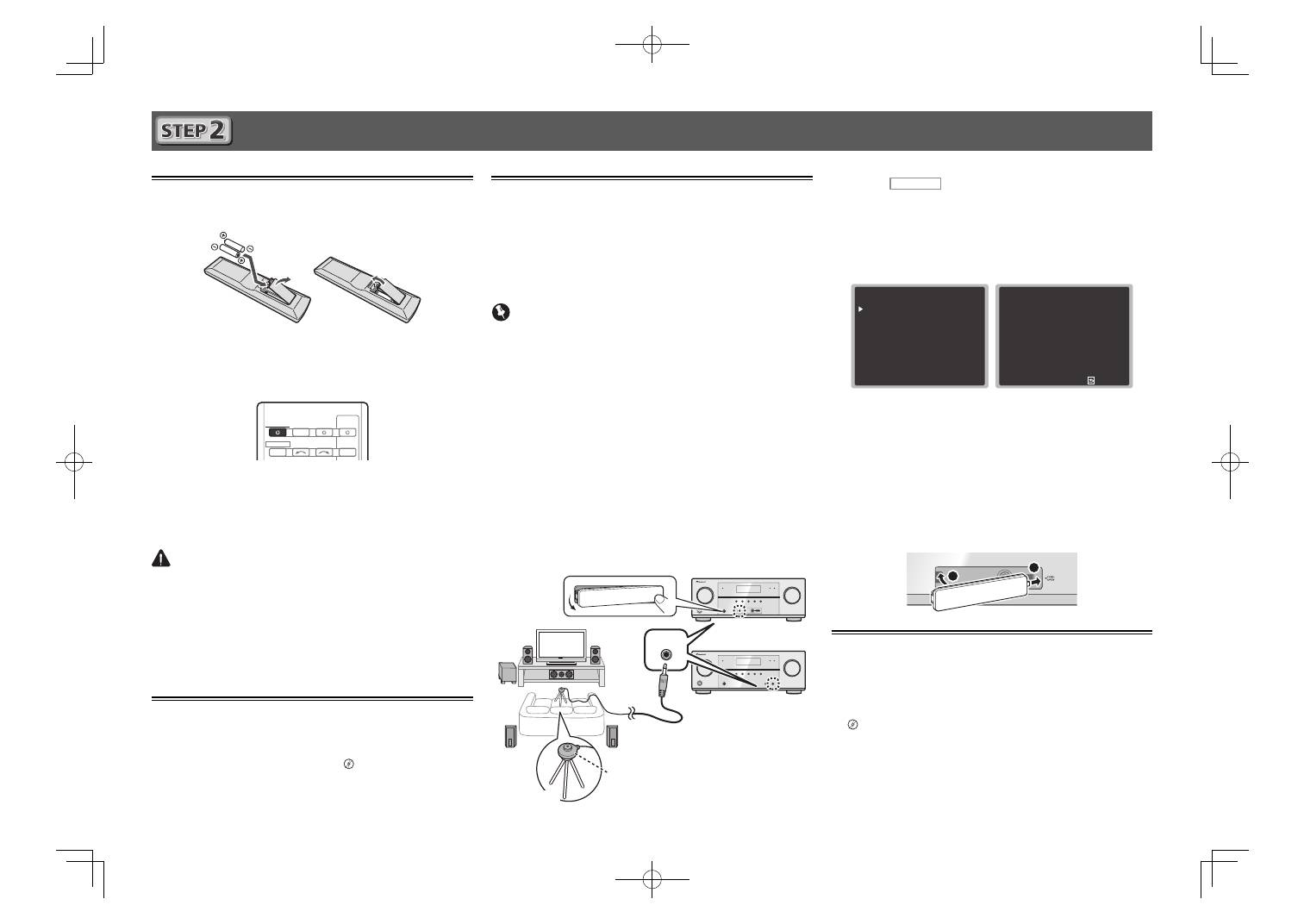
Put the batteries in the remote control.
The batteries included with the unit are to check initial
operations; they may not last over a long period. We
recommend using alkaline batteries that have a longer life.
2
Switch on the receiver and your TV.
INPUT SELECT
SOURCE
SLEEP
TV
CONTROL
INPUT
RECEIVER
RECEIVER
3
Switch the TV input so that it connects to the
receiver.
4
Turn the subwoofer on and turn up the
volume.
CAUTION
• Do not use or store batteries in direct sunlight or other
excessively hot place, such as inside a car or near a
heater. This can cause batteries to leak, overheat, explode
or catch fire. It can also reduce the life or performance of
batteries.
• When disposing of used batteries, please comply with
governmental regulations or environmental public
institution’s rules that apply in your country/area.
Canceling the demo display
The display on the front panel shows various information (demo
displays) when the receiver is not operating.
You can turn off the demo display.
“The FL Demo Mode
menu”
on page 31
(VSX-422)
/ page 52
(VSX-827/VSX-527)
• The demo mode is canceled automatically when the Auto
MCACC setup is performed (see below).
Automatically setting up for
surround sound (MCACC)
The Auto Multi-Channel Acoustic Calibration (MCACC) setup
uses the supplied setup microphone to measure and analyze
the test tone that is outputted by the speakers. This setup
enables automatic high precision measuring and settings;
utilizing it will create an optimum user listening environment.
Important
• Measure in a quiet environment.
• If you have a tripod, use it to place the microphone so
that it’s about ear level at your normal listening position.
Otherwise, place the microphone at ear level using a table
or a chair.
• Accurate measurements may not be possible if there are
obstacles between the speakers and the listening position
(microphone).
• When measuring, step away from the listening position,
and operate using the remote control from the external
side of all the speakers.
•
VSX-827/VSX-527 only:
Before using the Auto MCACC
setup, the
NETRADIO
,
M.SERVER
,
FAVORITE
,
iPod/USB
or
ADAPTER
input should not be selected as an input
source.
1
Connect the supplied setup microphone.
MCACC
SETUP MIC
CONTROL
ON / OFF
2
Press
RECEIVER
on the remote control, then
press the HOME MENU button.
The Home Menu appears on your TV.
3
Select ’Auto MCACC’ from the Home Menu,
then press ENTER.
Automatic measuring will start.
H o m e M e nu
1 . Au t o M C AC C
2 . M a nu a l S P S e t u p
3 . I n p u t A s s i g n
4 . P r e O u t S e t t i n g
5 . H D M I S e t u p
6 . Au t o Pow e r D ow n
7 . N e t wo r k S t a n d by
8 . F L D e m o M o d e
1 . Au t o M C AC C
N ow A n a ly z i n g
S u r ro u n d A n a ly z i n g
S p e a k e r S y s t e m
S p e a k e r D i s t a n c e
C h a n n e l L ev e l
A c o u s t i c C a l E Q
R e t u r n
• Measuring will take about 3 to 12 minutes.
4
Follow the instructions on-screen.
• Automatic setting is complete when the Home Menu
screen appears.
5
Make sure the setup microphone is
disconnected.
VSX-827/VSX-527 only:
Attach the front cover as shown in
the following illustration.
MCACC
SETUP MIC
VIDEO
iPod
iPhone
iPad
USB
1
2
Canceling the Auto Power Down
When this receiver is not used over a period of several hours, it
will power down automatically. The automatic power-off timer
is set to six hours under factory settings, and the timing can
be changed or the power-off function switched off altogether.
“The Auto Power Down menu”
on page 31
(VSX-422)
/ page
52
(VSX-827/VSX-527)
Tripod
Microphone
VSX-827/VSX-527
VSX-422
VSX-527
VSX-827̲SYXE̲QSG̲book.indb 4
VSX-827̲SYXE̲QSG̲book.indb 4
2012/03/02 10:58:58
2012/03/02 10:58:58
