
Pioneer VSX-827-S: Basic playback Multichannel playback Listening to the radio Saving station presets Listening to station presets
Basic playback Multichannel playback Listening to the radio Saving station presets Listening to station presets: Pioneer VSX-827-S
Table of contents
- Quick Start Guide What’s in the box
- Connecting up Connecting the speakers
- Initial Setup Before you start Canceling the demo display Automatically setting up for surround sound (MCACC) Canceling the Auto Power Down
- Basic playback Multichannel playback Listening to the radio Saving station presets Listening to station presets
- To enjoy the many functions of the unit to the fullest extent Playing an iPod Listening to Internet radio stations
English
Français
Italiano
Español
Nederlands
Deutsch
5
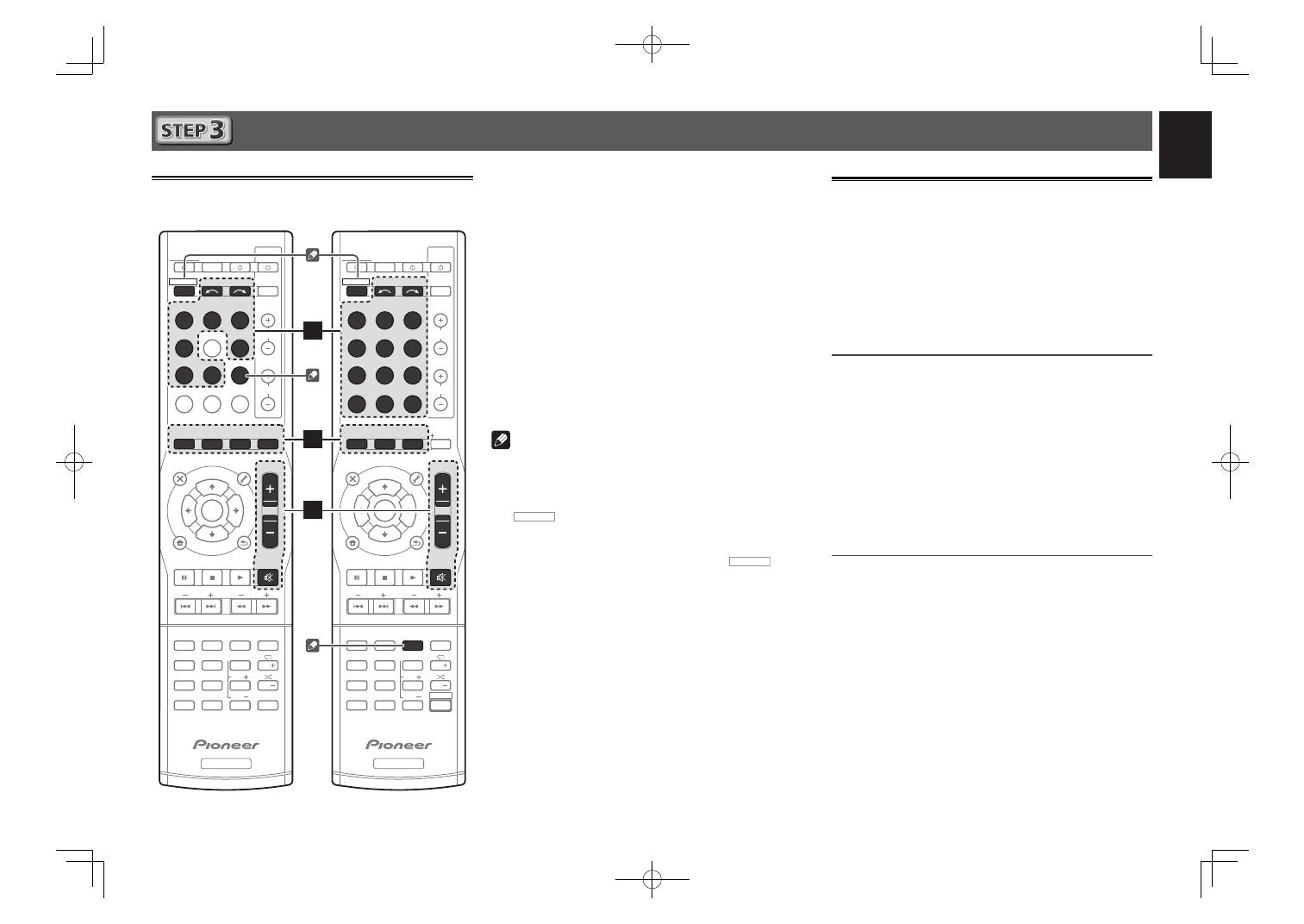
Basic playback
Multichannel playback
BD
DVD
INPUT SELECT
SOURCE
SLEEP
TV
CONTROL
CD
INPUT
1
4
7
MIDNIGHT
CH
RECEIVER
TUNER
iPod/USB
SAT/CBL
GAME
TV
SIGNAL SEL
Acous.EQ
PHASE
S.RETRIEVER
ENTER
ADV SURR
AUTO/
DIRECT
VOL
+
10
2
5
8
SPEAKERS
DIMMER
LEV
LEV
SB CH
DISP
CLR
3
6
9
0
ENTER
CH
CH
CH SELECT
MUTE
RETURN
AUDIO
PARAMETER
AUDIO
PARAMETER
TOOLS
VOLUME
VOLUME
BAND
MENU
HOME
MENU
iPod CTRL
PTY
HOME
MENU
iPod CTRL
PTY
TRE
BASS
TOP
MENU
RECEIVER
TUNE
TUNE
P
R
E
S
E
T
P
R
E
S
E
T
RECEIVER
ALC/
STANDARD
STEREO
NETWORK iPod/USB
INPUT SELECT
SOURCE
SLEEP
TV
CONTROL
ADAPTER
INPUT
1
4
7
MIDNIGHT
CH
RECEIVER
BD
DVD
DVR/BDR
SAT/CBL
GAME
VIDEO
CD
TUNER
TV
ENTER
Favorite
ADV SURR
AUTO/
DIRECT
VOL
+
10
2
5
8
SPEAKERS
DIMMER
LEV
LEV
SB CH
EQ
PHASE
SIGNAL SEL
DISP
CLR
3
6
9
0
ENTER
CH
CH
CH SELECT
S.RETRIEVER
MUTE
RETURN
TOOLS
BAND
MENU
TRE
BASS
TOP
MENU
RECEIVER
TUNE
TUNE
P
R
E
S
E
T
P
R
E
S
E
T
RECEIVER
ALC/
STANDARD
SHIFT
3
5
2
1
Switch on the playback component.
E.g. Turn the Blu-ray Disc player connected to the
HDMI BD IN
terminal on.
2
Switch the input of the receiver.
E.g. Press
BD
to select the
BD
input.
3
Press AUTO/DIRECT to select
’AUTO SURROUND’.
Also press
ALC/STANDARD
or
ADV SURR
for
multichannel playback. Select your preferred listening
mode.
4
Start the playback component’s playback.
E.g. Start playback of the Blu-ray Disc player.
5
Use VOLUME +/– to adjust the volume level.
Sound can be switched off by pressing
MUTE
button.
Note
• In order to listen to the audio from the source component
that is connected to this receiver using a coaxial or an
optical cable, choose the
C1
(coaxial) or
O1
(optical)
input. (
VSX-422:
Press
SIGNAL SEL
.
VSX-827/VSX-527:
Press
RECEIVER
then press
SIGNAL SEL
.)
• The input of the receiver will switch over, and you will
be able to operate other components using the remote
control. To operate the receiver, first press
RECEIVER
on
the remote control, then press the appropriate button to
operate.
• It will take about 1 minute to be able to use the
NETWORK
(internet radio and such),
iPod/USB
, or
ADAPTER PORT
from the time the power is turned on.
Listening to the radio
1
Press TUNER to select the tuner.
If necessary, press
BAND
to change the band (FM or AM).
2
Press TUNE
to tune to a station.
• Press and hold
TUNE
for about a second. The receiver
will start searching for the next station.
• If you’re listening to an FM station but the reception
is weak, press
BAND
to select FM MONO and set the
receiver to the mono reception mode.
Saving station presets
If you often listen to a particular radio station, it’s convenient to
have the receiver store the frequency for easy recall whenever
you want to listen to that station.
1
Press TOOLS while receiving a signal from the
station you want to store.
The preset number is blinking.
2
Press PRESET
to select the station preset
you want, then press ENTER.
The preset number stop blinking and the receiver stores
the station.
Listening to station presets
You will need to have some presets stored to do this.
Press PRESET
to select the station preset
you want.
VSX-422
VSX-827 / VSX-527
VSX-827̲SYXE̲QSG̲book.indb 5
VSX-827̲SYXE̲QSG̲book.indb 5
2012/03/02 10:59:00
2012/03/02 10:59:00
