
Pioneer VSX-529-S: Connecting up Connecting the speakers
Connecting up Connecting the speakers: Pioneer VSX-529-S
Table of contents
- Quick Start Guide What’s in the box
- Connecting up Connecting the speakers
- Connecting a TV and playback Connecting antennas Connecting to the network through LAN interface
- Initial Setup Before you start Automatically setting up for surround sound (MCACC) (VSX-824/VSX-529/VSX-424)
- Basic playback Multichannel playback
- Listening to the radio Saving station presets Listening to station presets Playing an iPod Listening to Internet radio stations
- To enjoy the many functions of the unit to the fullest extent
2
Connecting up
Connecting the speakers
The receiver will work with just two stereo speakers (the front speakers in the diagram) but using
at least three speakers is recommended, and a complete setup is best for surround sound.
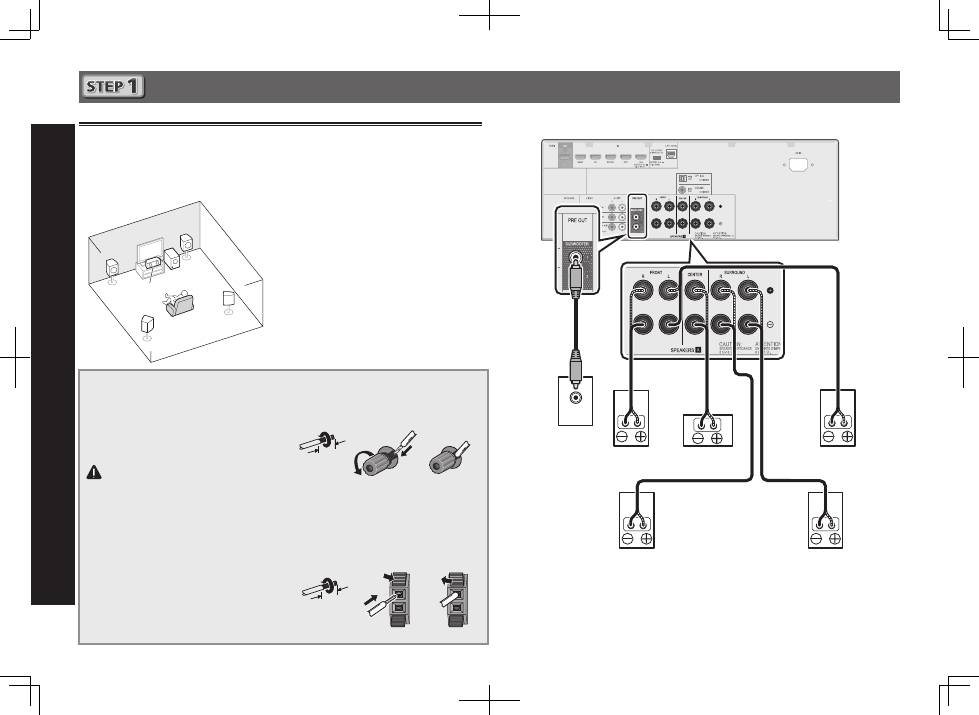
To achieve the best possible surround sound, install your speakers as shown below.
5.1 channel surround system:
After installing the speakers, connect them as shown below.
LINE LEVEL
INPUT
L
– Front Left
C
– Center
R
– Front Right
SL
– Surround Left
SR
– Surround Right
SW
– Subwoofer
Connecting the speaker cables
Make sure you connect the speaker on
the right to the right (
R
) terminal and the
speaker on the left to the left (
L
) terminal.
Also make sure the positive and negative
(
+/–
) terminals on the receiver match those
on the speakers.
CAUTION
•
Before making or changing
connections, switch off the power and
disconnect the power cord from the AC
outlet.
•
These speaker terminals carry
HAZARDOUS LIVE
voltage. To prevent
the risk of electric shock when
connecting or disconnecting the
speaker cables, disconnect the power
cord before touching any uninsulated
parts.
1
Twist exposed wire strands together.
2
Loosen terminal and insert exposed wire.
3
Tighten terminal.
1
2
3
10 mm
Connect the center and surround speaker
terminals of VSX-424/VSX-329 as shown below:
1
Twist exposed wire strands together.
2
Push open the tabs and insert exposed
wire.
3
Release the tabs.
1
2
3
10 mm
R
SL
L
SW
C
SR
Subwoofer
(
SW
)
Front Right (
R
)
Surround Right
(
SR
)
Surround Left
(
SL
)
Front Left (
L
)
Center (
C
)
VSX-824
The type of center and surround speaker terminals for VSX-424/VSX-329 is different from this
diagram.
You can use speakers with a nominal impedance between 6
W
and 16
W
.
