
Pioneer VSX-529-S: Basic playback Multichannel playback
Basic playback Multichannel playback: Pioneer VSX-529-S
Table of contents
- Quick Start Guide What’s in the box
- Connecting up Connecting the speakers
- Connecting a TV and playback Connecting antennas Connecting to the network through LAN interface
- Initial Setup Before you start Automatically setting up for surround sound (MCACC) (VSX-824/VSX-529/VSX-424)
- Basic playback Multichannel playback
- Listening to the radio Saving station presets Listening to station presets Playing an iPod Listening to Internet radio stations
- To enjoy the many functions of the unit to the fullest extent
5
English
Français
Italiano
Español
Nederlands
Deutsch
Basic playback
Multichannel playback
BD
DVD
INPUT SELECT
SOURCE
SLEEP
TV
CONTROL
CD
INPUT
1
4
7
MIDNIGHT
CH
RECEIVER
TUNER
iPod/USB SAT/CBL
GAME
TV
SIGNAL SEL
Acous.EQ
PHASE
S.RETRIEVER
ENTER
ADV SURR
AUTO/
DIRECT
VOL
+10
2
5
8
SPEAKERS
DIMMER
LEV
LEV
SB CH
DISP
CLR
3
6
9
0
ENTER
CH
CH
CH SELECT
MUTE
RETURN
AUDIO
PARAMETER
TOOLS
VOLUME
BAND
MENU
HOME
MENU
iPod CTRL
PTY
TRE
BASS
TOP
MENU
RECEIVER
TUNE
TUNE
PR
ES
ET
PR
ES
ET
RECEIVER
ALC/
STANDARD
STEREO
SLEEP
MUTE
CTRL
BD
AUTO
SURR
ADV
DVD
USB
TUNER
ADPT
iPod
TUN
GAME
CBL
ROKU
SAT
CD
TV
CH LEVEL
HDMI
MHL
BT
NET
S.SEL
ECO
STANDBY/ON
ENTER
CLR
SB CH
CH SEL
SP-A/B
Fav
RETURN
BAND
POP UP SUB TITLE DISP
DIMMER
STATUS
AUDIO
PRESET
TUNE
PTY
AUDIO P.
TOP
MENU
HOME
MENU
RECEIVER
LISTENING MODE
RECEIVER SIGNAL SEL
SOURCE
TOOLS
MENU
SHIFT
BASS
BASS
TRE
TRE
INPUT
CH
VOL
2
3
5
1
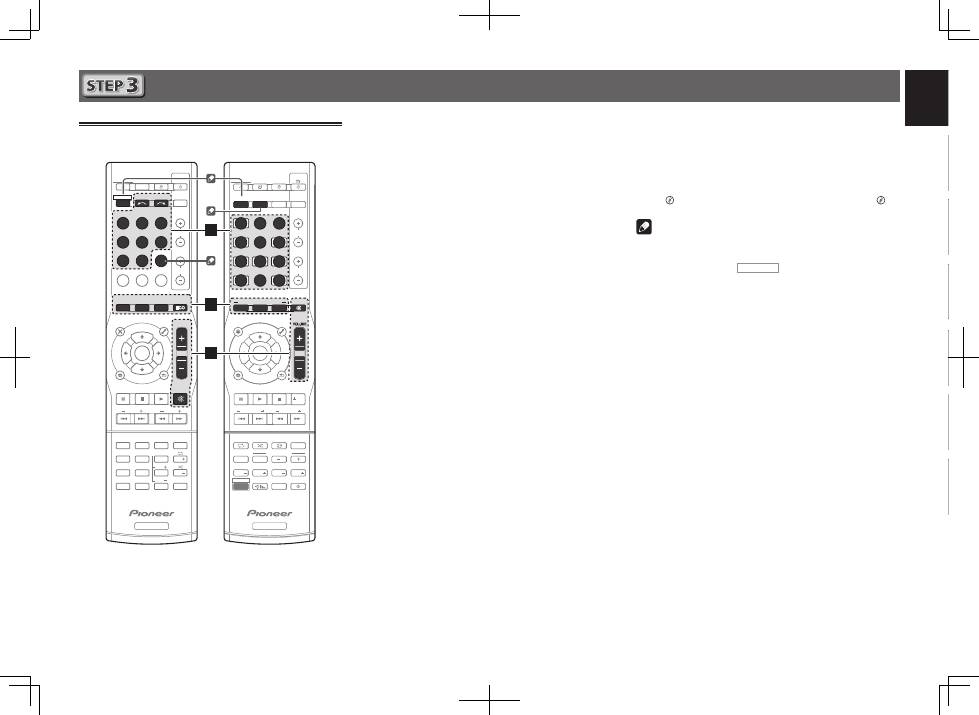
Switch on the playback component.
E.g. Turn the Blu-ray Disc player connected to the
HDMI BD IN
terminal on.
2
Switch the input of the receiver.
E.g. Press
BD
to select the
BD
input.
3
Press AUTO (VSX-824/VSX-529),
AUTO/DIRECT (VSX-424/VSX-329) to select
’AUTO SURROUND’.
Also press
SURR
(VSX-824/VSX-529),
ALC/STANDARD
(VSX-424/VSX-329) or
ADV
(VSX-824/VSX-529),
ADV SURR
(VSX-424/VSX-329) for multichannel playback. Select your
preferred listening mode.
4
Start the playback component’s playback.
E.g. Start playback of the Blu-ray Disc player.
5
Use VOLUME +/– to adjust the volume level.
•
If no sound comes out of the center speaker or surround
speaker, change the listening mode by pressing
SURR
(VSX-824/VSX-529),
ALC/STANDARD
(VSX-424/VSX-329) or
ADV
(VSX-824/VSX-529),
ADV SURR
(VSX-424/VSX-329).
E.g. Repeatedly press
ADV
(VSX-824/VSX-529),
ADV SURR
(VSX-424/VSX-329) to select [
EXT.STEREO
].
•
If there is no sound from the subwoofer
Cause:
The front speaker is set to
LARGE
.
(During 2ch audio input, the low frequency sound is
output not from the subwoofer but the front speaker)
How to fix:
If you want the sound to come from the subwoofer, please
change the speaker setup.
(There are 2 following methods)
Method 1:
Change the front speaker to
SMALL
.
The low frequency sound will be output not from the front
speaker but the subwoofer.
We recommend not changing this if the low frequency
function of the front speaker is high.
Method 2:
Change the subwoofer to
PLUS
.
The low frequency sound will output from both the front
speaker and the subwoofer.
This may lead to excessive low frequency sound.
If that happens, we suggest you do not change the setting
or change to Method 1.
l
“
Speaker Setting
” on page 33 (VSX-424/VSX-329),
“Speaker Setting”
on page 52 (VSX-824/VSX-529).
Note
•
If not using the remote control to operate:
– When operating the receiver, press
RECEIVER CTRL
(VSX-824/VSX-529),
RECEIVER
(VSX-424/VSX-329) and then
operate.
– When operating devices such as
NETWORK
(VSX-
824/VSX-529 only),
TUNER
, and
iPod
, press the various
function button (
NET
(VSX-824/VSX-529 only),
TUNER
,
iPod USB
(VSX-824/VSX-529),
iPod/USB
(VSX-424/VSX-
329), etc.) before operating.
•
In order to listen to the audio from the source component
that is connected to this receiver using a coaxial or an
optical cable, choose the
C1
(coaxial) or
O1
(optical) input.
(Press
SIGNAL SEL
.)
VSX-424/VSX-329
VSX-824/VSX-529
