
Pioneer SE-NC31C-K: Names and Functions of Parts
Names and Functions of Parts: Pioneer SE-NC31C-K
Table of contents
- Information to User Operating Environment
- Main Features
- Set Contents
- Names and Functions of Parts
- Inserting Battery
- Using the Earphone
- 3 Playing music 4 Following Use 5Precautions
- – When the use of privately owned earphones is prohibited inside the plane.
- Troubleshooting Problem Remedy
- About use of earphones
- Specifications Accessories
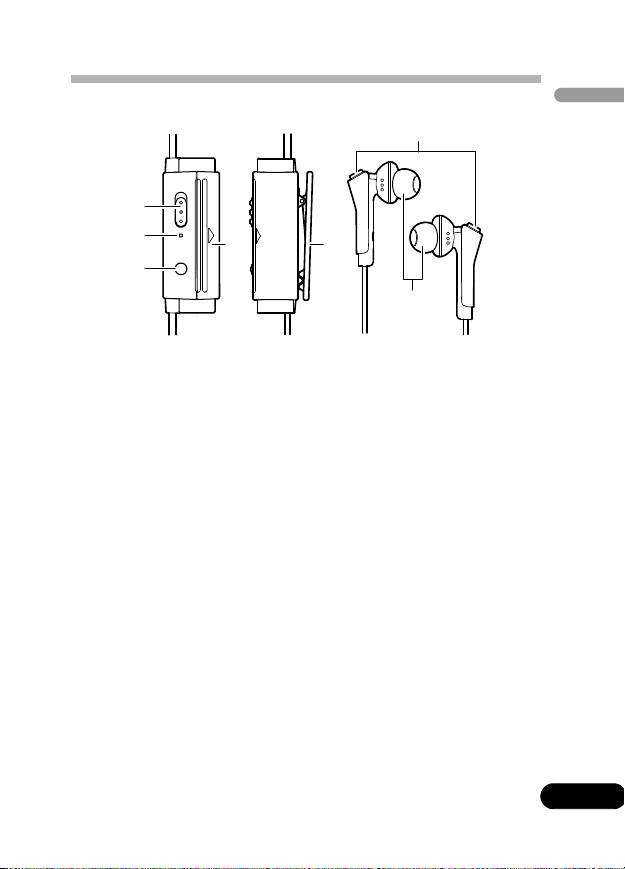
Names and Functions of Parts
English
1 Power switch
Use to turn noise-canceling function ON/OFF.
2 Power indicator
Lights when power is turned on.
3 Monitor button
Ambient sounds can be heard while this button is held
depressed.
4 Battery cover
Press in direction of arrow (triangle) to open battery cover.
5Clip
Use to fix unit to chest pocket, lapel, etc.
6 Microphones
These detect ambient sound.
7 Earphone tips (silicon rubber)
Select from sizes S, M, or L to best match your own ears.
5
En
6
1
2
4
5
3
7
SE-NC31C_en.fm 5 ページ 2010年8月3日 火曜日 午前10時52分
Top 10 manuals
100.00
NZXT HALE90 1000W99.99
Samsung SM-R38099.97
AEG BSB 18C99.97
Dell 2700W99.97
Smeg KSEC70X99.96
Beurer HDE 4099.96
Pyramida KH 50 v.299.96
MSI CSM-H81M-P3299.96
AEG HR 562799.95
Melissa 640-048