
Pioneer SC-1223-S: Multichannel playback
Multichannel playback: Pioneer SC-1223-S
Table of contents
- Remote Control Setup microphone AAA size IEC R03 dry cell batteries x2 AM loop antenna FM wire antenna These quick start guide Power cord Warranty card Safety Brochure
- English Connection and initial setup
- Connecting up Connecting the speakers
- Connecting a TV and playback components Connecting antennas Connecting to the network through LAN interface
- Before you start Automatically setting up for surround sound (MCACC)
- Multichannel playback
- Playing an iPod Listening to Internet radio stations
6
Basic playback
Multichannel playback
RECEIVER
D.ACCESS
CH LEVEL
DIMMER
SLEEP
SIGNAL SEL
SPEAKERS
MPX
PRESET
TUNE
BAND
PTY
iPod CTRL
HOME
MENU
CH
TV CONTROL
INPUT
INPUT SELECT
iPod
USB
CBL
STATUS
SAT
TUNER
ZONE 2
ZONE 3
HD ZONE
ADPT
CD
TV
RCU SETUP
SOURCE
STANDBY/ON
BDR
BD
DVD
DVR
NET
HDMI
RECEIVER
MUTE
VOLUME
VOL
TOP MENU
VIDEO
PARAMETER
AUDIO
PARAMETER
ENTER
RETURN
CLASS
ENTER
/ CLR
CH
CH
5
4
6
8
0
7
9
FEATURES
TOOLS
MENU
ALL ZONE STBY
DISCRETE ON
+Favorite
Z2
Z3
HDZ
P.CTRL+
PHASE
HDMI OUT
MCACC
AUTO/ALC/
DIRECT
AUTO
S.RTRV
STANDARD ADV SURR
ECO
PQLS
OPTION
AUDIO
DISP
MHL
2
1
3
2
4
6
3
1
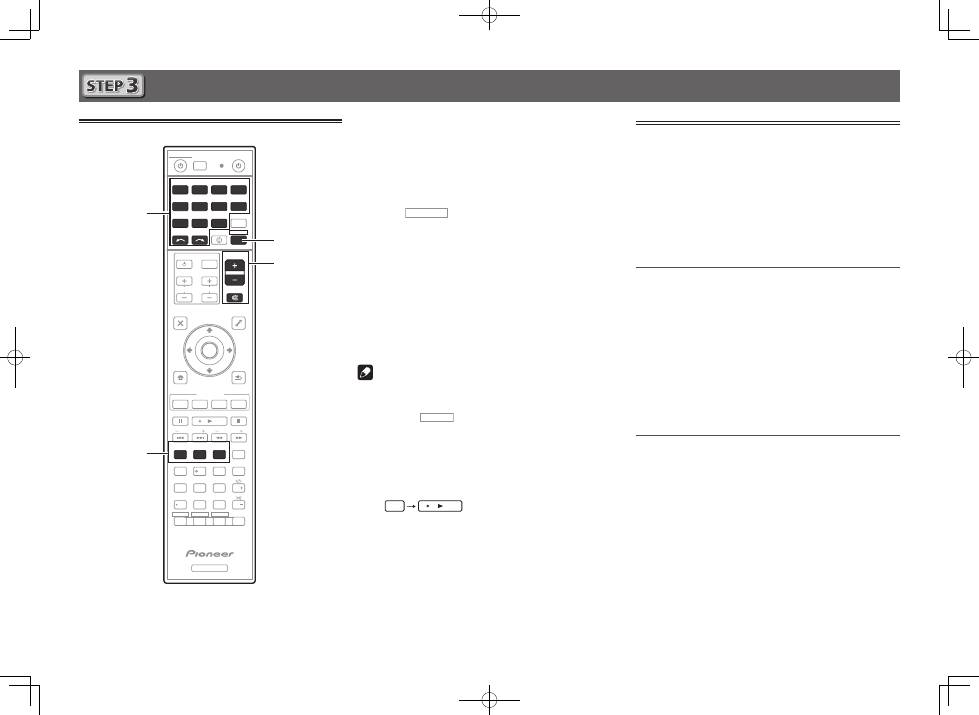
Switch on the playback component.
E.g.) Turn the Blu-ray Disc player connected to the
HDMI
BD IN
terminal on.
2
Switch the input of the receiver.
E.g.) Press
BD
to select the
BD
input.
3
Press
RECEIVER
to the receiver operation mode.
4
Press AUTO/ALC/DIRECT to select ’AUTO
SURROUND’.
For multi-channel playback with a 2-channel audio input
(TV, music, etc.), press the
STANDARD
or
ADV SURR
button to select your preferred listening mode.
5
Start the playback component’s playback.
E.g.) Start playback of the Blu-ray Disc player.
6
Use VOLUME +/– to adjust the volume level.
Sound can be switched off by pressing
MUTE
button.
Note
• Switch to one of the underlined devices to use the remote
control to operate that device. To operate the receiver,
first press
RECEIVER
, then press the appropriate button to
operate.
• The receiver’s remote control can be used to operate
not only the receiver but also a variety of other devices,
including an iPod/USB device, a Blu-ray Disc player, a TV,
etc.
E.g.) Playing a Blu-ray Disc player
BD
Listening to the radio
1
Press TUNER to select the tuner.
If necessary, press
BAND
to change the band (FM or AM).
2
Press TUNE +/– to tune to a station.
• Press and hold
TUNE +/–
for about a second. The receiver
will start searching for the next station.
• If you’re listening to an FM station but the reception is
weak, press
MPX
to select FM MONO and set the receiver
to the mono reception mode.
Saving station presets
If you often listen to a particular radio station, it’s convenient to
have the receiver store the frequency for easy recall whenever
you want to listen to that station.
1
Press TOOLS while receiving a signal from the
station you want to store.
The preset number is blinking.
2
Press PRESET +/– to select the station preset
you want, then press ENTER.
The preset number stop blinking and the receiver stores
the station.
Listening to station presets
You will need to have some presets stored to do this.
Press PRESET +/– to select the station preset
you want.
