
Pioneer SC-1223-S: English Connection and initial setup
English Connection and initial setup: Pioneer SC-1223-S
Table of contents
- Remote Control Setup microphone AAA size IEC R03 dry cell batteries x2 AM loop antenna FM wire antenna These quick start guide Power cord Warranty card Safety Brochure
- English Connection and initial setup
- Connecting up Connecting the speakers
- Connecting a TV and playback components Connecting antennas Connecting to the network through LAN interface
- Before you start Automatically setting up for surround sound (MCACC)
- Multichannel playback
- Playing an iPod Listening to Internet radio stations
2
English
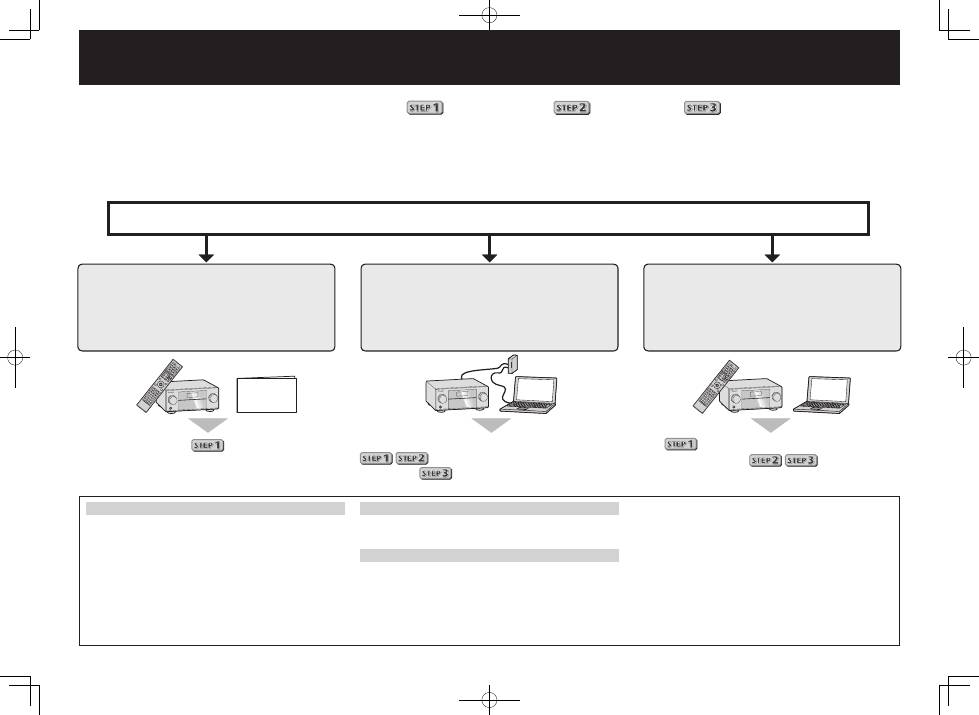
Connection and initial setup following
the instructions in the
“Wiring Navi” in AVNavigator
(Connection to the network is required
for the initial setup.)
Connect by following the instructions
in the “Wiring Navi” in AVNavigator
(For when the receiver is not to be
connected to a network.)
Connection and initial setup by
referring to this Quick Start Guide
It is unnecessary to read this guide for explanations;
will be explained in the “Wiring Navi”
and
in the “Operation Guide”.
will be conducted in the “Wiring Navi”,
so move on to
in this guide’
after “Wiring Navi” is completed.
Move on to
in this guide.
Connection and initial setup
Using AVNavigator
AVNavigator for Mac
1
Download “AVNavigator 2013.pkg” from
http://www.pioneer.eu.
2
Launch “AVNavigator 2013.pkg” from the “Downloads”
folder.
3
Follow the instructions on the screen to install.
4
Launch “AVNavigator 2013”.
• The file is located in the “Applications” folder just under
the hard disk (Macintosh HD).
• AVNavigator for Mac can be used with Mac OS X (10.7 or
10.8) .
AVNavigator for iPad
1
Download AVNavigator from the App Store.
2
Launch AVNavigator.
AVNavigator for Windows
Launch the desktop from the start screen (for Windows 8 only).
1
Load the included CD-ROM into your computer’s CD drive.
• If the CD-ROM’s top menu screen is not displayed,
double-click “MAIN_MENU.exe” on the CD-ROM.
• The CD-ROM’s top menu screen appears.
• This CD-ROM can be used with Microsoft
®
Windows
®
XP/Windows Vista
®
/Windows
®
7/Windows
®
8.
• The supported browser is Microsoft Internet Explorer
®
8, 9 or 10.
2
Click “AVNavigator” on the “Installing Software” menu.
3
Follow the instructions on the screen to install.
4
Click [AVNavigator 2013.II] on the desktop to launch
AVNavigator.
• AVNavigator is launched and Wiring Navi starts up.
• Depending on the network or security settings on the
computer on which AVNavigator is to be installed,
AVNavigator’s functions may not work properly.
Enjoy easy multichannel playback with this unit in 3 steps:
Connecting up
→
Initial setup
→
Basic playback
.
Convenient with easy connection and initial setup upon following the instructions displayed on-screen by installing AVNavigator.
• The Mac OS version of AVNavigator can be downloaded from http://www.pioneer.eu.
• The iPad version of AVNavigator can be downloaded from the App Store.
• The provided CD-ROM includes the Windows version of AVNavigator.
Start connecting by choosing one method from among the following in accordance with your play environment.
Quick Start
Guide
