
Pioneer P1-K: Connecting the speakers Connecting playback components Connecting your iPod/iPhone/iPad mini or USB Connecting aerials device
Connecting the speakers Connecting playback components Connecting your iPod/iPhone/iPad mini or USB Connecting aerials device: Pioneer P1-K
Table of contents
- What’s in the box Remote control CD-ROM (Operating instructions) Remote control cable RCA audio cable (red/white plugs) FM aerial (XC-P01 only), AAA size IEC R03 dry cell batteries x2 These guides Power cord x2 Speaker caution sheet Warranty card
- Information for users on collection and disposal of old equipment and used batteries POWER-CORD CAUTION Operating Environment VENTILATION CAUTION Condensation
- Connecting the speakers Connecting playback components Connecting your iPod/iPhone/iPad mini or USB Connecting aerials device
- Basic control Installing the unit Loading the batteries
English
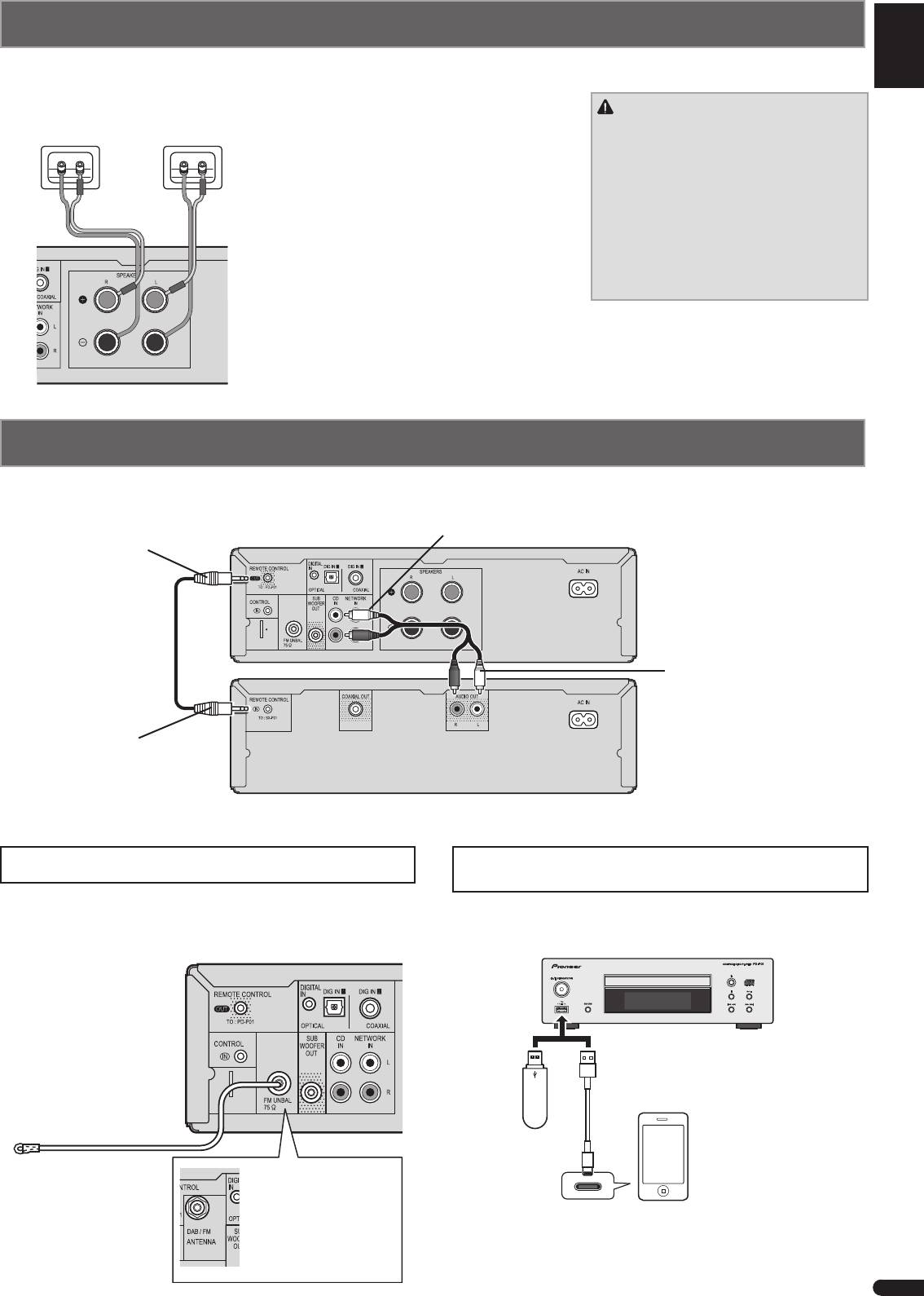
Connecting the speakers
Be sure to complete all connections before connecting the unit to the AC power source.
Make sure you connect the speaker on the
CAUTION
Right speaker Left speaker
right to the right (R) terminal and the speaker
Français
on the left to the left (L) terminal. Also make
•
These speaker terminals carry
HAZARDOUS LIVE
sure the positive and negative (+/–) terminals
voltage. To prevent
on the stereo receiver match those on the
the risk of electric shock when connecting
speakers.
or disconnecting the speaker cables,
disconnect the power cord before touching
You can use speakers with a nominal
any uninsulated parts.
impedance between 4
W
and 16
W
.
Español
•
Make sure that all the bare speaker wire
is twisted together and inserted fully into
the speaker terminal. If any of the bare
speaker wire touches the back panel it
may cause the power to cut off as a safety
measure.
Deutsch
Italiano
Connecting playback components
Connect the stereo receiver and CD player with the supplied remote control cable and RCA audio cable.
Nederlands
To REMOTE CONTROL
Stereo receiver (XC-P01 for example)
To CD IN sockets
OUT socket
ANTENNA
Remote control cable
To AUDIO OUT sockets
To REMOTE CONTROL
IN socket
CD player
Connecting your iPod/iPhone/iPad mini or USB
Connecting aerials
device
Connect the FM aerial wire (XC-P01) or DAB/FM aerial wire (XC-
Connect your iPod/iPhone/iPad mini or USB device to the iPod/
P01DAB) as shown below.
iPhone/iPad mini/USB terminal on the front panel of the CD player.
Stereo receiver (XC-P01 for example)
ANTENNA
USB cable provided with iPod/iPhone/iPad mini
units, or a commercially available USB cable to
support iPod/iPhone/iPad mini (for iPod connection)
iPod/iPhone/iPad mini
FM aerial
USB mass
storage
device
XC-P01DAB:
Connect the DAB/FM aerial
to the DAB/FM socket.
3
En
XC_P01_P01DAB_QSG.indb 3 2012/12/21 13:32:43
