
Pioneer P1-K: Basic control Installing the unit Loading the batteries
Basic control Installing the unit Loading the batteries: Pioneer P1-K
Table of contents
- What’s in the box Remote control CD-ROM (Operating instructions) Remote control cable RCA audio cable (red/white plugs) FM aerial (XC-P01 only), AAA size IEC R03 dry cell batteries x2 These guides Power cord x2 Speaker caution sheet Warranty card
- Information for users on collection and disposal of old equipment and used batteries POWER-CORD CAUTION Operating Environment VENTILATION CAUTION Condensation
- Connecting the speakers Connecting playback components Connecting your iPod/iPhone/iPad mini or USB Connecting aerials device
- Basic control Installing the unit Loading the batteries
Basic control
CAUTION
Installing the unit
Loading the batteries
•
Incorrect use of batteries may result in
such hazards as leakage and bursting.
•
When installing this unit, make sure to put it
The batteries included with this unit are to
Observe the following precautions:
on a level and stable surface.
check initial operations; they may not last
over a long period. We recommend using
–
Never use new and old batteries together.
Don
’
t install it on the following places:
alkaline batteries that have a longer life.
–
Insert the plus and minus sides of the
–
on a color TV (the screen may distort)
batteries properly according to the marks
–
near a cassette deck (or close to a device
in the battery case.
that gives off a magnetic eld). This may
–
Batteries with the same shape may have
interfere with the sound.
different voltages. Do not use different
–
in direct sunlight
batteries together.
–
in damp or wet areas
–
When inserting the batteries, make
–
in extremely hot or cold areas
sure not to damage the springs on the
battery’s (–) terminals. This can cause
–
in places where there is vibration or other
movement
WARNING
batteries to leak or overheat.
–
When disposing of used batteries, please
–
in places that are very dusty or that have
•
Do not use or store batteries in direct
comply with governmental regulations or
hot fumes or oils (such as a kitchen)
sunlight or other excessively hot place,
environmental public institution’s rules
such as inside a car or near a heater. This
that apply in your country/area.
can cause batteries to leak, overheat,
explode or catch re. It can also reduce the
life or performance of batteries.
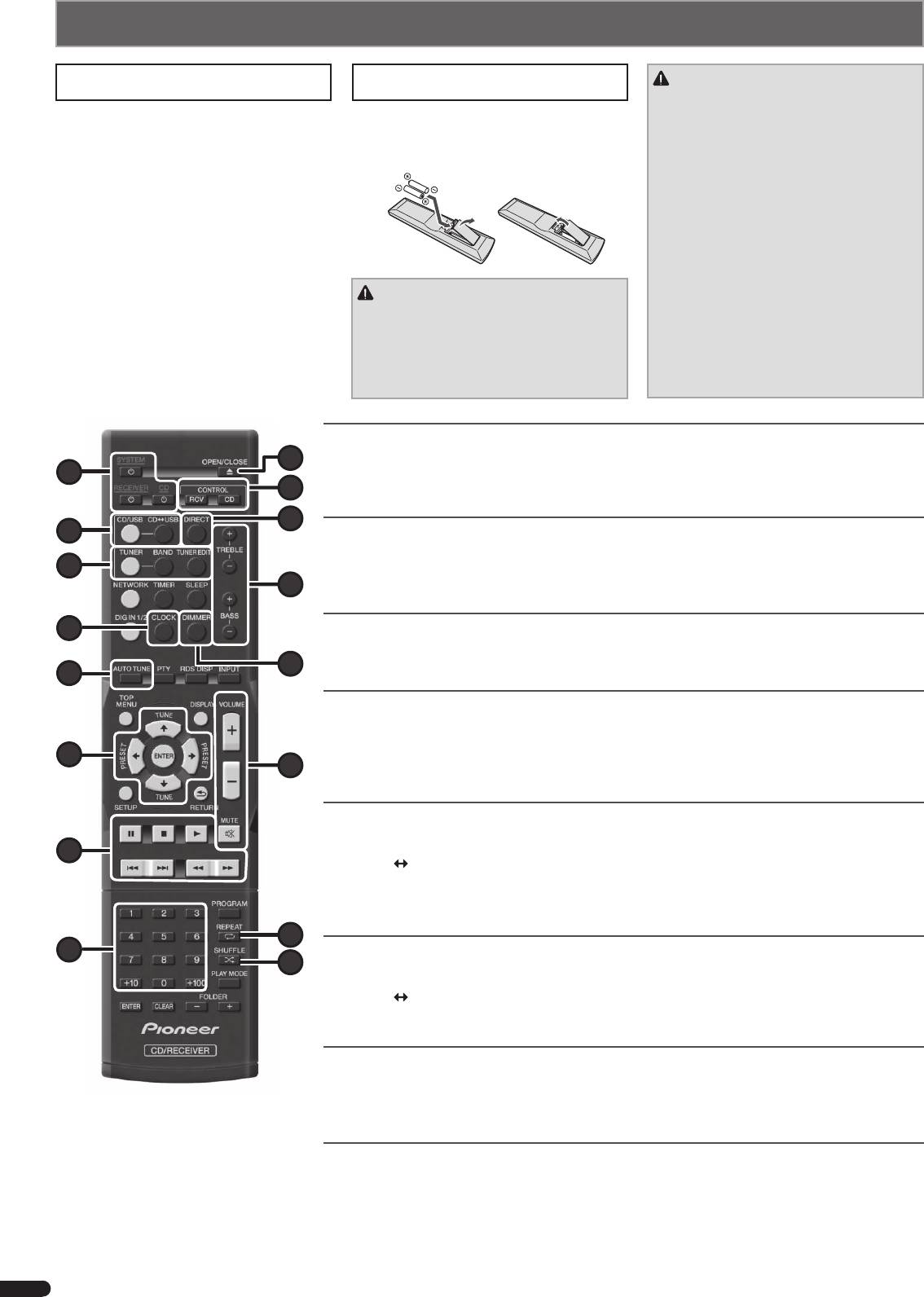
Switching the unit between standby and on
9
Press
u
SYSTEM
(
1
)
to turn on the stereo receiver and CD player.
1
Press
u
RECEIVER
(
1
)
to turn on the stereo receiver only.
10
Press
u
CD
(
1
)
to turn on the CD player only.
11
2
Setting the clock
1. Press CONTROL RCV (
a
).
3
2. Press CLOCK (
4
) and press ENTER (
6
).
12
3. Use
k/l
and ENTER (
6
) to adjust the day of the week and time.
4
Control the display brightness
1. Press CONTROL RCV (for the stereo receiver) (
a
) or CONTROL CD (for the CD player) (
a
).
13
5
2. Press DIMMER (
d
) to switch the display brightness in four steps.
Control sound and adjust volume
Press DIRECT (
b
) to listen to the sound source in the original sound quality.
Press TREBLE +/– (
c
) or BASS +/– (
c
) to adjust sound quality.
6
14
Press VOLUME +/– (
e
) to adjust the listening volume.
Press MUTE (
e
) to mute the sound.
Listening to the audio CD
1. Press CD/USB (
2
).
7
2. Press CD
USB (
2
) to select CD function for the CD player.
3. Press
h
OPEN/CLOSE (
9
) to open the disc tray, and place a disc.
4. Press
d
(
7
) to start playback. Use numeric buttons (
8
) or
o/p
(
7
) to select a track.
5. Press REPEAT (
f
) or SHUFFLE (
g
) to adjust the play mode.
15
8
Playing iPod/iPhone/iPad mini/USB device
16
1. Press CD/USB (
2
).
2. Press CD
USB (
2
) to select iPod/USB function for the CD player, and connect your iPod/iPhone/iPad
mini/USB device to the iPod/iPhone/iPad mini/USB terminal.
3. Press
d
(
7
) to start playback.
Listening to the radio
1. Press TUNER (
3
).
2. Press CONTROL RCV (
a
), and press BAND (
3
) to select a band (FM MONO or FM STEREO).
3. Use TUNE
i/j
(
6
) to tune.
Listening to DAB (XP-01DAB only)
1. Press TUNER (
3
).
2. Press CONTROL RCV (
a
), and press BAND (
3
) to select DAB.
3. Press TUNE
i/j
(
6
) to select a DAB service, and press ENTER (
6
).
When listening to DAB for the rst time, press AUTO TUNE (
5
) instead of the operation in step 3.
4
En
XC_P01_P01DAB_QSG.indb 4 2012/12/21 13:32:43
