
Pioneer MVH-7300: Installation
Installation: Pioneer MVH-7300
Installation
English
Notes
• Check all connections and systems before final
installation.
• Do not use unauthorized parts. The use of
unauthorized parts may cause malfunctions.
• Consult with your dealer if installation requires
drilling of holes or other modifications of the
vehicle.
• Do not install this unit where:
— it may interfere with operation of the vehicle.
— it may cause injury to a passenger as a result
of a sudden stop.
• Install this unit away from hot places such as near
the heater outlet.
• Optimum performance is obtained when the unit is
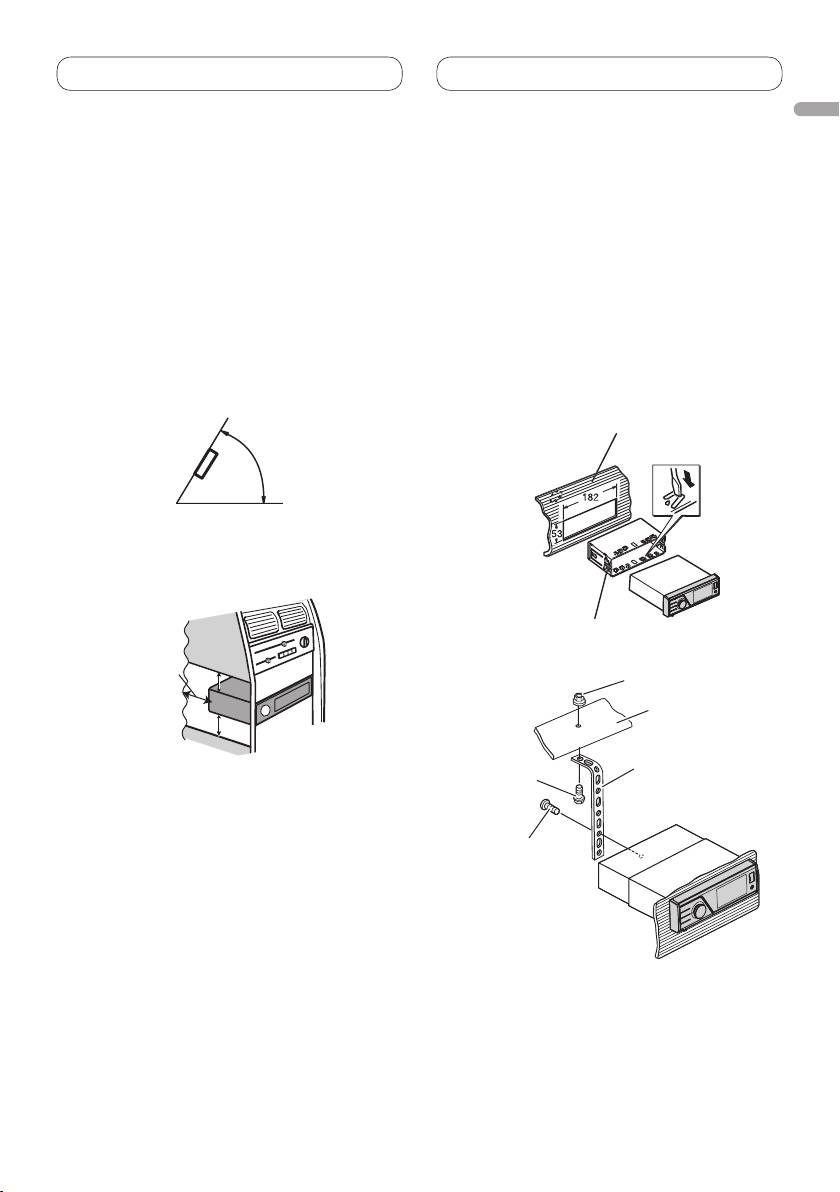
installed at an angle of less than 60°.
7
<YRD5342-A> <7>
60°
• When installing, to ensure proper heat dispersal
when using this unit, make sure you leave ample
space behind the rear panel and wrap any loose
cables so they are not blocking the vents.
5cm
Leave ample
5 cm
space
5 cm
Installation with the mounting
sleeve
• Use commercially available parts when
installing.
1. Insert the mounting sleeve into the
dashboard.
For installation in shallow spaces, use the
supplied mounting sleeve. If there is enough
space, use the mounting sleeve that came with
the vehicle.
2. Secure the mounting sleeve by using
a screwdriver to bend the metal tabs
(90°) into place.
Dashboard
Mounting sleeve
3. Install the unit as illustrated.
Nut
Firewall or
metal support
Metal strap
Screw
Screw (M4
×
8)
• Make sure that the unit is installed securely
in place. An unstable installation may cause
skipping or other malfunctions.
Installation
Removing the unit
Installing the microphone
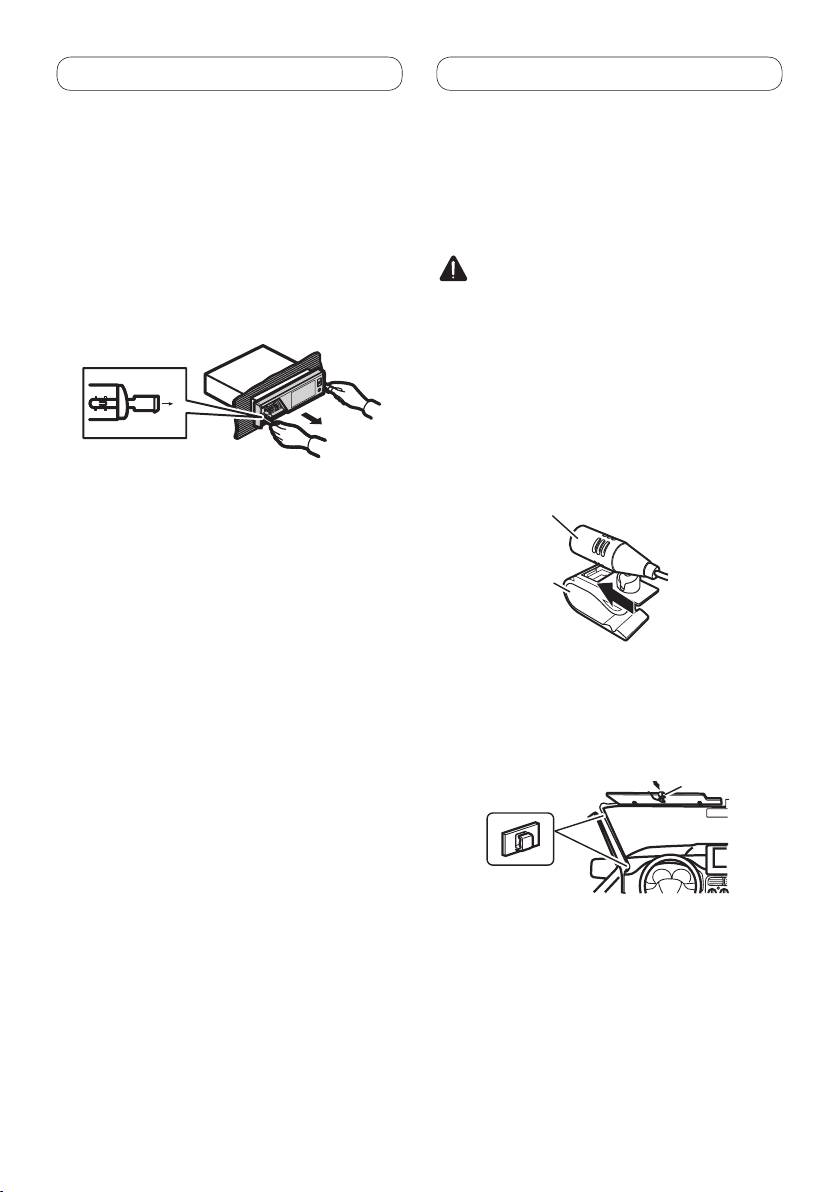
1. Press the detach button to release the
(MVH-8300BT only)
front panel.
Install the microphone in a position and
• Refer to the Operation Manual about how to
orientation that will enable it to pick up the
release the front panel.
voice of the person operating the system.
2. Insert the supplied extraction keys
into both sides of the unit until they
CAUTION
click into place.
It is extremely dangerous to allow the microphone
lead to become wound around the steering
3.
Pull the unit out of the dashboar
d.
column or gear shift. Be sure to install the unit in
such a way that it will not obstruct driving.
When installing the microphone
on the sun visor
1. Install the microphone on the
microphone clip.
Microphone
Microphone clip
2. Install the microphone clip on the sun
visor.
• With the sun visor up, install the microphone
clip. (Lowering the sun visor reduces the voice
recognition rate.)
Microphone clip
Clamp
• Use separately sold clamps to secure the lead
where necessary inside the vehicle.
8
<YRD5342-A> <8>

Installation
English
When installing the microphone
on the steering column
1. Install the microphone on the
microphone clip.
Microphone
Microphone base
Microphone clip
Fit the microphone
lead into the
groove
• Microphone can be installed without using
microphone clip. In this case, detach the
microphone base from the microphone clip. To
detach the microphone base from microphone
clip, slide the microphone base.
2. Install the microphone clip on the
steering column.
Double-sided tape
Install the microphone
clip on the rear side of
the steering column.
Clamp
• Use separately sold clamps to secure the lead
where necessary inside the vehicle.
Adjusting the microphone angle
The microphone angle can be adjusted.
9
<YRD5342-A> <9>


