
Pioneer KURO KRP-S02: 2. Screw an supplied screw into the speaker mounting hole (lower of the two) at the top, rear of the flat panel display.
2. Screw an supplied screw into the speaker mounting hole (lower of the two) at the top, rear of the flat panel display.: Pioneer KURO KRP-S02
Table of contents
- CAUTION CHECKING THE ACCESSORIES Installation
- INSTALLATION ON THE FLAT PANEL DISPLAY When using the table top stand: 1. Attaching the Speaker Brackets to the Speakers.
- 2. Screw an supplied screw into the speaker mounting hole (lower of the two) at the top, rear of the flat panel display.
- Connect the speaker cables Connect the speaker cables
- When using the hung on wall unit: CABINET MAINTENANCE
- SPECIFICATIONS
English
10
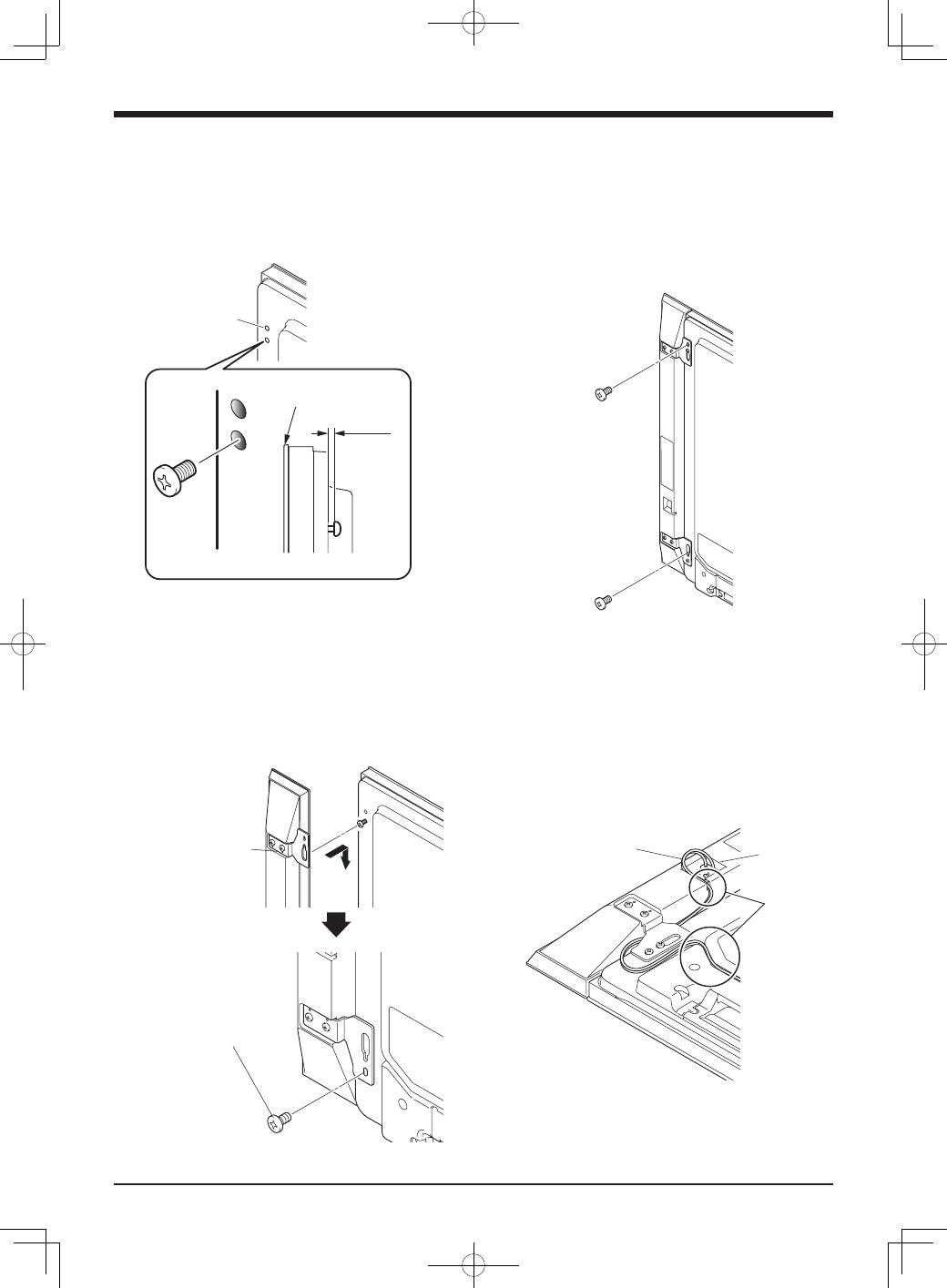
2. Screw an supplied screw into the
speaker mounting hole (lower of the
two) at the top, rear of the flat panel
display.
Do not tighten it all the way yet. Leave it loose, with
about 5 mm left to tighten.
5 mm
Speaker
Mounting
Hole
Top, rear of flat
panel display
Top of flat panel display
Leave a space of about 5 mm
3. Hang the speaker bracket on the
screw you installed at the top by
passing the wide part over it and
lowering into the slot; screw in the
lower screw temporarily.
After passing the wide part of the hole of the speaker
bracket (top) over the screw, lower the speaker onto it.
Tighten with the provided
screw the bottom
speaker bracket to the
flat panel display
temporarily (one place
bottom).
After passing the
wide part of the
hole over the screw,
lower the speaker.
4. Adjust the position of the speaker
and then tighten the upper and lower
screws firmly.
5. Tighten the two screws, at the top
and bottom for each speaker (total of
four screws), thus fixing the speakers
to the flat panel display.
6. Pass the supplied speaker cable
between the speaker and the flat
panel display (below the speaker
bracket) from below.
7. Connect the speaker cables to the
speaker (see next page).
8. Insert the cable in the groove on the
speaker.
Speaker Cable
Speaker
Terminal
Insertion
in groove
9. Connect the other end of the speaker
cables to the rear of flat panel display
(see next page).
