
Pioneer KRP-SW01W: Attaching the Pioneer Display and Television Assembling the Stand
Attaching the Pioneer Display and Television Assembling the Stand: Pioneer KRP-SW01W
Table of contents
- Contents Cautions
- Checking the Enclosed Parts Care for the Glossy Surface of the Stand
- Attaching the Pioneer Display and Television Assembling the Stand
- Attaching the Pioneer Display and Television
- Forward/Backward Angle of Inclination Adjustment Mechanism
- Installing the Product on a TV table etc. Preparing the Cables
- Preventing Equipment from Falling Over
- Dimensions Diagram Detaching the Pioneer Display and Television from the Stand Specifications
12
En
Attaching the Pioneer Display and Television
Caution
The weight of a Pioneer display and television is
about 31.4 kg (69.2 lbs), they have no depth, and
are unstable. Therefore, at least two people must
assemble and install them.
Ìi
• Be sure to install it on a flat stable location.
• Insert the screws in the holes vertically and tighten them
securely.
Attachment Method
1
Attach the fall-prevention straps to the stand
using attachment screws
4
.
Fix the screws with a Phillips screwdriver.
Screw
�
(M4 × 10 mm: black)
Fall-prevention strap
Assembling the Stand
Ìi
• Always assemble it on a flat table etc.
• Insert the screws in the holes vertically and tighten them
securely.
• When doing this, do not take off your hand from the support
column until it is fixed firmly.
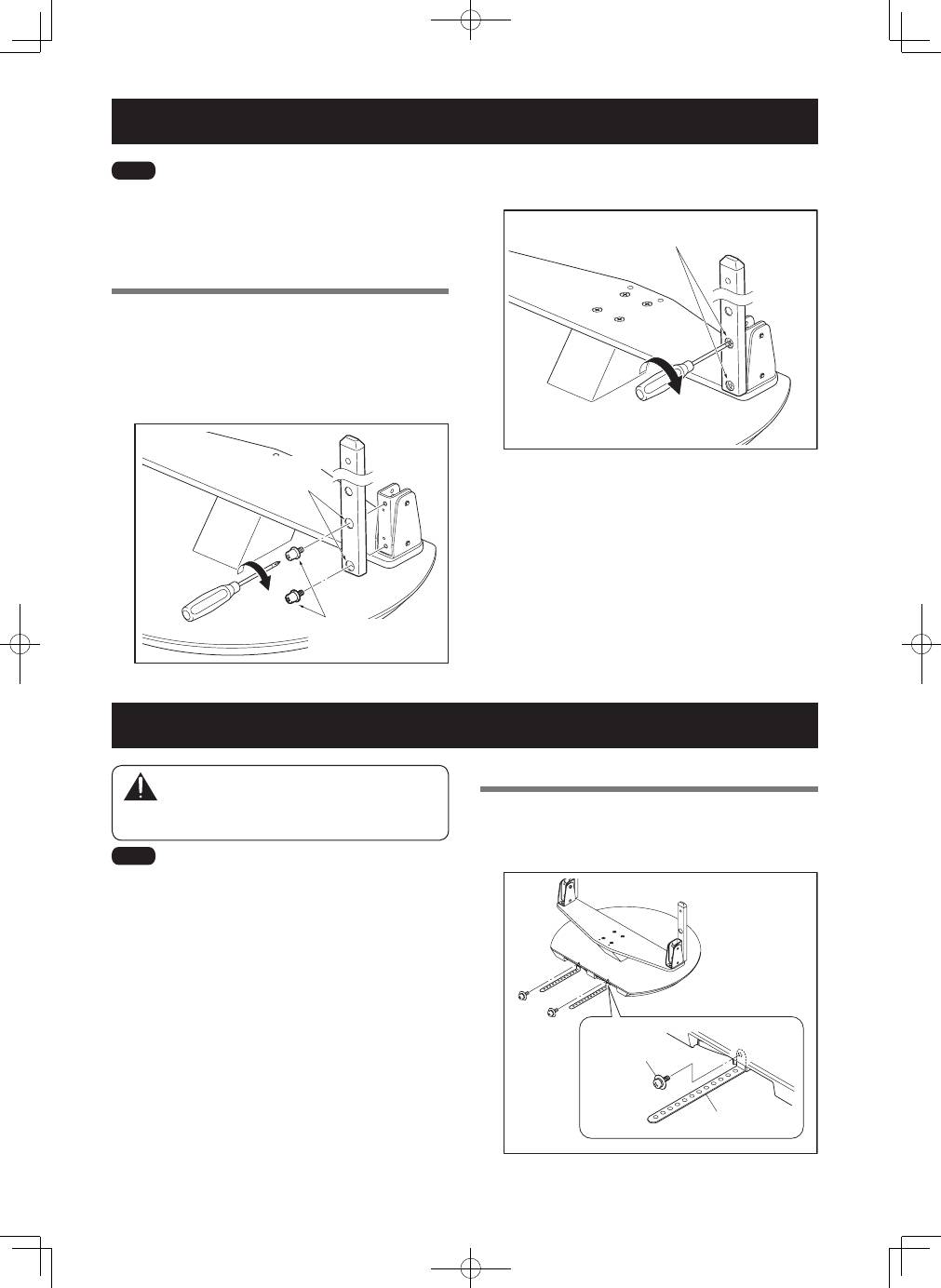
Assembly Procedure
1
Secure the support column to the stand
with
the Installation screws
1
(4 locations on the
left and right).
Using a Phillips screwdriver, first loosely attach the
top attachment screw, then loosely attach the bottom
attachment screw.
Screws
�
(M6 × 12 mm: black)
The larger holes
are on the front.
2
Fully tighten the Installation screws (4 locations
on the left and right).
Fully tighten the attachment screws.
