
Pioneer KRP-S04: INSTALLATION ON THE FLAT PANEL DISPLAY When using the table top stand:
INSTALLATION ON THE FLAT PANEL DISPLAY When using the table top stand:: Pioneer KRP-S04
Table of contents
- CAUTION CHECKING THE ACCESSORIES Installation
- INSTALLATION ON THE FLAT PANEL DISPLAY When using the table top stand:
- English
- Connect the speaker cables Connect the speaker cables
- When using the wall mount unit: CABINET MAINTENANCE
- SPECIFICATIONS
9
English
English
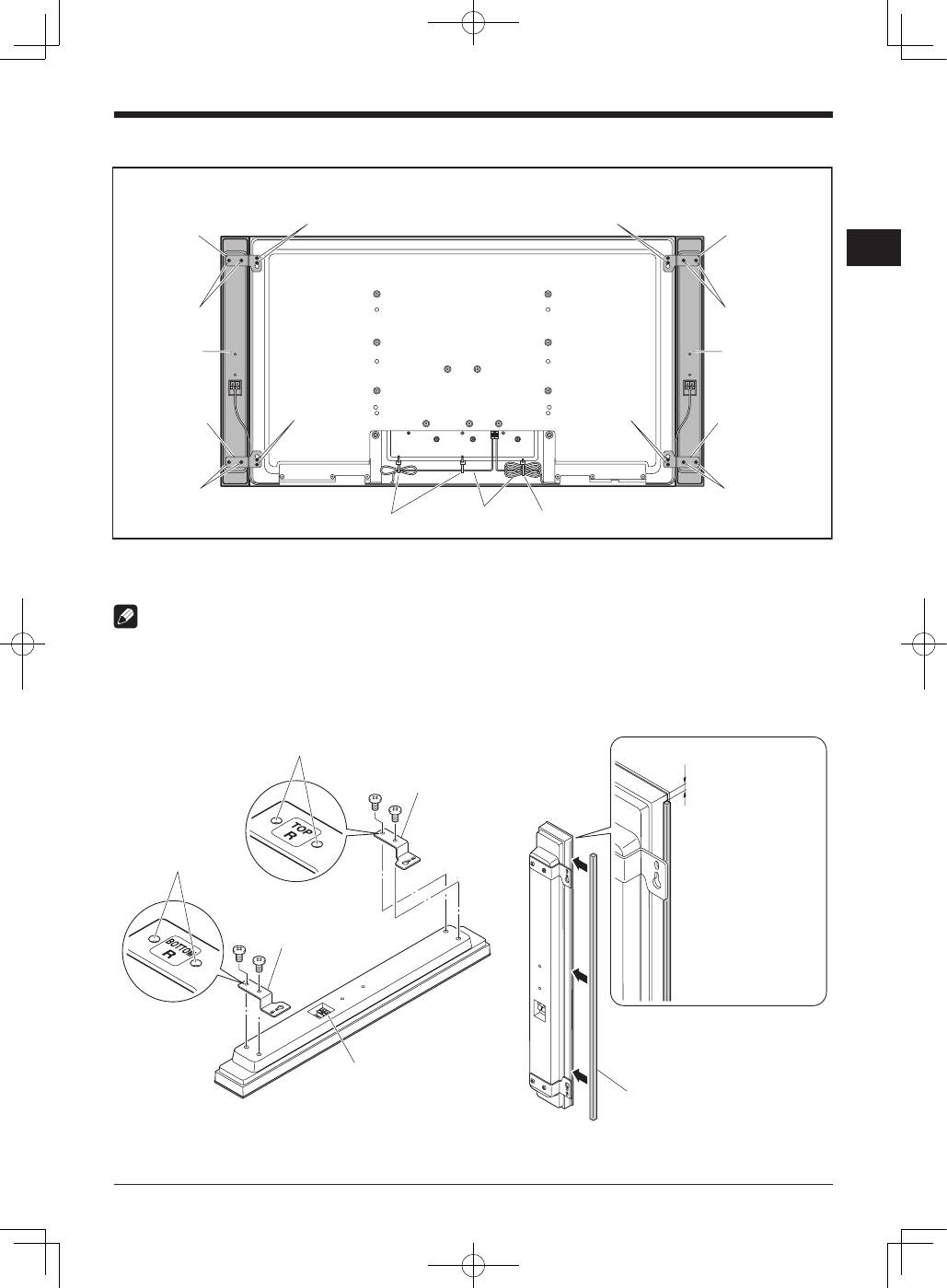
INSTALLATION ON THE FLAT PANEL DISPLAY
Flat panel display with the speaker installed
Speaker
Speaker
Speaker mounting
screw (M5 × 10 mm)
Speaker mounting
screw (M5 × 10 mm)
Speaker bracket
(for TOP-Left)
Speaker bracket
(for BOTTOM-Right)
Speaker bracket
(for BOTTOM-Left)
Speaker mounting
screw (M5 × 10 mm)
Speaker mounting
screw (M5 × 10 mm)
Speaker mounting
screw (M5 × 10 mm)
Speaker mounting
screw (M5 × 10 mm)
Cable clamp*
Cable clamp*
Speaker cable*
Speaker mounting
screw (M5 × 10 mm)
Speaker mounting
screw (M5 × 10 mm)
*: Accessories of the flat panel display
Speaker bracket
(for TOP-Right)
When using the table top stand:
NOTE:
Before attaching the speaker, please attach the KRP-TS02/KRP-SW01 series table top stand to the flat panel display.
1. Attaching the Speaker Brackets and Padding strips to the Speakers.
There are top and bottom speaker brackets for both the left and the right speakers. Attach the appropriate brackets to the top
and the bottom on the back of the speakers using the supplied screws.
(It shows the attachment of the bracket on the right side. It is attached on the left side by the same procedure.)
1 mm
Remove the paper liner
on the back of the
padding strip and
attach the padding strip
1 mm below the top
side of the speaker.
Screw holes
Speaker bracket
(For BOTTOM-Right)
Speaker bracket
(For TOP-Right)
Place the speaker so its terminals
(bottom) are facing you.
Screw holes
Do not pull the padding strip hard.
Doing so may stretch it.
If the padding strip is too long, cut it.
Padding strip
