
Pioneer DEH-X9500BT: Removing the unit DIN front/rear mount
Removing the unit DIN front/rear mount: Pioneer DEH-X9500BT
Table of contents
Important
! Check all connections and systems before
final installation.
! Do not use unauthorized parts as this may
cause malfunctions.
! Consult your dealer if installation requires
drilling of holes or other modifications to the
vehicle.
! Do not install this unit where:
— it may interfere with operation of the vehicle.
— it may cause injury to a passenger as a result
of a sudden stop.
! The semiconductor laser will be damaged if
it overheats. Install this unit away from hot
places such as near the heater outlet.
! Optimum performance is obtained when the
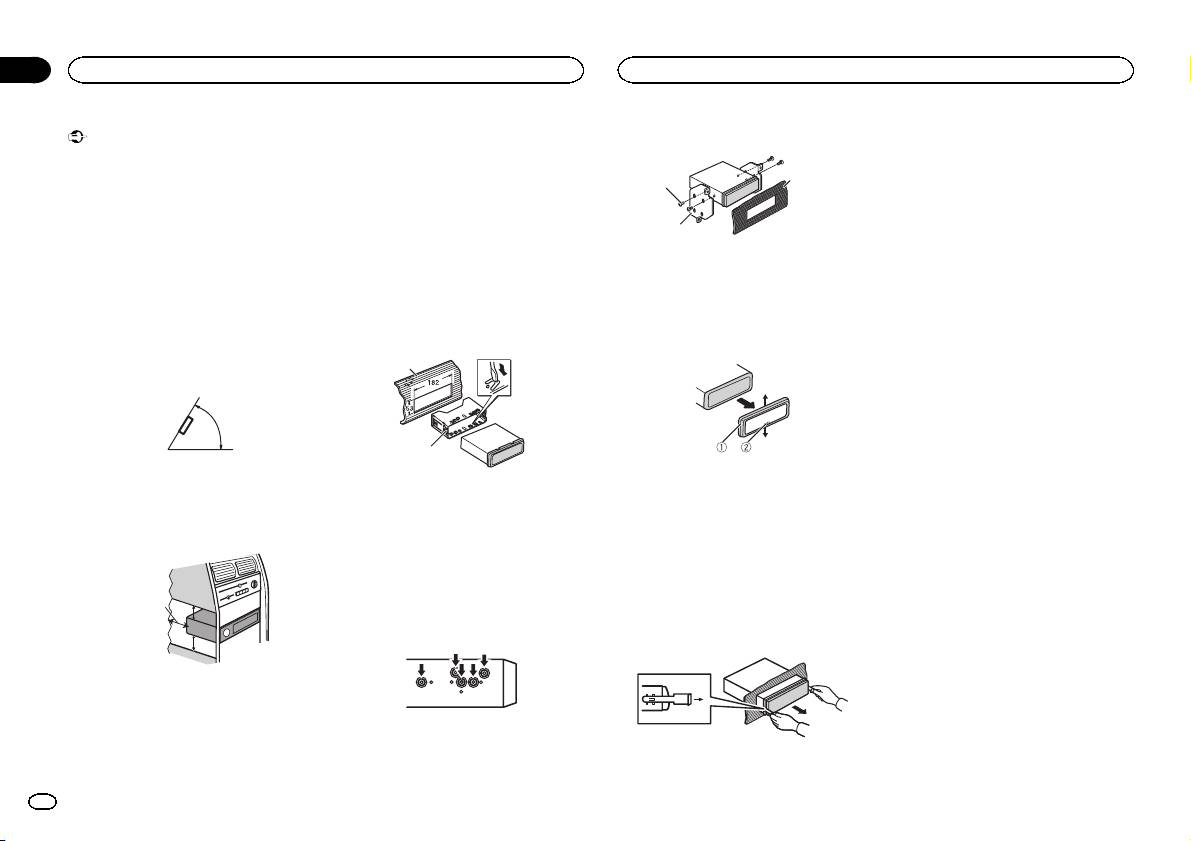
unit is installed at an angle of less than 60°.
60°
! When installing, to ensure proper heat dis-
persal when using this unit, make sure you
leave ample space behind the rear panel and
wrap any loose cables so they are not block-
ing the vents.
5cmcm
Section
01
Installation
Installation
Use commercially available parts when instal-
2 Tighten two screws on each side.
Removing and re-attaching the
ling.
front panel
You can remove the front panel to protect your
DIN Front-mount
3
1
unit from theft.
1 Insert the mounting sleeve into the dash-
Press the open button and push the front panel
board.
upward and pull it toward you.
2
For installation in shallow spaces, use the sup-
For details, refer to operation manual.
plied mounting sleeve. If there is enough space,
1 Tapping screw (5 mm × 8 mm)
use the mounting sleeve that came with the ve-
2 Mounting bracket
hicle.
3 Dashboard or console
2 Secure the mounting sleeve by using a
screwdriver to bend the metal tabs (90°) into
Removing the unit
place.
1 Remove the trim ring.
1
2
1 Trim ring
1 Dashboard
2 Notched tab
2 Mounting sleeve
! Releasing the front panel allows easier ac-
# Make sure that the unit is installed securely in
cess to the trim ring.
place. An unstable installation may cause skipping
! When reattaching the trim ring, point the
or other malfunctions.
side with the notched tab down.
DIN Rear-mount
2 Insert the supplied extraction keys into
both sides of the unit until they click into
Leave ample
1 Determine the appropriate position
5 cm
place.
space
where the holes on the bracket and the side
of the unit match.
5 cm
3 Pull the unit out of the dashboard.
DIN front/rear mount
This unit can be properly installed using either
front-mount or rear-mount installation.
2
En
