
Pioneer DEH-X9500BT: Power amp (sold separately) When installing the microphone on the sun visor When installing the microphone on the steering column
Power amp (sold separately) When installing the microphone on the sun visor When installing the microphone on the steering column: Pioneer DEH-X9500BT
Table of contents
- Removing the unit DIN front/rear mount
- Power cord This unit
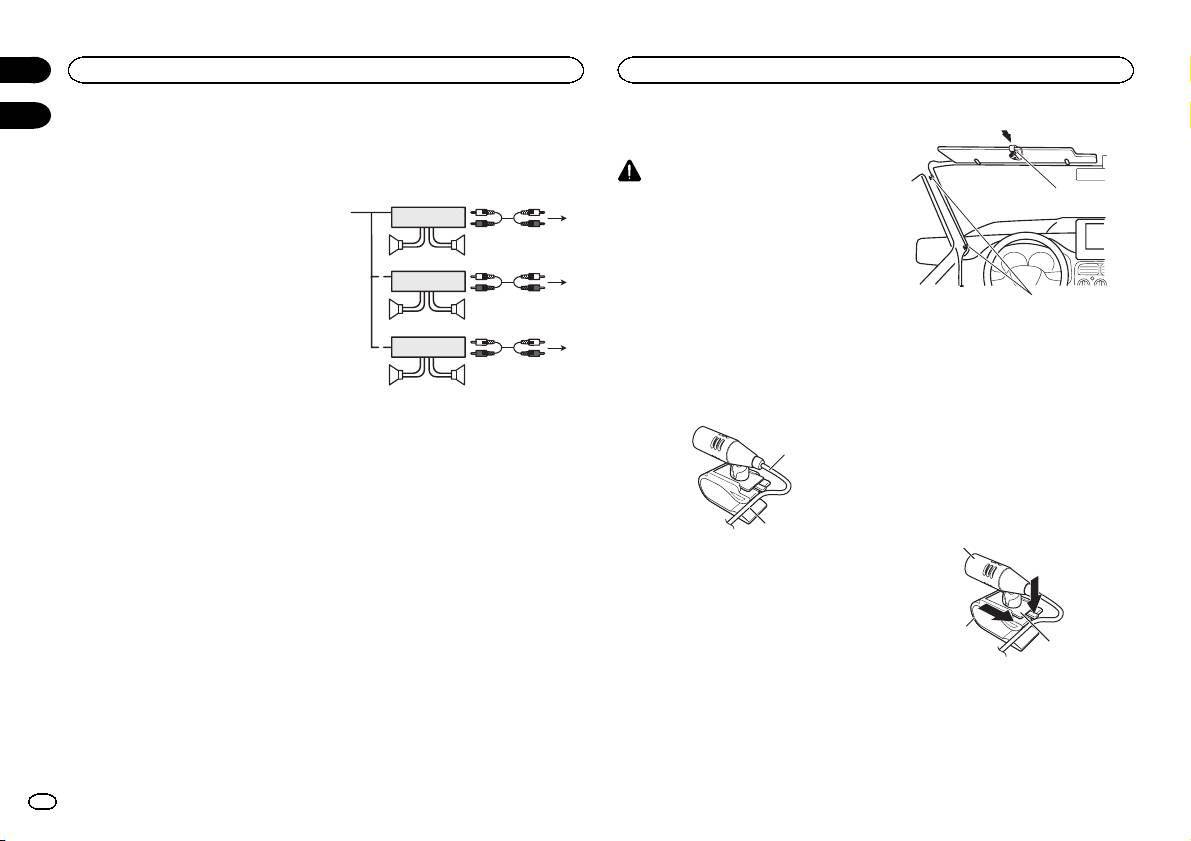
- Power amp (sold separately) When installing the microphone on the sun visor When installing the microphone on the steering column
- Adjusting the microphone angle
Notes
! Only for DEH-X9500BT
Power amp (sold separately)
! Change the set up menu of this unit (refer to
Perform these connections when using the op-
the operation manual). The subwoofer output
tional amplifier.
CAUTION
of this unit is monaural.
It is extremely dangerous to allow the micro-
1
! When using a subwoofer of 70 W (2 W), be
1
3
phone lead to become wound around the steer-
sure to connect the subwoofer to the violet
2
ing column or shift lever. Be sure to install the
and violet/black leads of this unit. Do not
4
unit in such a way that it will not obstruct driv-
connect anything to the green and green/
55
ing.
black leads.
3
Note
1
2
6
Install the microphone in a position and orienta-
77
tion that will enable it to pick up the voice of the
person operating the system.
3
2
1
8
When installing the
99
microphone on the sun visor
1 Fit the microphone lead into the groove.
1 System remote control
Connect to Blue/white cable.
2 Power amp (sold separately)
1
3 Connect with RCA cable (sold separately)
4 To Rear output
5 Rear speaker
6 To Front output
7 Front speaker
2
8 To subwoofer output
9 Subwoofer
1 Microphone lead
2 Groove
2 Install the microphone clip on the sun
visor.
With the sun visor up, install the microphone
clip. (Lowering the sun visor reduces the voice
recognition rate.)
2
Section
02
Connections
Installing the microphone
03
1 Microphone clip
2 Clamp
Use separately sold clamps to secure the
lead where necessary inside the vehicle.
When installing the
microphone on the steering
column
1 Detach the microphone base from the mi-
crophone clip.
To detach the microphone base from the micro-
phone clip, slide the microphone base.
1
2
3
1 Microphone
2 Microphone clip
3 Microphone base
4
En
