
Pioneer DEH-3300UB: Troubleshooting Error messages Removing and re-attaching the front panel
Troubleshooting Error messages Removing and re-attaching the front panel: Pioneer DEH-3300UB
Table of contents
- In case of trouble About this unit Demo mode
- Head unit Basic Operations Menu operations identical for function settings/audio adjustments/initial settings/lists Display indication
- Tuner
- CD/CD-R/CD-RW and US B storage devices iPod
- Audio Adjustments
- Initial Settings Selecting the illumination color
- Using an AUX source Sound muting
- Power cord Installation DIN front/rear mount Power amp (sold separately)
- Troubleshooting Error messages Removing and re-attaching the front panel
- Handling guidelines
- Compressed audio compatibility (disc, USB) Sequence of audio files iPod compatibility
- Russian character chart Copyright and trademark Specifications
Section
Appendix
03
Installation
Additional Information
English
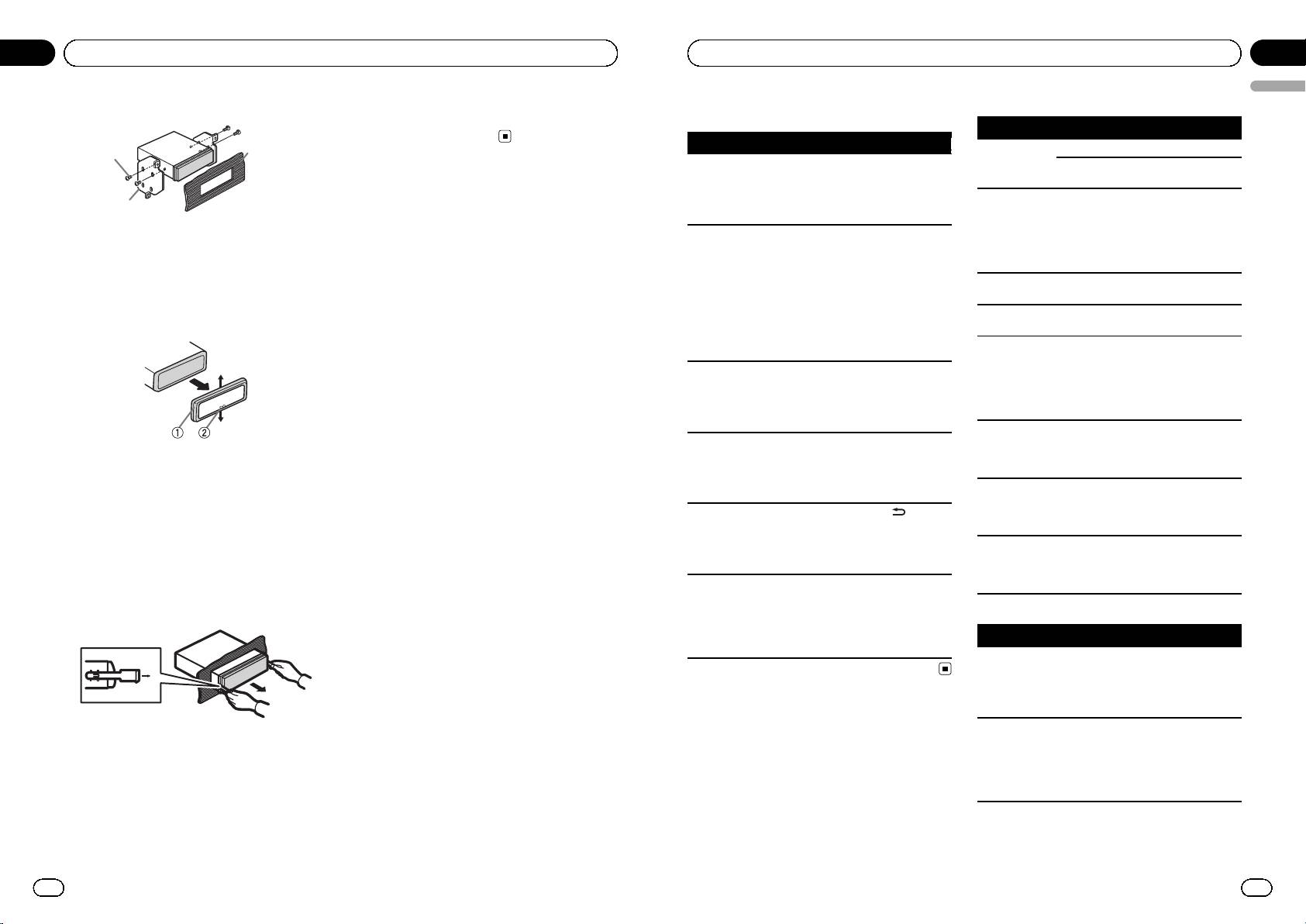
2 Tighten two screws on each side.
For details, refer to Removing the front panel to
Troubleshooting
Built-in CD Player
protect your unit from theft and Re-attaching
Message Cause Action
the front panel on page 5.
Symptom Cause Action
3
ERROR-11, 12,
The disc is dirty. Clean the disc.
1
The display
You did not per-
Perform operation
17, 30
The disc is
Replace the disc.
automatically
form any opera-
again.
scratched.
returns to the
tion within about
ordinary dis-
30 seconds.
ERROR-10, 11,
There is an elec-
Turn the ignition
2
play.
12, 15, 17, 30,
trical or mechan-
switch OFF and
A0
ical error.
back ON, or switch
1 Tapping screw (5 mm × 8 mm)
The repeat play
Depending on
Select the repeat
to a different
2 Mounting bracket
range changes
the repeat play
play range again.
source, then back
unexpectedly.
range, the se-
3 Dashboard or console
to the CD player.
lected range may
change when se-
ERROR-15 The inserted disc
Replace the disc.
Removing the unit
lecting another
is blank
folder or track, or
ERROR-23 Unsupported CD
Replace the disc.
1 Remove the trim ring.
when fast for-
format
warding/rever-
FRMT READ Sometimes there
Wait until the mes-
sing.
is a delay be-
sage disappears
A subfolder is
Subfolders can-
Select another re-
tween the start of
and you hear
not played
not be played
peat play range.
playback and
sound.
back.
when FOLDER
when you start to
(folder repeat) is
hear any sound.
selected.
NO AUDIO The inserted disc
Replace the disc.
NO XXXX ap-
There is no text
Switch the display
does not contain
1 Trim ring
pears when a
information em-
or play another
any playable
2 Notched tab
display is chan-
bedded.
track/file.
files.
ged (NO TITLE,
! Releasing the front panel allows easier ac-
SKIPPED The inserted disc
Replace the disc.
for example).
cess to the trim ring.
contains DRM
The display is
Demo mode is
! Press
to can-
protected WMA
! When reattaching the trim ring, point the
illuminated
on.
cel demo mode.
files.
side with the notched tab down.
when the unit
! Turn off the
PROTECT All the files on
Replace the disc.
is turned off.
demo display set-
2 Insert the supplied extraction keys into
the inserted disc
ting.
both sides of the unit until they click into
are embedded
The unit is mal-
You are using a
Move electrical de-
place.
with DRM.
functioning.
device, such as a
vices that may be
3 Pull the unit out of the dashboard.
There is inter-
cellular phone,
causing the inter-
USB storage device/iPod
ference.
that transmits
ference away from
electric waves
the unit.
Message Cause Action
near the unit.
NO DEVICE When plug and
! Turn the plug
play is off, no
and play on.
USB storage de-
! Connect a com-
vice or iPod is
patible USB sto-
connected.
rage device/iPod.
Error messages
FRMT READ Sometimes there
Wait until the mes-
When you contact your dealer or your nearest
is a delay be-
sage disappears
Removing and re-attaching the
Pioneer Service Center, be sure to note the
tween the start of
and you hear
playback and
sound.
front panel
error message.
when you start to
You can remove the front panel to protect your
hear any sound.
unit from theft.
Press the detach button and push the front
panel upward and pull it toward you.
18
En
En
19
<CRD4524-A/N>10
