
Pioneer DEH-140UB: Troubleshooting Error messages
Troubleshooting Error messages: Pioneer DEH-140UB
Table of contents
- About this unit About this manual In case of trouble
- Head unit Display indication Basic operations Set up menu
- Storing and recalling stations Tuner for each band Menu operations identical for set up menu/function settings/audio adjustments/ initial settings/lists
- Function settings Advanced operations using special buttons Displaying text information CD/CD-R/CD-RW and USB storage devices Basic operations Selecting and playing files/ tracks from the name list
- Function settings Initial settings Audio adjustments
- Connections Turning the clock display on or off Sound muting This unit
- Power cord Installation Power amp (sold separately) DIN front/rear mount
- Troubleshooting Error messages
- Additional information USB storage device
Section
Installation
Additional information
03
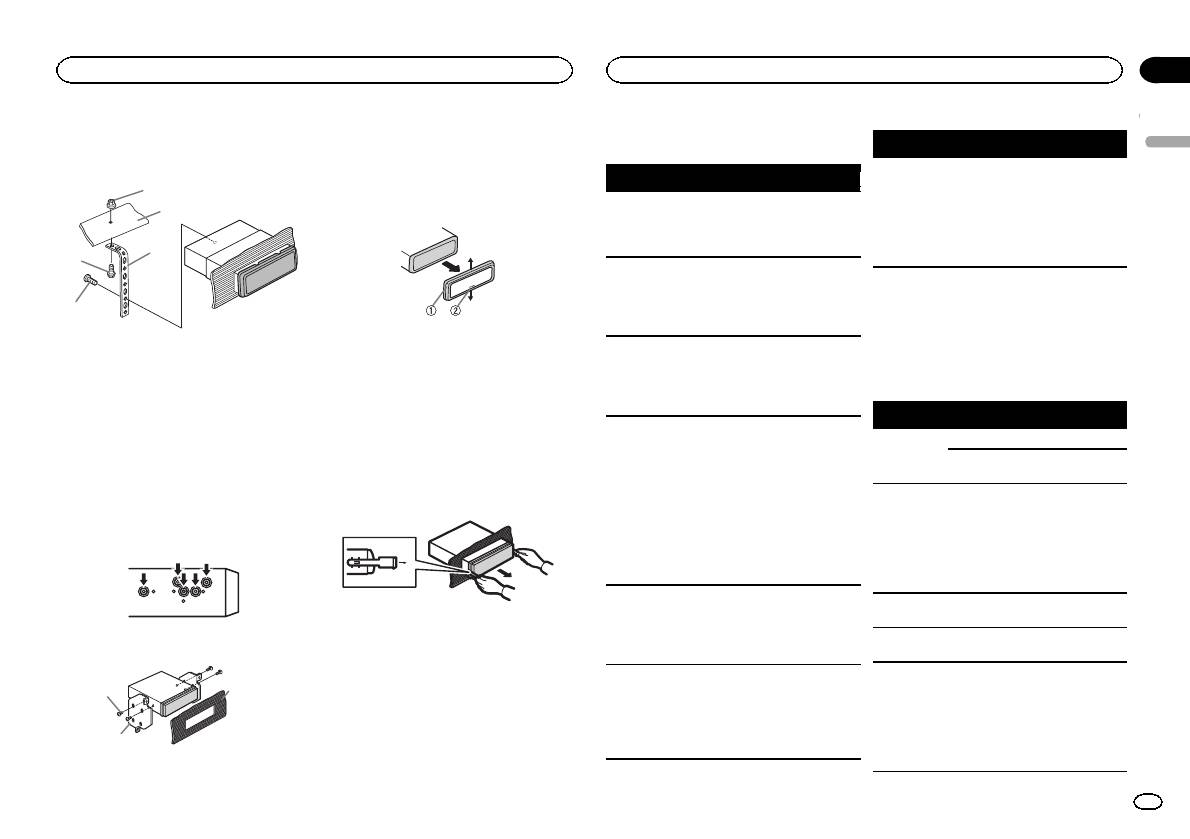
2 Mounting sleeve
2 Mounting bracket
Troubleshooting
Symptom Cause Action
3 Dashboard or console
English
3 Install the unit as illustrated.
The unit is
You are using a
Move electrical
Symptom Cause Action
Removing the unit
malfunction-
device, such as
devices that may
1
ing.
a cellular
be causing the in-
The display il-
Demo mode is
Turn off the demo
1 Remove the trim ring.
2
There is inter-
phone, that
terference away
lumination
on.
display setting.
ference.
transmits elec-
from the unit.
turns on and
tric waves near
off at random.
3
4
the unit.
The clock is
Demo mode is
Turn off the demo
not displayed
on.
display setting.
when the
5
Error messages
clock display
is turned on.
When you contact your dealer or your nearest
1 Trim ring
Pioneer Service Center, be sure to note the error
The display
You did not per-
Perform operation
1 Nut
2 Notched tab
message.
automatically
form any opera-
again.
2 Firewall or metal support
! Releasing the front panel allows easier ac-
returns to the
tion within
3 Metal strap
cess to the trim ring.
ordinary dis-
about 30 sec-
Built-in CD Player
4 Screw
! When reattaching the trim ring, point the
play.
onds.
5 Screw (M4 × 8)
side with the notched tab down.
Message Cause Action
# Make sure that the unit is installed securely in
The repeat
Depending on
Select the repeat
place. An unstable installation may cause skipping
2 Insert the supplied extraction keys into
play range
the repeat play
play range again.
ERROR-07,
The disc is dirty. Clean the disc.
or other malfunctions.
both sides of the unit until they click into
changes un-
range, the se-
11, 12, 17, 30
The disc is
Replace the disc.
place.
expectedly.
lected range
scratched.
may change
DIN Rear-mount
ERROR-07,
There is an elec-
Turn the ignition
3 Pull the unit out of the dashboard.
when another
10, 11, 12,
trical or me-
switch OFF and
1 Determine the appropriate position
folder or track is
15, 17, 30,
chanical error.
back ON, or
where the holes on the bracket and the side
being selected
A0
switch to a differ-
of the unit match.
or during fast
ent source, then
forwarding/re-
back to the CD
versing.
player.
A subfolder is
Subfolders can-
Select another re-
ERROR-15 The inserted
Replace the disc.
not played
not be played
peat play range.
disc is blank.
back.
when FLD (fold-
Removing and re-attaching the front
er repeat) is se-
ERROR-23 Unsupported
Replace the disc.
2 Tighten two screws on each side.
panel
lected.
CD format.
You can remove the front panel to protect your
NO XXXX ap-
There is no em-
Switch the display
FRMT READ Sometimes
Wait until the
unit from theft.
3
pears when a
bedded text in-
or play another
there is a delay
message disap-
1
Press the detach button and push the front
display is
formation.
track/file.
between the
pears and you
panel upward and pull it toward you.
changed (NO
start of playback
hear sound.
For details, refer to Removing the front panel to
TITLE, for ex-
and when you
2
protect your unit from theft and Re-attaching the
ample).
start to hear any
front panel on page 4.
sound.
1 Tapping screw (5 mm × 8 mm)
En
9
